
If you really want to build a workflow that drives growth, you have to start by connecting your tools and data. This means breaking down the walls between marketing, sales, and your CRM to get information flowing freely, which is what lets you trigger smart, automated actions across your entire team.
An integrated workflow isn't just about stringing tasks together. It’s a growth engine that eliminates manual errors and puts your whole revenue cycle on fast-forward.
Why Integrated Workflows Are Your New Growth Engine
Let's be honest—disconnected tools and manual data entry are killing your momentum. In a market this competitive, speed and accuracy are non-negotiable. When your marketing platform doesn’t talk to your CRM, or your sales reps are working from stale lead data, you’re creating friction that costs you real customers and revenue.
Every time someone has to copy-paste data from one system to another, it’s a potential mistake waiting to happen. It's also a colossal waste of time.
Worse, siloed teams deliver a choppy, disjointed customer experience. I’ve seen it happen a hundred times: a prospect gets a marketing email pushing a feature they literally just discussed with a sales rep. Why? Because the data wasn't synced. It doesn't just look unprofessional; it kills trust.
The Shift to a Unified Ecosystem
This is exactly why smart businesses are ditching their collection of separate tools and moving toward a single, automated ecosystem. When you build a workflow on a platform like Stamina, you’re not just automating tasks—you’re building a single source of truth for your entire go-to-market motion.
Data from marketing campaigns, sales calls, and customer support tickets all flows into one place, giving everyone real-time visibility into what’s actually happening.
This connection unlocks some seriously powerful capabilities:
Eliminate Costly Errors: Automation gets rid of the human error that comes with manual data entry, making sure your information is consistent and reliable everywhere.
Gain Real-Time Insights: Your teams can finally see the full customer journey as it unfolds, from the first ad click to the final signed contract.
Enable Powerful Personalization: With a complete data profile at your fingertips, you can trigger highly relevant, personalized outreach at scale.
The proof is in the numbers. Sales teams using automation see an average productivity bump of 14.5%. Businesses that automate their lead nurturing generate a staggering 451% more sales-ready leads. The right workflow isn't just a nice-to-have; it's a competitive advantage that can drive over 10% revenue growth in just 6-9 months.
A connected system is the foundation for faster lead response times, smoother handoffs between teams, and a direct, measurable impact on your bottom line. It turns your operations from a series of disconnected sprints into a coordinated, revenue-driving machine.
To get a clearer picture of how this works in practice, let's break down the core components.
Core Components of an Integrated Workflow
This table outlines the essential building blocks of a modern workflow and the role each one plays inside the Stamina platform.
Component | Primary Function | Key Benefit |
|---|---|---|
Data Connectors | Syncs marketing, sales, and CRM data into one system. | Creates a single source of truth for all customer information. |
Trigger Engine | Monitors for specific events (e.g., form submission, email open). | Initiates automated actions in real-time based on prospect behavior. |
Action Sequencer | Executes a series of pre-defined tasks across teams. | Ensures consistent follow-up and eliminates manual handoffs. |
AI Personalization | Uses lead data to customize messaging and outreach. | Makes every interaction feel relevant and human-like. |
Reporting & KPIs | Tracks performance metrics and workflow effectiveness. | Provides clear visibility into what’s working and what isn’t. |
By bringing these elements together on one platform, you create a powerful, self-optimizing system that aligns your entire team around a single goal: growth.
Here’s a visual that shows how Stamina bridges the gaps between these vital business functions, turning scattered data points into a cohesive strategy.
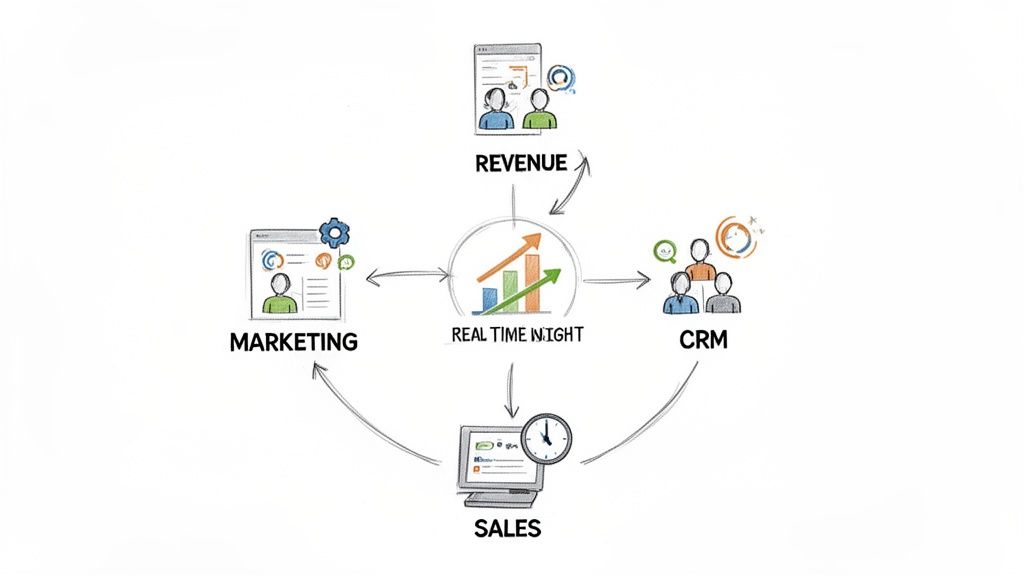
As you can see, a central platform gives you the real-time insight needed to orchestrate actions across your entire go-to-market team. By connecting these once-separate functions, you build the foundation for workflows that are both intelligent and incredibly effective. You can explore Stamina's integrated workflow solutions to see how our platform empowers teams to work together seamlessly.
Mapping Your Workflow From Goal to Trigger
Every great workflow starts with a clear goal, not a fancy tool. I’ve seen it a thousand times: someone gets excited about automation, jumps straight into the workflow builder, and starts connecting random actions. It almost always ends in a chaotic, broken process that creates more work than it saves.
The secret is to work backward. Start with the end in mind. What’s the single most important business result you want to achieve? Forget about the process for a minute and focus on the outcome.
Define Your Desired Outcome
First, nail down a specific, measurable objective. This forces you to think strategically from the get-go and gives you a North Star for every decision you make while building your automation.
A few powerful goal examples I've seen work well:
Booking more qualified demos: The goal isn’t just meetings; it's meetings with people who are actually a good fit.
Reviving cold leads: Target a specific segment of your database that’s gone quiet and kickstart a new conversation.
Increasing trial-to-paid conversion: Nurture new users through their trial to show them value and push them toward an upgrade.
Reducing lead response time: Make sure every single inbound lead gets a response in under five minutes.
Once you have that clear objective, you can start working backward to connect your high-level goal to the concrete actions that get you there. A solid goal helps you structure the information you need to collect. If you haven't already, it's worth checking out our guide on designing a flexible CRM data model—it’s foundational for capturing the right data to power your workflows.
Identify the Critical Trigger
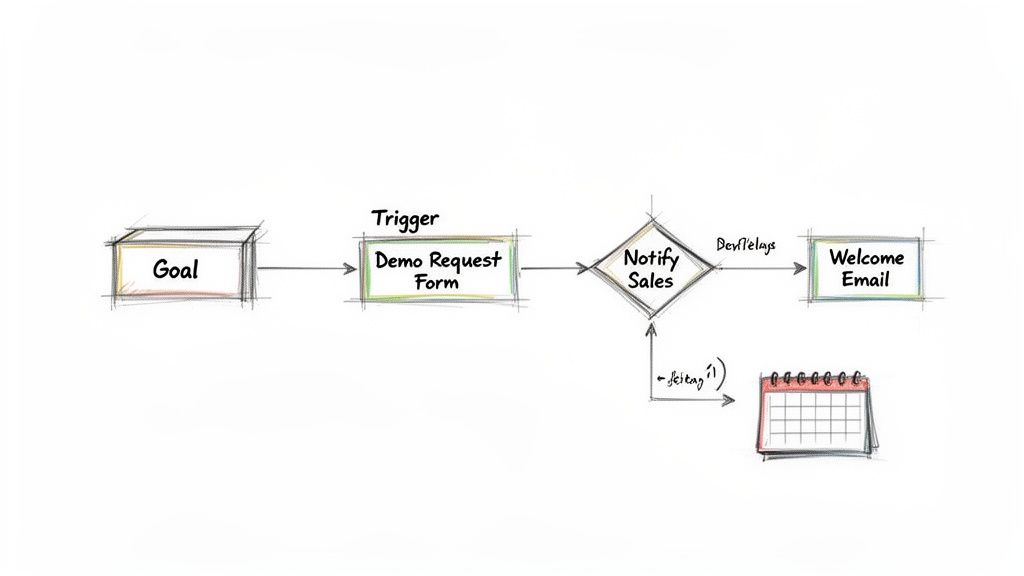
With your goal locked in, it’s time to find the trigger—the one specific event that kicks off the entire automated workflow. The trigger is that moment a prospect or customer takes an action that signals they're ready for the next step. It’s the starting pistol for your process.
Think about it: if your goal is to book more demos, what’s the most reliable signal that someone wants one? It's almost always them filling out your "Request a Demo" form. That submission is the perfect trigger.
A trigger isn't just an action; it's a moment of intent. Choosing the right trigger ensures your workflow fires at the exact moment it can deliver the most value, transforming a passive process into a proactive, revenue-driving machine.
Let’s look at how this plays out in a few common scenarios.
Goal | Ideal Trigger | Why It Works |
|---|---|---|
Qualify New Leads | Prospect downloads a "Buyer's Guide" ebook. | This signals high intent and a research-focused mindset, perfect for a qualification sequence. |
Re-engage Old Contacts | A contact who hasn't been active in 90 days clicks a link in a marketing email. | This click shows renewed interest, creating a prime opportunity for a targeted follow-up. |
Onboard New Customers | A deal is marked as "Closed-Won" in the CRM. | This is the official start of the customer relationship, ideal for triggering a welcome series. |
Map the Customer Journey
Now that you have your goal and trigger, you can map out the customer’s journey. Just visualize the path a person takes from that initial trigger to the final goal. This map becomes the blueprint for your entire workflow sequence.
For our "Book a Demo" example, the journey might look something like this:
Trigger: Prospect submits the "Request a Demo" form on your website.
Immediate Action: An internal Slack notification hits the sales channel so the team can jump on it fast.
Simultaneous Action: The prospect gets an automated, personalized "Thank You" email confirming their request.
CRM Action: A new deal and contact are created in the sales pipeline and assigned to the next available rep.
Follow-Up Task: A task is automatically created for the assigned rep to call the prospect within 15 minutes.
This simple map outlines a complete, cross-team process. It connects marketing (the form), sales (the notification and task), and your CRM (the data entry) into one seamless flow. This foundational mapping is what turns a basic automation into a powerful system that actually performs.
Alright, you've got your objectives planned out. Now for the fun part: building your first real, cross-team workflow inside Stamina. This is where the strategy you mapped out comes to life.
We're going to build one of the most common and effective workflows I've seen: a new lead downloads a top-of-funnel ebook. The goal isn't just to send them a thank you email. It's to intelligently qualify their interest, nurture them, and then hand them off to sales at exactly the right time.
This is what a real, automated conversation looks like.
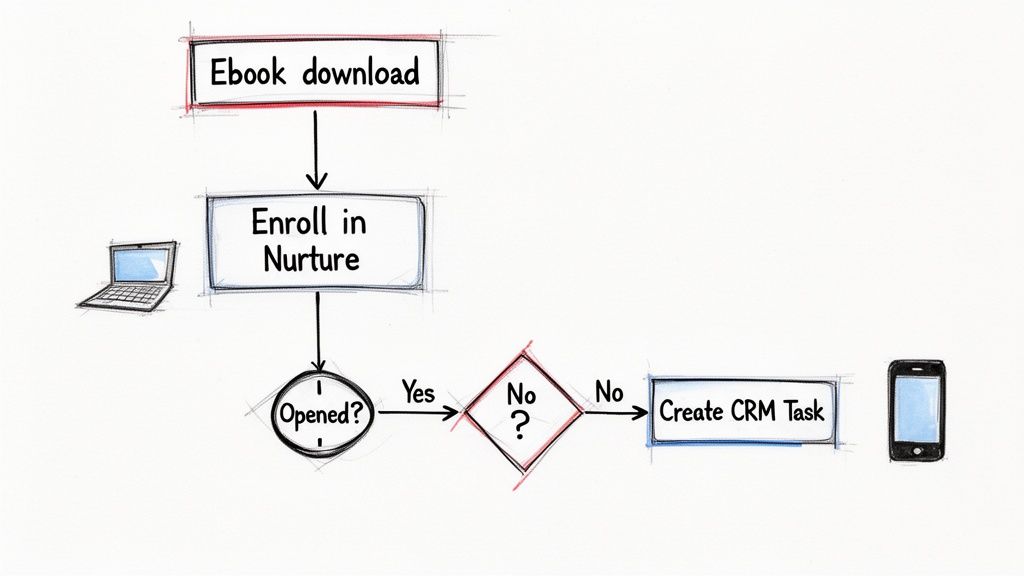
The diagram above shows this exact logic in Stamina's workflow builder. A single trigger—the ebook download—kicks off a sequence that branches based on what the prospect actually does.
Laying the Groundwork: The Trigger and First Actions
Every workflow in Stamina starts with a trigger. For our ebook download scenario, the trigger is “Form Submitted”. We'll get specific and select the "Ebook Download" form. The second someone hits submit, they're in.
Right away, we need two things to happen simultaneously:
Deliver the asset: Send an email with a link to the ebook. This gives them instant gratification and shows the form worked.
Update your records: Add the prospect to a “Marketing Nurture” audience. This simple tag keeps your contacts organized inside Stamina for reporting and segmentation later on.
These first moves are simple, but they set the stage for the smarter logic that comes next.
Adding Intelligence with Delays and Conditions
Next, we wait. Hitting a new lead with five emails in an hour is a fantastic way to get an unsubscribe. This is where the "Delay" action is your best friend.
Let's add a three-day delay. This gives them a reasonable amount of time to actually open the email and check out the ebook.
After the delay, it's time for the workflow to get smart. We'll use an "If/Then" condition to create a fork in the road. The condition will check one simple thing: "Has this contact opened the initial ebook delivery email?"
This question splits your workflow into two paths:
The "Yes" Path: They opened it. That's a clear signal of interest. We can now escalate them toward sales.
The "No" Path: They didn't open it. Maybe they were busy or just missed it. We'll try a different, gentler approach.
This is the key. Building a workflow with conditional logic means you stop batch-and-blasting and start having a one-to-one conversation at scale. Each action a prospect takes (or doesn't take) informs the next step, making the entire journey more relevant.
It's no surprise that the global sales process automation software market, valued at $12.2 billion in 2024, is projected to hit $19.5 billion by 2030. For revenue teams, the impact is undeniable: 78% report better pipeline management, and companies see an average $5.44 ROI for every dollar spent on automation. You can read more about these findings to see how automation is changing the game.
Orchestrating the Cross-Team Handoff
Let's follow the "Yes Path" for our engaged prospect. Since they opened the email, they've raised their hand. Now it's time to connect marketing's effort directly to the sales team.
The workflow will fire off a series of actions for a perfectly smooth handoff:
Create a CRM Task: This automatically creates a task in the Stamina CRM and assigns it to the next available sales development rep (SDR). The task can even have a dynamic title like: "Follow up with [Contact Name] about [Ebook Title]."
Update Lead Status: The contact's status instantly changes from "Marketing Qualified" to "Sales Ready." This flags them as a priority for the entire sales team.
Send an Internal Notification: Push a real-time message to a sales-specific Slack channel, letting the team know a hot lead just came in.
And what about the prospect on the "No Path"? We don't just forget about them. Instead, we can enroll them in a different, slower-paced nurture sequence designed to re-engage. This way, no lead gets left behind, but your sales team's valuable time is focused only on those showing the strongest intent.
Automation is great for figuring out when to contact someone. But real personalization is what answers the question of what to say.
Once you’ve built the bones of your workflow—the triggers, delays, and logic—it’s time to add the intelligence that makes your outreach actually stand out. This is where Stamina's built-in AI assistant, Zara, takes a good workflow and makes it a powerful one.
Instead of blasting out the same pre-written template, imagine a workflow that crafts a unique opening line for every single person. That's exactly what Zara does.
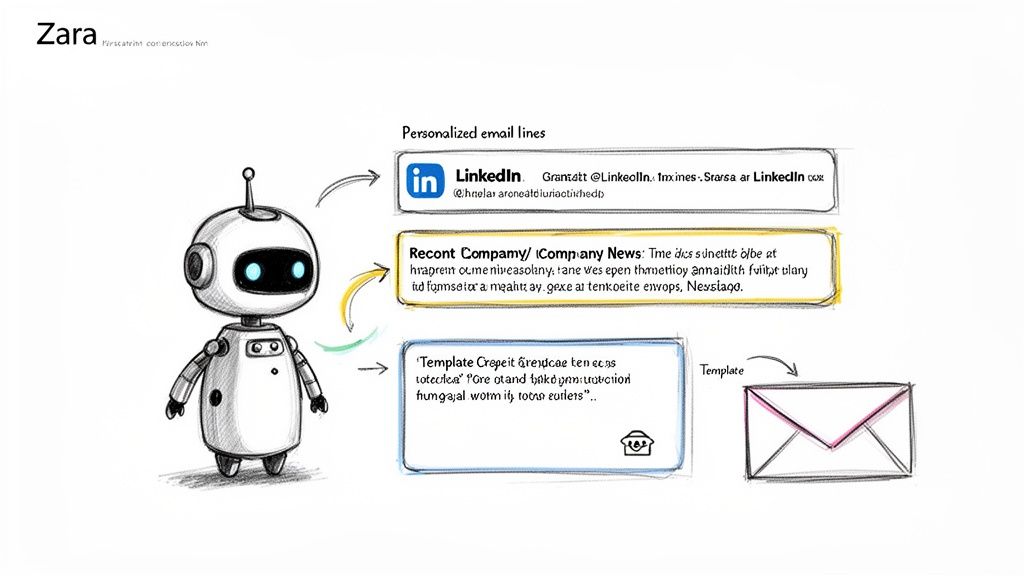
By dropping Zara directly into your action steps, you can command her to scan a prospect's LinkedIn profile, recent company news, or other public info. From there, she generates a relevant, human-sounding icebreaker. It’s the perfect blend of automation’s efficiency and the personal touch that used to require hours of manual research.
How to Use Zara for Smarter Personalization
Adding Zara to a workflow is surprisingly simple. Inside the builder, you just add an "AI Action" step. This tells the system to pause and let Zara do her work before the next step, like sending an email, kicks off.
Here’s what that looks like in a real-world lead qualification flow:
Trigger: A lead from one of your target accounts hits your pricing page.
AI Action - Research: Zara gets to work, researching the lead's LinkedIn profile for their job title and any recent posts.
AI Action - Generate Copy: She then crafts a custom opening line based on what she found. Something like, "Saw your post on scaling engineering teams—your point about developer burnout really resonated."
Send Email: The workflow then pops that custom line into a pre-built email template and hits send.
This process keeps your outreach structure consistent, but the content feels unique and specific to each person. You can learn more about how our AI SDR, Zara, powers this capability and other advanced sales plays.
The real magic happens when you combine scale with relevance. Zara doesn't just automate sending emails; she automates the thinking that goes into a great email, letting your team have hundreds of personalized conversations at once.
This approach is the direct opposite of all that manual work that bogs sales teams down. Reps can easily waste 71% of their time on things like manual data entry. Smart workflow automation flips that script.
We see it with our users all the time. Teams that use Zara to auto-generate sequences see a huge boost in efficiency. It reflects what the data shows across the industry—the 44% of teams that automate customer communications see 76% higher win rates.
Speed Things Up with Pre-Built Templates and Playbooks
You don’t have to start from scratch every time you build a workflow. Stamina comes loaded with a library of templates and playbooks for the most common use cases. You can customize them or just use them right out of the box.
They’re proven sequences that already have the logic and timing figured out for you.
Some of our most popular playbooks include:
Lead Qualification Flow: Automatically nurtures and scores new leads based on their engagement, only handing them off to sales when they’re genuinely warm.
Demo Booking Sequence: For prospects showing high intent, this playbook triggers a multi-touch sequence laser-focused on getting a meeting on the calendar.
Event Follow-Up: Perfect for after a webinar or conference. This playbook sends targeted follow-ups based on whether someone attended or was a no-show.
Cold Lead Revival: This one is designed to re-engage contacts who’ve gone dark. It uses a sequence of value-driven, low-pressure touchpoints to warm them back up.
These playbooks give you an incredible head start. You can launch a sophisticated campaign in minutes, then go back and layer in Zara's AI personalization to make it even more effective. It's that combination of automation, AI, and proven strategy that lets you scale high-touch outreach without burning out your team.
How to Measure and Optimize Workflow Performance
Hitting 'launch' on a new workflow feels great, but that’s where the real work begins. An automated sequence without data is just a shot in the dark. With the right metrics, you can turn a decent workflow into an unstoppable growth engine that consistently books meetings and closes deals.
Before anything goes live, you absolutely have to test your logic. Seriously. A quick dry run with an internal test contact can save you from a world of hurt—like accidentally sending a "Welcome New Customer!" email to a cold prospect. Map out every single branch of your logic and push a test contact through each path. This ensures all your triggers and actions fire exactly as you planned.
Define Your Key Performance Indicators
Once your workflow is running, it's time to switch from checking functionality to measuring performance. You need to zero in on the Key Performance Indicators (KPIs) that actually tell you if the workflow is achieving its original goal. Forget vanity metrics; focus on the data that matters.
For example, if you built a sequence to book more demos, you should be obsessing over the conversion rate at every step. How many people who downloaded your ebook opened the follow-up email? Of those, how many clicked the link to your demo scheduler? These micro-conversions are your leading indicators for success.
A few essential KPIs to watch in Stamina include:
Email Reply Rates: Are people actually engaging? Low reply rates are a huge red flag that your copy, timing, or personalization is off.
Stage-to-Stage Conversion: This is where you find the leaks. Track how leads move from one step to the next. A big drop-off at a specific point tells you exactly where to focus your efforts.
Sales Cycle Velocity: How long does it take for a lead to get from the trigger to the goal? A faster cycle means your workflow is doing its job and moving prospects along efficiently.
Don’t just stare at the final conversion number. The real gold is in the performance between the steps. Think of it as a journey—you need to know exactly where prospects are getting lost along the way.
From Data to Actionable Insights
Data is pointless if you don't act on it. Inside Stamina's analytics dashboard, you can see your workflow’s performance visualized, making it easy to spot the weak spots. Look for any step where a huge percentage of contacts are dropping out or just stalling. That’s your starting line for optimization.
You might notice, for instance, a fantastic open rate on your first email but a terrible click-through rate. That's a good sign! It means your subject line is working, but the email body or call-to-action is falling flat. This is the perfect time to run an A/B test on your messaging and see what resonates.
To make it easier, here are the essential workflow KPIs to track and what they tell you about performance.
Essential Workflow KPIs and Their Meaning
This table breaks down the most important metrics for your automated workflows and gives you concrete ideas on how to improve them.
KPI | What It Measures | How to Improve It |
|---|---|---|
Stage Conversion Rate | The percentage of contacts moving from one step to the next. | A/B test messaging, adjust delay times, or simplify the call-to-action. |
Positive Reply Rate | The percentage of automated emails that receive a positive response. | Refine personalization with Zara or test different value propositions. |
Task Completion Rate | How often reps complete auto-generated tasks on time. | Improve internal notifications or refine task descriptions for clarity. |
By checking these numbers regularly, you create a powerful feedback loop that fuels continuous improvement.
You can get even more granular with your analysis by exploring our guide on Stamina's call intelligence features. When you start turning those numbers into real, actionable improvements, you'll see your workflow's performance—and your revenue—start to climb.
Scaling Your Workflows for Team and Client Growth
The simple workflow that got your first few deals is great. But when you grow from a team of three to ten, that same workflow can turn into a messy, tangled knot. What was once efficient becomes a bottleneck, and suddenly, no one’s sure who owns what.
The real challenge isn't just creating one workflow—it's building a secure, scalable automation engine that actually supports your growth.
This is where governance comes in. When anyone can edit your workflows, it’s only a matter of time before someone accidentally breaks a mission-critical sequence. A single misplaced action could stop your demo request notifications cold or, even worse, send the wrong email to thousands of contacts. I’ve seen it happen more times than I can count.
Securing Your Automation Engine
In Stamina, you can lock down your most important processes with user permissions. This lets you control exactly who can create, edit, or just view specific workflows, preventing costly mistakes.
Admin Access: Give this to a couple of trusted gatekeepers who understand the entire system. They’re the only ones who should be making major changes.
Editor Access: Perfect for team leads, like your Head of Sales. They can tweak sales-specific workflows without touching anything in marketing.
View-Only Access: Let the broader team see how everything works without giving them the power to break it.
This tiered system keeps your core automation safe while giving your team the visibility they need to do their jobs.
Think of it like this: not everyone on a construction site gets to operate the crane. You need rules to keep things from collapsing as you build bigger. The same goes for your automation.
Agency Mode for Client Management
For agencies juggling multiple clients, keeping track of separate automation strategies is pure chaos. This is exactly what Stamina's Agency Mode was built to solve. It gives you a single dashboard to manage completely separate workspaces for each client.
This means you can build and run unique plays, sequences, and workflows for Client A that never, ever touch Client B’s setup. Each workspace is a self-contained environment, which keeps data private and strategies focused. You can jump between client accounts with a click.
You can even turn your expertise into a new revenue stream with white-labeling. This feature lets you offer the entire Stamina platform under your agency’s brand. Your clients get a powerful automation tool that looks like it’s yours, and you get a scalable service that makes your agency stand out.
As you dive into building automations, a few questions always seem to come up. It's easy to get tripped up on the terminology or worry that you're making things too complicated from the start.
Let's clear up some of the most common questions I hear so you can build your first workflows with confidence.
What’s the Difference Between a Sequence and a Workflow?
People use these terms interchangeably, but they mean very different things, especially in Stamina.
A sequence is a simple, linear set of actions that usually lives within one team. Think of a basic sales email cadence—it's a fixed path. An email goes out, you wait three days, another email goes out. It's a train on a track.
A cross-team workflow is much more powerful. It’s an intelligent, multi-department system that uses conditional logic to connect marketing, sales, and your CRM. For example, a workflow can send a marketing email, wait for a prospect to click a link, and then automatically create a high-priority task for a sales rep while instantly updating the contact's lead score in the CRM. It reacts to what people do.
How Do I Know If My Workflow Is Too Complex?
Here’s a simple test I use: if you can't explain the workflow's goal to a coworker in under 30 seconds, it’s too complicated. Automation gets messy when you try to make one workflow do everything.
Your workflow should have one primary job. If it’s trying to do ten things at once, you’re setting it up for failure. Simplicity scales; complexity breaks.
Use Stamina’s visual builder to map it out. If your diagram looks like a spiderweb before you've even tested the main path, that's a red flag. Split that giant process into two or three smaller, connected workflows. They'll be far easier to manage, troubleshoot, and improve.
Can I Edit an Active Workflow?
Yes, and you absolutely should be. Your first version is never your last. The goal is to optimize based on what the data tells you.
In Stamina, you can pause any active workflow to make changes without losing enrolled contacts or messing up your progress. This is perfect for A/B testing a subject line or tweaking the delay between a form submission and a follow-up call.
Just remember, when you add a new step—like a new email—you have to think about the people already moving through the automation. Stamina gives you the option to apply changes only to new contacts. This is a lifesaver because it keeps the experience consistent for everyone already in the flow.
Ready to stop juggling disconnected tools and start building powerful, unified automations? Stamina brings your marketing, sales, and CRM data together on one AI-powered platform. Create your first workflow today!
Composed with Outrank

