Master Your CRM Work Flow: A Practical Guide

Build a powerful CRM work flow to boost sales and marketing. This guide covers design, automation, and optimization with real-world examples. Start now!

0 - Minute Read

A CRM is just a glorified address book until you tell it what to do. A “CRM work flow” is simply the set of rules that turns your static contact list into an active, automated system that drives sales.

Without it, you’re stuck with manual chaos. Leads slip through the cracks, follow-ups are inconsistent, and your team wastes time on tasks a machine could handle instantly. This is how revenue gets lost.

Why an Automated CRM Work Flow Is a Growth Engine

Let's be real—managing leads with spreadsheets and shared inboxes is a recipe for disaster. A new lead fills out a form on your website, and what happens? It lands in an inbox, waits for someone to notice, gets manually assigned, and days might pass before a sales rep ever reaches out. By then, the lead is cold.

Worse, a competitor who responded in minutes has already won their attention. An automated CRM work flow fixes this disconnect between marketing getting the lead and sales acting on it.

Here’s how that same scenario plays out with automation:

  • The Old Way (Manual): A prospect downloads an ebook. The notification gets lost in a busy inbox. A day later, someone on the marketing team forwards it to the sales manager, who then assigns it to a rep. The rep, busy with other tasks, finally sends a generic email two days after the initial download.

  • The Automated Way (Workflow): The moment that ebook is downloaded, the CRM work flow kicks in. The lead is instantly scored, routed to the right rep based on territory, and a task is created in their name. Simultaneously, the prospect gets a personalized email referencing the ebook and is added to a relevant nurture sequence.

This is the kind of orchestration that turns a simple database into a growth machine. It's why 91% of companies with over 10 employees use a CRM and why the market is set to hit $112 billion by 2025. The ROI is undeniable—businesses see an average return of $8.71 for every dollar spent.
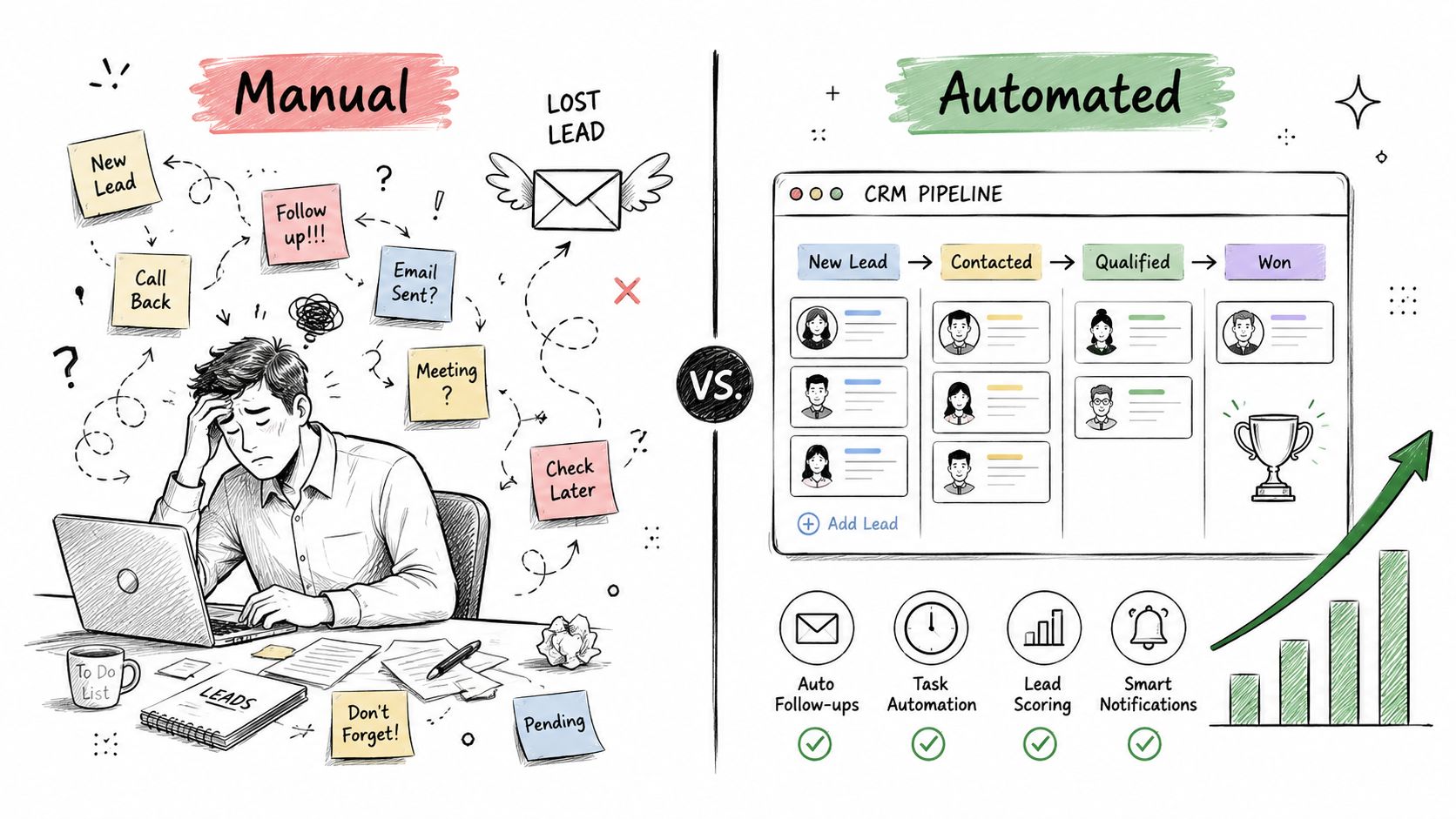
A comparison illustration showing a stressed person managing leads manually versus an organized, automated CRM pipeline.

From Problem to Competitive Advantage

Smart CRM workflows take your biggest operational headaches and turn them into powerful advantages. When you get this right, you don't just fix problems—you build a well-oiled machine that scales.

Take a look at a few common issues and how an automated workflow provides the solution.

Immediate Wins From a CRM Work Flow

Manual Process Problem

Automated Workflow Solution

Leads go cold while waiting for manual assignment.

Leads are instantly routed to the correct sales rep with a notification and follow-up task.

Inconsistent follow-up from reps.

Follow-up tasks and email sequences are automatically triggered to ensure no lead is forgotten.

Time-consuming data entry for sales and marketing teams.

Contact properties, deal stages, and tasks are updated automatically based on prospect actions.

Poor visibility into what’s working and what’s not.

Every touchpoint is tracked and reported on, providing clear data on performance.

Marketing and sales are disconnected, leading to poor handoffs.

Workflows create a bridge between teams, ensuring a seamless customer journey from first touch to closed deal.

These are not just small fixes; they are strategic shifts. By implementing workflows, you can improve sales data accuracy and finally get your teams on the same page.

Connecting marketing actions directly to sales outcomes is the key. To dig deeper into how these two functions should work together, check out our guide on marketing automation and CRM integration.

Alright, enough theory. Let's get our hands dirty and build the four CRM workflows that will actually make you money. Think of these as the core plays in your company's growth playbook. Each one targets a specific point in the customer journey, making sure no lead or deal ever falls through the cracks.

These aren't just ideas—they're actionable systems you can set up right now. Get them right, and you'll have a smooth, automated path that guides people from their first click to a closed deal and keeps them coming back.
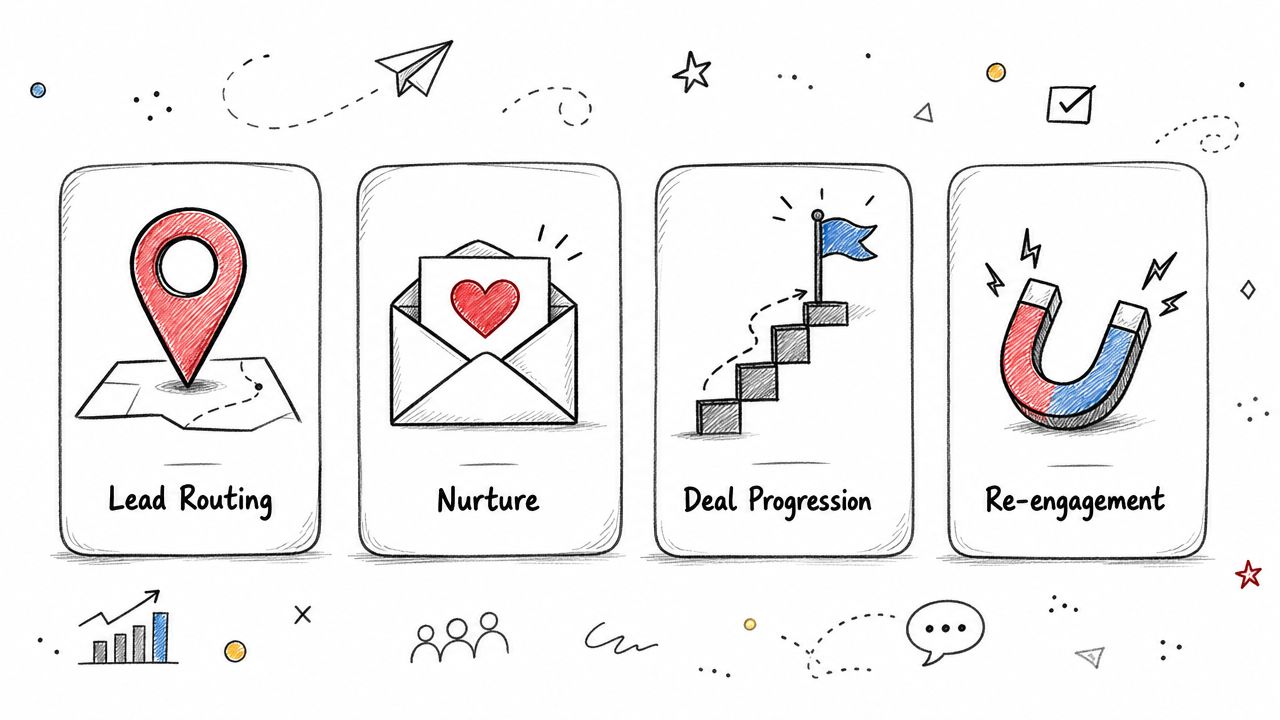
A sketched infographic showing four business stages: Lead Routing, Nurture, Deal Progression, and Re-engagement.

Automated Lead Routing

In sales, speed is everything. Your first and most critical workflow is Automated Lead Routing. This is all about getting a hot new lead to the right salesperson, instantly. It kills the dreaded "lead black hole"—that shared inbox where opportunities go to die while everyone figures out who should respond.

You can set up simple rules based on the data you already have:

  • Geography: Any lead from the Midwest? Send it straight to your Chicago-based rep.

  • Source: Did they come from a specific partner's webinar? Route it to the rep who manages that relationship.

  • Company Size: Inquiries from companies over 500 employees? Make sure they land with your senior account executives.

The goal here is simple: slash your response time from hours or days down to minutes. This one automation alone can be a game-changer for your contact rates.

Smart Lead Nurturing

Let's be real: most leads aren't ready to buy the second they sign up. That's where a Smart Lead Nurturing workflow comes in. It’s designed to keep your company top-of-mind by delivering real value over time, not just spamming them with sales pitches.

A prospect who downloaded your manufacturing case study needs to see different emails than someone who attended your webinar on retail analytics. This isn't just about using their first name; it's about continuing the conversation they started, building trust, and proving you're an expert.

You’re playing the long game here, educating them and building a relationship. When they are finally ready to pull the trigger, you'll be the first person they call. For more ideas on what these sequences can look like, you can learn more about how to create a workflow that actually converts.

Deal Progression Prompts

Once a lead turns into a real sales opportunity, the momentum can't stop. A Deal Progression workflow acts like a sales manager's assistant, nudging reps to take the next best step to keep things moving forward.

For example, when a rep moves a deal to the "Proposal Sent" stage, the workflow can automatically schedule a follow-up task for three days later. Or, if a high-value deal sits idle for more than a week, it can trigger a notification to the sales manager. It’s all about creating accountability and preventing deals from stalling out.

Customer Re-engagement

Finally, you need a workflow for the ones that got away. A Customer Re-engagement workflow is your secret weapon for winning back cold leads or spotting upsell opportunities with current customers.

This automation might kick in if a contact hasn't opened an email in 90 days, or if an existing customer's product usage suddenly drops. You'd be surprised how often a simple, personalized "checking in" email can spark a conversation and uncover hidden revenue.

Bringing Your Workflows to Life with Automation

You’ve got your workflow diagrams sketched out. That's a great start, but a map on paper isn’t going to drive revenue. Now it's time to turn those plans into a real, automated machine inside your CRM.

The secret sauce is a simple but powerful concept: if/then logic.

At its core, every automation boils down to two things:

  • Triggers: A specific event that kicks off the workflow.

  • Actions: The task (or series of tasks) your CRM automatically performs in response.

It’s about setting up a chain reaction where one event seamlessly triggers the next, creating a hands-off journey for your leads and customers.

Building Your Automation Rules

So, how does this actually work in practice? Let me walk you through a common scenario I've seen a hundred times.

Imagine a hot lead fills out the "Request a Demo" form on your website. That form submission is your trigger. Instead of that lead sitting in an inbox waiting for someone to notice, automation takes over instantly.

A simple but effective CRM workflow might look like this:

  • When: A contact submits the "Request a Demo" form...

  • Then: Instantly change the lead’s status from "New" to "Marketing Qualified Lead" (MQL).

  • And: Automatically create and assign a task for the right sales rep to call the lead within 24 hours.

  • And: Send a confirmation email to the lead, letting them know a team member will be in touch shortly.

This one workflow ensures a high-intent lead gets immediate attention. No more leads falling through the cracks. It dramatically increases your odds of making a connection while they're still interested. For a deeper dive into optimizing this first touchpoint, check out how Social Intents' lead capture features can enhance this process.
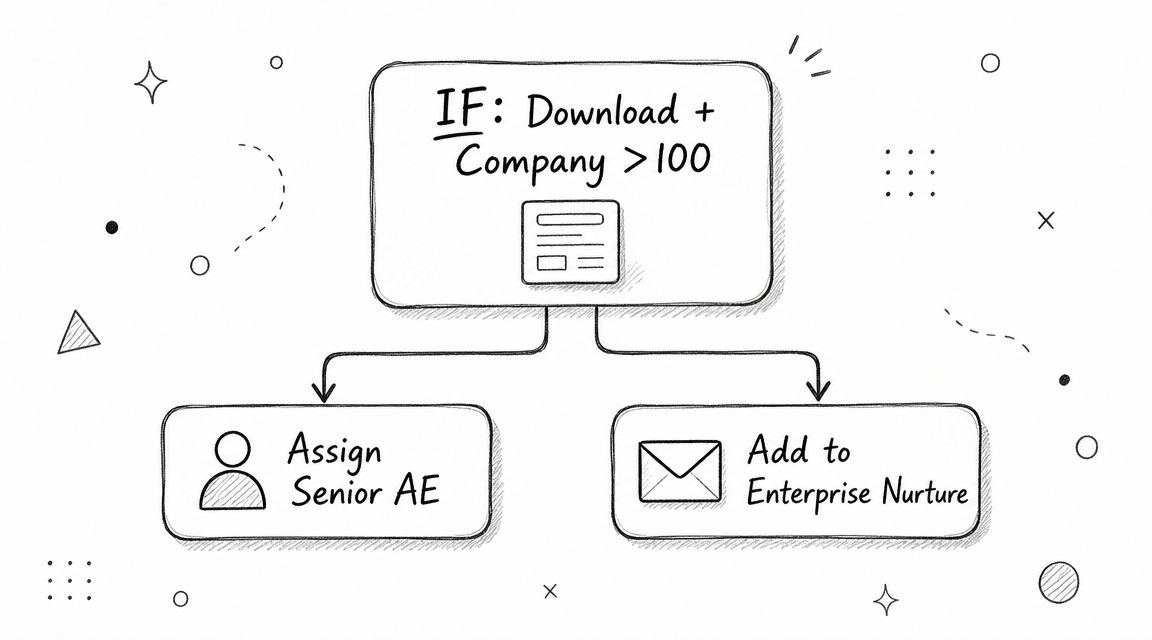
A hand-drawn flowchart diagram illustrating a CRM workflow for lead qualification based on company size.

Adding Intelligence with AI

But here's where it gets really interesting. Modern platforms like Stamina bring an AI layer into the mix, making these workflows much smarter than simple, static rules. AI can adapt its actions based on subtle behaviors and signals.

For example, an AI-powered system might spot a high-value visitor who has viewed your pricing page three times and watched a case study video, even if they haven't filled out a form. The AI can flag this "ghost" lead and alert a sales rep to proactively engage, turning a passive browser into an active conversation.

This is the key difference. Instead of feeling robotic, the automation becomes more intuitive and, frankly, more human. By blending clear rules with intelligent, adaptive triggers, you create a CRM workflow that doesn't just run—it thinks.

If you're ready to explore even more advanced sequences, we break down some powerful examples in our guide to building a marketing automation workflow.

Measuring What Matters and Optimizing for Revenue

An automated CRM workflow that isn't measured is just a guess. To turn your automations into a predictable revenue engine, you have to track the metrics that actually move the needle—not just the ones that look good on a dashboard.

It's easy to get distracted by vanity stats like email open rates. While interesting, they don't tell you if your workflow is actually closing deals. Instead, you need to zero in on the key performance indicators (KPIs) that connect directly to your bottom line. These are the numbers that reveal the true health of your sales and marketing machine.
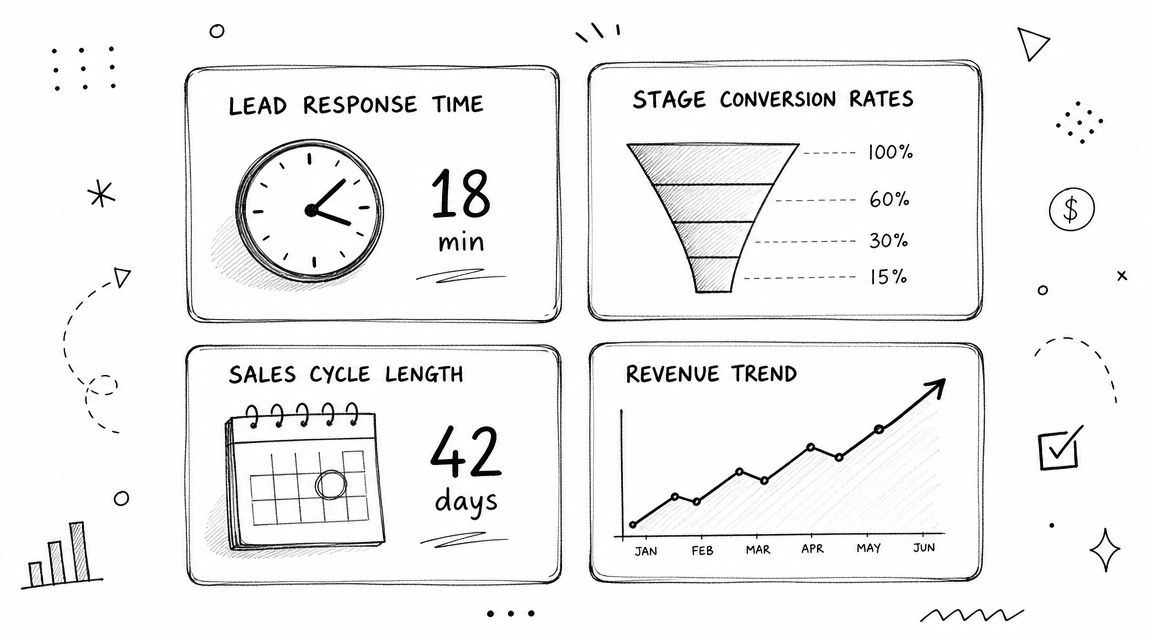
A hand-drawn business infographic displaying CRM performance metrics like lead response time, conversion rates, and revenue trends.

Core KPIs for Workflow Optimization

So, where do you start? Build a simple dashboard to monitor the vital signs of your key workflows. Your goal is to see, at a glance, if your automations are pulling their weight.

Focus on these essential metrics:

  • Lead Response Time: This is the clock running between a lead's first action (like filling out a form) and your sales team’s first touchpoint. A fast response is one of the single biggest factors in converting inbound leads.

  • Stage-by-Stage Conversion Rates: Don't just look at the final win rate. Track how many leads move from "New" to "Contacted," then from "Contacted" to "Qualified," and so on. This shows you exactly where your funnel is leaking revenue.

  • Sales Cycle Length: How long does it take to turn a brand-new lead into a paying customer? A well-designed workflow should shorten this timeline by eliminating friction and automating the tedious follow-ups.

Here’s a quick-reference table of the most important metrics to keep an eye on.

Key CRM Workflow Performance Metrics

Metric

What It Tells You

Improvement Goal

Lead Response Time

How quickly your team engages with a new inbound lead.

Reduce the time to under 5 minutes.

Conversion Rate (by Stage)

Where leads are dropping off in your sales process.

Identify and fix bottlenecks between stages.

Sales Cycle Length

The average time it takes to close a deal from first contact.

Shorten the cycle by automating tasks and nurturing.

Customer Lifetime Value (CLV)

The total revenue a customer brings in over time.

Increase through upselling and re-engagement workflows.

Deal Win Rate

The percentage of qualified opportunities that become closed-won deals.

Improve by refining deal progression and nurturing automations.

Tracking these KPIs gives you a clear picture of what's working and what isn't, allowing you to make data-backed decisions instead of just guessing.

Optimizing these metrics isn’t a one-time project; it's a continuous cycle of measuring, learning, and refining. Even a small improvement in your stage-to-stage conversion rate can have a massive impact on your final revenue numbers.

The data backs this up. Businesses that get their CRM workflows right report a 29% increase in sales revenue, a 34% boost in team productivity, and a 42% improvement in forecast accuracy. This is because solid automation consistently shortens sales cycles by an average of 8 to 14 days and can significantly lift conversion rates. You can discover the latest CRM statistics for businesses to see more of these trends.

For more hands-on tips to fine-tune your entire sales engine, check out our complete guide on sales process optimization.

Common CRM Workflow Mistakes and How to Fix Them

Even with a perfectly mapped-out plan, CRM workflows can go sideways. The real difference between a system that fuels growth and one that just creates headaches is catching the common mistakes before they completely derail your team.

I’ve seen it dozens of times. Teams either build automations so complex that nobody can manage them, or they completely forget about the human side of the equation—like proper training—and wonder why no one uses the tool. Let's look at a couple of classic warning signs and the practical ways to fix them.

Symptom: Your Sales Team Hates the CRM

This is the big one. If you hear reps complaining that your CRM workflow is just dumping junk leads on them, pay attention. When they feel their pipeline is full of unqualified contacts, they’ll ditch the system and go right back to their trusty old spreadsheets. This isn't a sales problem; it's a workflow problem.

  • The Fix: This is a glaring sign that you need to revisit your lead scoring rules. Your definition of a Marketing Qualified Lead (MQL) is probably way too loose. It's time to tighten it up. Require more meaningful actions (like a pricing page visit or a demo request) or better demographic data (like a specific industry or company size) before a lead ever gets passed to sales automatically.

Symptom: Your Automations Sound Robotic

On the flip side, some teams over-automate until their communication has zero personality. If your automated emails and follow-ups are generic and impersonal, your prospects are going to tune you out immediately. The point of automation is to create efficiency, not a robotic clone army.

Key Takeaway: The worst thing you can do after a prospect shows genuine interest is make them feel like a number in a machine. Every touchpoint, even an automated one, should reinforce that you understand their needs and are there to help.

  • The Fix: Personalize everything. Seriously. Use dynamic content tokens in your emails to pull in data from the contact's record—their company name, their industry, or the exact e-book they just downloaded. This is where AI-driven platforms like Stamina really shine, as they can auto-generate personalized email variants for you. This ensures that even outreach at scale feels like a one-to-one conversation. And don't forget to review and refresh your templates regularly to keep them from getting stale.

Frequently Asked Questions About CRM Workflows

When you’re diving into CRM workflows, a few questions always pop up. Getting these sorted out early can save you a ton of headaches down the road.

Which Process Should I Automate First?

This is a great question, and it's one we get all the time. The best place to start is almost always lead routing.

Why? Because speed to lead is everything. Every minute you spend manually figuring out who gets a new inquiry is a minute that lead is getting cold. Automating this single process ensures every new prospect gets to the right person, instantly. It’s the fastest way to get a meaningful lift in your conversion rates right out of the gate.

Can a CRM Workflow Do More Than Sales?

Definitely. While sales workflows get all the glory, thinking of them as only a sales tool is a huge mistake. A well-built CRM workflow should connect your entire business.

  • Marketing: You can automatically nurture leads with specific content based on how they behave on your website.

  • Customer Service: Imagine a support ticket being created the instant a customer sends an email with “urgent help” in the subject line. That’s a workflow.

  • Onboarding: You can trigger a complete welcome email series the second a new customer’s deal is marked as "won."

The real goal here is to create a single, seamless experience for the customer, no matter which part of your company they’re talking to.

What Is the Difference Between a Workflow and a Sequence?

This is another point that trips people up. It’s actually pretty simple when you break it down.

A sequence is a sales tool. It's a series of automated emails or tasks sent from a specific rep’s inbox to one person. The moment that person replies or books a meeting, the sequence stops.

A workflow is a business process engine. It’s a much broader, system-level automation that can enroll contacts in different campaigns, update their properties in the CRM, send marketing emails, or assign tasks to anyone on the team based on complex "if/then" rules.

In short, a sequence is a specific tool for a sales rep's direct outreach. A workflow is the powerful, behind-the-scenes engine running your entire process.

Ready to stop juggling disconnected tools and build powerful workflows that connect your entire team? With Stamina, you get an AI-powered platform that unifies your marketing, sales, and CRM, allowing you to build and automate the processes that drive real revenue growth. Get started with Stamina today.

A CRM is just a glorified address book until you tell it what to do. A “CRM work flow” is simply the set of rules that turns your static contact list into an active, automated system that drives sales.

Without it, you’re stuck with manual chaos. Leads slip through the cracks, follow-ups are inconsistent, and your team wastes time on tasks a machine could handle instantly. This is how revenue gets lost.

Why an Automated CRM Work Flow Is a Growth Engine

Let's be real—managing leads with spreadsheets and shared inboxes is a recipe for disaster. A new lead fills out a form on your website, and what happens? It lands in an inbox, waits for someone to notice, gets manually assigned, and days might pass before a sales rep ever reaches out. By then, the lead is cold.

Worse, a competitor who responded in minutes has already won their attention. An automated CRM work flow fixes this disconnect between marketing getting the lead and sales acting on it.

Here’s how that same scenario plays out with automation:

  • The Old Way (Manual): A prospect downloads an ebook. The notification gets lost in a busy inbox. A day later, someone on the marketing team forwards it to the sales manager, who then assigns it to a rep. The rep, busy with other tasks, finally sends a generic email two days after the initial download.

  • The Automated Way (Workflow): The moment that ebook is downloaded, the CRM work flow kicks in. The lead is instantly scored, routed to the right rep based on territory, and a task is created in their name. Simultaneously, the prospect gets a personalized email referencing the ebook and is added to a relevant nurture sequence.

This is the kind of orchestration that turns a simple database into a growth machine. It's why 91% of companies with over 10 employees use a CRM and why the market is set to hit $112 billion by 2025. The ROI is undeniable—businesses see an average return of $8.71 for every dollar spent.

A comparison illustration showing a stressed person managing leads manually versus an organized, automated CRM pipeline.

From Problem to Competitive Advantage

Smart CRM workflows take your biggest operational headaches and turn them into powerful advantages. When you get this right, you don't just fix problems—you build a well-oiled machine that scales.

Take a look at a few common issues and how an automated workflow provides the solution.

Immediate Wins From a CRM Work Flow

Manual Process Problem

Automated Workflow Solution

Leads go cold while waiting for manual assignment.

Leads are instantly routed to the correct sales rep with a notification and follow-up task.

Inconsistent follow-up from reps.

Follow-up tasks and email sequences are automatically triggered to ensure no lead is forgotten.

Time-consuming data entry for sales and marketing teams.

Contact properties, deal stages, and tasks are updated automatically based on prospect actions.

Poor visibility into what’s working and what’s not.

Every touchpoint is tracked and reported on, providing clear data on performance.

Marketing and sales are disconnected, leading to poor handoffs.

Workflows create a bridge between teams, ensuring a seamless customer journey from first touch to closed deal.

These are not just small fixes; they are strategic shifts. By implementing workflows, you can improve sales data accuracy and finally get your teams on the same page.

Connecting marketing actions directly to sales outcomes is the key. To dig deeper into how these two functions should work together, check out our guide on marketing automation and CRM integration.

Alright, enough theory. Let's get our hands dirty and build the four CRM workflows that will actually make you money. Think of these as the core plays in your company's growth playbook. Each one targets a specific point in the customer journey, making sure no lead or deal ever falls through the cracks.

These aren't just ideas—they're actionable systems you can set up right now. Get them right, and you'll have a smooth, automated path that guides people from their first click to a closed deal and keeps them coming back.

A sketched infographic showing four business stages: Lead Routing, Nurture, Deal Progression, and Re-engagement.

Automated Lead Routing

In sales, speed is everything. Your first and most critical workflow is Automated Lead Routing. This is all about getting a hot new lead to the right salesperson, instantly. It kills the dreaded "lead black hole"—that shared inbox where opportunities go to die while everyone figures out who should respond.

You can set up simple rules based on the data you already have:

  • Geography: Any lead from the Midwest? Send it straight to your Chicago-based rep.

  • Source: Did they come from a specific partner's webinar? Route it to the rep who manages that relationship.

  • Company Size: Inquiries from companies over 500 employees? Make sure they land with your senior account executives.

The goal here is simple: slash your response time from hours or days down to minutes. This one automation alone can be a game-changer for your contact rates.

Smart Lead Nurturing

Let's be real: most leads aren't ready to buy the second they sign up. That's where a Smart Lead Nurturing workflow comes in. It’s designed to keep your company top-of-mind by delivering real value over time, not just spamming them with sales pitches.

A prospect who downloaded your manufacturing case study needs to see different emails than someone who attended your webinar on retail analytics. This isn't just about using their first name; it's about continuing the conversation they started, building trust, and proving you're an expert.

You’re playing the long game here, educating them and building a relationship. When they are finally ready to pull the trigger, you'll be the first person they call. For more ideas on what these sequences can look like, you can learn more about how to create a workflow that actually converts.

Deal Progression Prompts

Once a lead turns into a real sales opportunity, the momentum can't stop. A Deal Progression workflow acts like a sales manager's assistant, nudging reps to take the next best step to keep things moving forward.

For example, when a rep moves a deal to the "Proposal Sent" stage, the workflow can automatically schedule a follow-up task for three days later. Or, if a high-value deal sits idle for more than a week, it can trigger a notification to the sales manager. It’s all about creating accountability and preventing deals from stalling out.

Customer Re-engagement

Finally, you need a workflow for the ones that got away. A Customer Re-engagement workflow is your secret weapon for winning back cold leads or spotting upsell opportunities with current customers.

This automation might kick in if a contact hasn't opened an email in 90 days, or if an existing customer's product usage suddenly drops. You'd be surprised how often a simple, personalized "checking in" email can spark a conversation and uncover hidden revenue.

Bringing Your Workflows to Life with Automation

You’ve got your workflow diagrams sketched out. That's a great start, but a map on paper isn’t going to drive revenue. Now it's time to turn those plans into a real, automated machine inside your CRM.

The secret sauce is a simple but powerful concept: if/then logic.

At its core, every automation boils down to two things:

  • Triggers: A specific event that kicks off the workflow.

  • Actions: The task (or series of tasks) your CRM automatically performs in response.

It’s about setting up a chain reaction where one event seamlessly triggers the next, creating a hands-off journey for your leads and customers.

Building Your Automation Rules

So, how does this actually work in practice? Let me walk you through a common scenario I've seen a hundred times.

Imagine a hot lead fills out the "Request a Demo" form on your website. That form submission is your trigger. Instead of that lead sitting in an inbox waiting for someone to notice, automation takes over instantly.

A simple but effective CRM workflow might look like this:

  • When: A contact submits the "Request a Demo" form...

  • Then: Instantly change the lead’s status from "New" to "Marketing Qualified Lead" (MQL).

  • And: Automatically create and assign a task for the right sales rep to call the lead within 24 hours.

  • And: Send a confirmation email to the lead, letting them know a team member will be in touch shortly.

This one workflow ensures a high-intent lead gets immediate attention. No more leads falling through the cracks. It dramatically increases your odds of making a connection while they're still interested. For a deeper dive into optimizing this first touchpoint, check out how Social Intents' lead capture features can enhance this process.

A hand-drawn flowchart diagram illustrating a CRM workflow for lead qualification based on company size.

Adding Intelligence with AI

But here's where it gets really interesting. Modern platforms like Stamina bring an AI layer into the mix, making these workflows much smarter than simple, static rules. AI can adapt its actions based on subtle behaviors and signals.

For example, an AI-powered system might spot a high-value visitor who has viewed your pricing page three times and watched a case study video, even if they haven't filled out a form. The AI can flag this "ghost" lead and alert a sales rep to proactively engage, turning a passive browser into an active conversation.

This is the key difference. Instead of feeling robotic, the automation becomes more intuitive and, frankly, more human. By blending clear rules with intelligent, adaptive triggers, you create a CRM workflow that doesn't just run—it thinks.

If you're ready to explore even more advanced sequences, we break down some powerful examples in our guide to building a marketing automation workflow.

Measuring What Matters and Optimizing for Revenue

An automated CRM workflow that isn't measured is just a guess. To turn your automations into a predictable revenue engine, you have to track the metrics that actually move the needle—not just the ones that look good on a dashboard.

It's easy to get distracted by vanity stats like email open rates. While interesting, they don't tell you if your workflow is actually closing deals. Instead, you need to zero in on the key performance indicators (KPIs) that connect directly to your bottom line. These are the numbers that reveal the true health of your sales and marketing machine.

A hand-drawn business infographic displaying CRM performance metrics like lead response time, conversion rates, and revenue trends.

Core KPIs for Workflow Optimization

So, where do you start? Build a simple dashboard to monitor the vital signs of your key workflows. Your goal is to see, at a glance, if your automations are pulling their weight.

Focus on these essential metrics:

  • Lead Response Time: This is the clock running between a lead's first action (like filling out a form) and your sales team’s first touchpoint. A fast response is one of the single biggest factors in converting inbound leads.

  • Stage-by-Stage Conversion Rates: Don't just look at the final win rate. Track how many leads move from "New" to "Contacted," then from "Contacted" to "Qualified," and so on. This shows you exactly where your funnel is leaking revenue.

  • Sales Cycle Length: How long does it take to turn a brand-new lead into a paying customer? A well-designed workflow should shorten this timeline by eliminating friction and automating the tedious follow-ups.

Here’s a quick-reference table of the most important metrics to keep an eye on.

Key CRM Workflow Performance Metrics

Metric

What It Tells You

Improvement Goal

Lead Response Time

How quickly your team engages with a new inbound lead.

Reduce the time to under 5 minutes.

Conversion Rate (by Stage)

Where leads are dropping off in your sales process.

Identify and fix bottlenecks between stages.

Sales Cycle Length

The average time it takes to close a deal from first contact.

Shorten the cycle by automating tasks and nurturing.

Customer Lifetime Value (CLV)

The total revenue a customer brings in over time.

Increase through upselling and re-engagement workflows.

Deal Win Rate

The percentage of qualified opportunities that become closed-won deals.

Improve by refining deal progression and nurturing automations.

Tracking these KPIs gives you a clear picture of what's working and what isn't, allowing you to make data-backed decisions instead of just guessing.

Optimizing these metrics isn’t a one-time project; it's a continuous cycle of measuring, learning, and refining. Even a small improvement in your stage-to-stage conversion rate can have a massive impact on your final revenue numbers.

The data backs this up. Businesses that get their CRM workflows right report a 29% increase in sales revenue, a 34% boost in team productivity, and a 42% improvement in forecast accuracy. This is because solid automation consistently shortens sales cycles by an average of 8 to 14 days and can significantly lift conversion rates. You can discover the latest CRM statistics for businesses to see more of these trends.

For more hands-on tips to fine-tune your entire sales engine, check out our complete guide on sales process optimization.

Common CRM Workflow Mistakes and How to Fix Them

Even with a perfectly mapped-out plan, CRM workflows can go sideways. The real difference between a system that fuels growth and one that just creates headaches is catching the common mistakes before they completely derail your team.

I’ve seen it dozens of times. Teams either build automations so complex that nobody can manage them, or they completely forget about the human side of the equation—like proper training—and wonder why no one uses the tool. Let's look at a couple of classic warning signs and the practical ways to fix them.

Symptom: Your Sales Team Hates the CRM

This is the big one. If you hear reps complaining that your CRM workflow is just dumping junk leads on them, pay attention. When they feel their pipeline is full of unqualified contacts, they’ll ditch the system and go right back to their trusty old spreadsheets. This isn't a sales problem; it's a workflow problem.

  • The Fix: This is a glaring sign that you need to revisit your lead scoring rules. Your definition of a Marketing Qualified Lead (MQL) is probably way too loose. It's time to tighten it up. Require more meaningful actions (like a pricing page visit or a demo request) or better demographic data (like a specific industry or company size) before a lead ever gets passed to sales automatically.

Symptom: Your Automations Sound Robotic

On the flip side, some teams over-automate until their communication has zero personality. If your automated emails and follow-ups are generic and impersonal, your prospects are going to tune you out immediately. The point of automation is to create efficiency, not a robotic clone army.

Key Takeaway: The worst thing you can do after a prospect shows genuine interest is make them feel like a number in a machine. Every touchpoint, even an automated one, should reinforce that you understand their needs and are there to help.

  • The Fix: Personalize everything. Seriously. Use dynamic content tokens in your emails to pull in data from the contact's record—their company name, their industry, or the exact e-book they just downloaded. This is where AI-driven platforms like Stamina really shine, as they can auto-generate personalized email variants for you. This ensures that even outreach at scale feels like a one-to-one conversation. And don't forget to review and refresh your templates regularly to keep them from getting stale.

Frequently Asked Questions About CRM Workflows

When you’re diving into CRM workflows, a few questions always pop up. Getting these sorted out early can save you a ton of headaches down the road.

Which Process Should I Automate First?

This is a great question, and it's one we get all the time. The best place to start is almost always lead routing.

Why? Because speed to lead is everything. Every minute you spend manually figuring out who gets a new inquiry is a minute that lead is getting cold. Automating this single process ensures every new prospect gets to the right person, instantly. It’s the fastest way to get a meaningful lift in your conversion rates right out of the gate.

Can a CRM Workflow Do More Than Sales?

Definitely. While sales workflows get all the glory, thinking of them as only a sales tool is a huge mistake. A well-built CRM workflow should connect your entire business.

  • Marketing: You can automatically nurture leads with specific content based on how they behave on your website.

  • Customer Service: Imagine a support ticket being created the instant a customer sends an email with “urgent help” in the subject line. That’s a workflow.

  • Onboarding: You can trigger a complete welcome email series the second a new customer’s deal is marked as "won."

The real goal here is to create a single, seamless experience for the customer, no matter which part of your company they’re talking to.

What Is the Difference Between a Workflow and a Sequence?

This is another point that trips people up. It’s actually pretty simple when you break it down.

A sequence is a sales tool. It's a series of automated emails or tasks sent from a specific rep’s inbox to one person. The moment that person replies or books a meeting, the sequence stops.

A workflow is a business process engine. It’s a much broader, system-level automation that can enroll contacts in different campaigns, update their properties in the CRM, send marketing emails, or assign tasks to anyone on the team based on complex "if/then" rules.

In short, a sequence is a specific tool for a sales rep's direct outreach. A workflow is the powerful, behind-the-scenes engine running your entire process.

Ready to stop juggling disconnected tools and build powerful workflows that connect your entire team? With Stamina, you get an AI-powered platform that unifies your marketing, sales, and CRM, allowing you to build and automate the processes that drive real revenue growth. Get started with Stamina today.

Share this article

Share this article

Send a shareable link to your team or anyone who might find it useful.

Send a shareable link to your team or anyone who might find it useful.

Copy link

Copied

Share directly to

Table of contents

Give Your Business the Stamina it needs to Thrive