Marketing Automation and CRM Integration: An SMB Guide

Unlock growth with our guide to marketing automation and CRM integration. Learn to unify data, boost sales, and avoid common pitfalls for your SMB in 2026.

0 - Minute Read

Your team probably already feels the problem.

Marketing runs campaigns, captures form fills, sends nurture emails, and watches engagement. Sales opens the CRM and sees a name, a company, and maybe a note that says “ebook download.” Nobody can tell which emails the lead clicked, what page they spent time on, or whether they went cold because the messaging missed the mark or because the handoff happened too late.

The reverse problem is just as common. Sales learns that a prospect cares about pricing, implementation speed, or a specific use case. That information never gets back into marketing. So marketing keeps sending generic content, sales keeps improvising follow-up, and the customer gets a fragmented experience that feels like dealing with two separate companies.

That’s why marketing automation and crm integration matters. This isn’t a nice-to-have for larger teams. It’s the operating model that lets a growing SMB treat customer data as one shared asset instead of a set of disconnected exports, workarounds, and Slack messages.

The High Cost of Disconnected Customer Data

Disconnected systems create a false narrative inside the business. Marketing thinks it’s generating demand. Sales thinks lead quality is weak. Customer success later discovers the buyer had strong intent signals early on, but nobody had the full picture when it mattered.

The issue usually isn’t effort. It’s architecture.

When your marketing automation platform and CRM don’t talk properly, people start compensating manually. Reps copy notes from one system to another. Marketers build segments from stale lists. Pipeline reviews become debates about whose numbers are right rather than conversations about what to fix.

What this looks like in practice

A common SMB setup looks efficient on paper. One tool sends emails, another stores contacts, a third handles forms, and maybe a fourth manages outbound. Each tool does its own job. The trouble starts at the handoffs.

A lead downloads a guide, visits the pricing page, and replies to an email. Marketing sees engagement. Sales sees a record with limited context. If the rep reaches out without that history, the conversation starts cold even when the buyer is already warm.

Practical rule: If sales has to ask questions your systems already answered, your stack is wasting demand.

The cost shows up in missed follow-up, duplicate records, weak attribution, and slow decisions. It also affects retention. Teams can’t personalize well when customer history is fragmented.

The market has already moved in the other direction. The global CRM market is projected to surpass $112 billion by 2025, and businesses achieve an average ROI of $8.71 for every $1 invested, driven by the need to unify data and enhance customer retention by up to 27%, according to Teamgate’s 2025 CRM trends analysis.

Why SMBs feel this faster

Larger companies can sometimes absorb inefficiency with headcount. SMBs usually can’t. One sales manager may also be the CRM admin. One marketer may run demand gen, lifecycle, and reporting. When systems are disconnected, the burden lands on a small team that already has too much to do.

That’s why unified operations matter early. SMBs don’t need more point tools. They need fewer data breaks, clearer ownership, and one reliable customer record. That’s the operational logic behind an all-in-one business platform approach.

Understanding the Core Concepts of Integration

Most confusion starts with the tools themselves. People buy a CRM and assume it can handle full lifecycle marketing. Or they buy a marketing automation platform and expect it to function like a sales system. Those assumptions create messy implementations.

At a basic level, the two systems serve different roles.

The MAP and the CRM do different jobs

A marketing automation platform is the loudspeaker and listening layer. It sends campaigns, tracks engagement, triggers workflows, and reacts to behavior. It’s good at one-to-many communication and behavior-based automation.

A CRM is the central relationship record. It stores account, contact, pipeline, and ownership data. It gives sales and service teams a structured place to manage conversations, opportunities, and next steps.

Neither system is enough on its own if you want clean handoffs and a usable customer timeline.
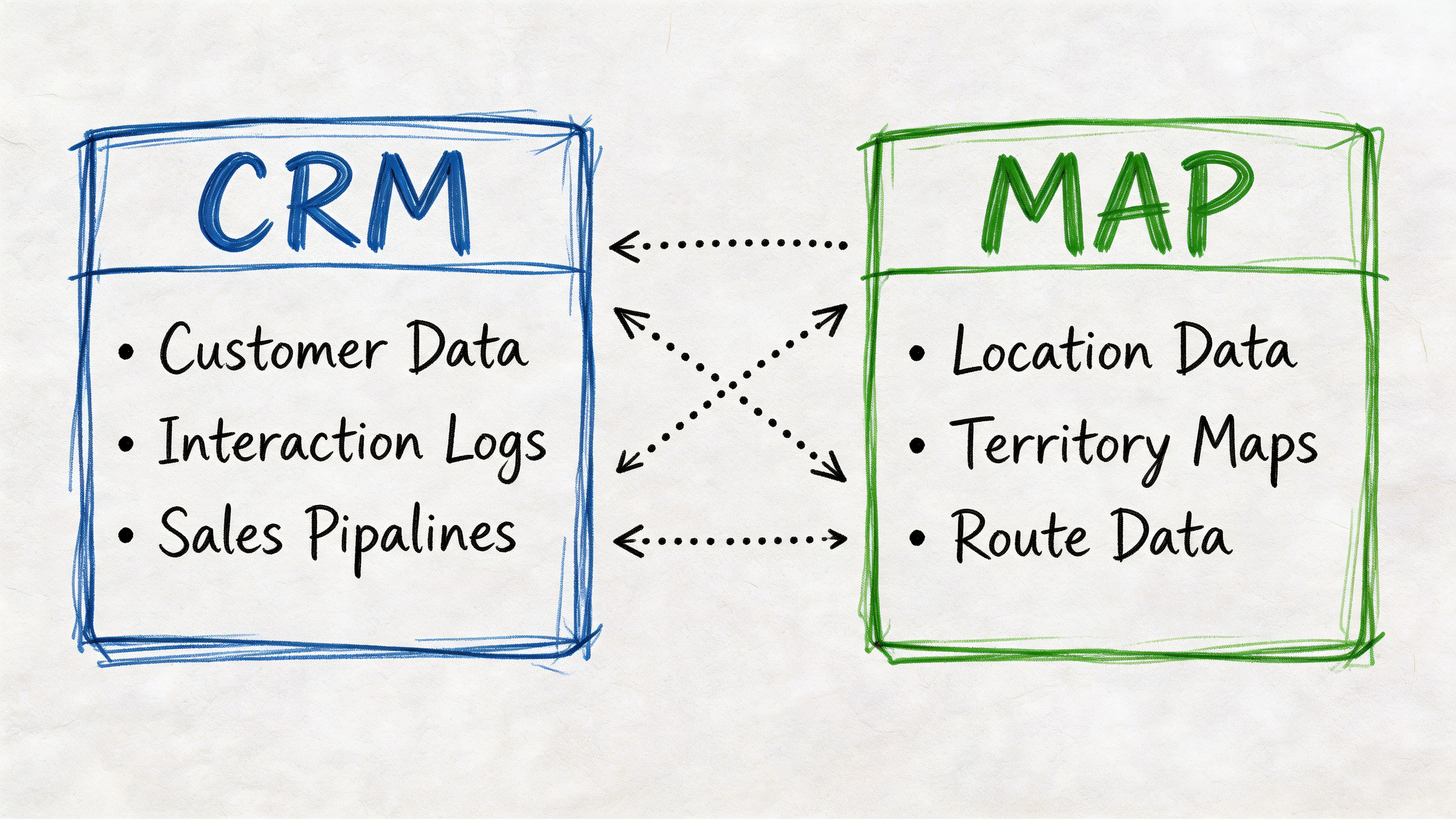
A hand-drawn diagram illustrating the bidirectional integration between CRM systems and mapping software data.

Integration is the operating layer

The integration is what turns those two tools into one coordinated system. Think of it as the central nervous system. It carries signals in both directions so both sides react to the same reality.

Without that layer, marketing acts on partial engagement data and sales acts on partial relationship data. With it, a rep can see campaign history, lead score, content consumed, and recent form activity inside the CRM. Marketing can see lifecycle changes, ownership updates, and revenue outcomes without waiting for a spreadsheet.

That’s also why data quality can’t be treated as cleanup work after launch. Before you automate anything serious, it helps to improve CRM data quality with analytics QA so field values, event tracking, and contact updates stay trustworthy across the stack.

What a proper integration actually enables

A real integration does more than move contact records around. It creates shared triggers and shared context across the customer lifecycle.

For example:

  • Behavior informs sales: Email clicks, form submissions, and content consumption flow into the CRM so reps know what to reference.

  • Pipeline informs marketing: Deal stage, close status, and customer status flow back to marketing so the right nurture or expansion workflows fire.

  • Ownership stays current: If a rep changes or an account gets reassigned, automated communications don’t continue from the wrong context.

  • Lifecycle logic stays consistent: Marketing and sales act on the same definition of lead status instead of maintaining separate realities.

If you’ve ever built a drip campaign that adapts to buyer behavior, you’ve already seen the dependency. The workflow only works when the underlying CRM and marketing data are aligned.

The integration isn’t just a connector. It’s the control layer that decides which team sees what, when they see it, and what happens next.

Architecting a Unified Customer View

The success or failure of most SMB projects hinges not on tool selection, but on the data model.

A unified customer view doesn’t happen because two vendors say they integrate. It happens because you decide what data moves, in which direction, under what rules, and which system owns each field.
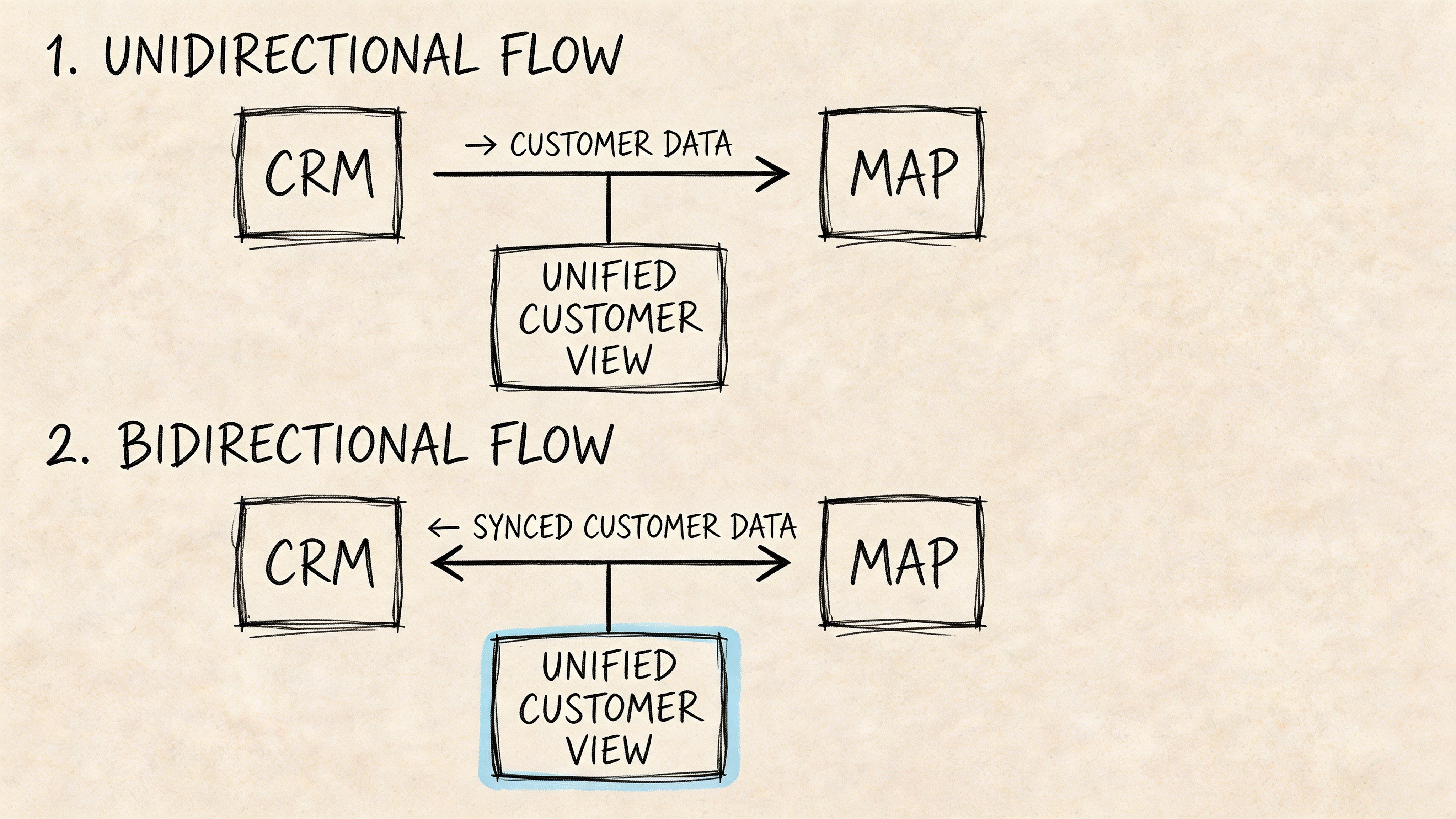
A diagram comparing unidirectional and bidirectional data flow between CRM and MAP systems with a unified customer view.

Unidirectional versus bidirectional sync

A unidirectional sync pushes data one way. This is common in early-stage setups. Marketing may send lead activity into the CRM, but sales updates never flow back.

That can work for a simple handoff model. It breaks down once both teams need shared lifecycle data. Marketing keeps nurturing leads that already entered an opportunity stage. Sales misses context from fresh engagement because updates are delayed or incomplete.

A bidirectional sync creates a feedback loop. Behavioral data reaches sales, and sales outcomes reach marketing. According to ClientFactory’s guide to CRM and marketing automation integration, bidirectional data synchronization is the key to integration, triggering automated sales actions and boosting conversions by 20-30%. That same guidance stresses two essential requirements: precise field mapping and a clearly defined system of record, typically CRM for firmographic data and marketing automation for behavioral data.

The system of record question

Teams often get sloppy. They let both tools edit the same fields without rules. That’s how duplicates, conflicting lifecycle stages, and broken reports show up.

Use a simple ownership model:

  • CRM owns stable business data. Accounts, contacts, opportunities, ownership, close dates.

  • Marketing automation owns behavioral data. Email engagement, campaign participation, content interactions, scoring inputs.

  • Shared fields need rules. Lifecycle stage, phone number, and certain status fields may need updates in both directions, but only if the logic is explicit.

If two systems can overwrite the same field and nobody can explain the precedence rule, the field isn’t governed.

Example data field mapping between Marketing Automation and CRM

Data Field

System of Record (Master)

Syncs from MA to CRM

Syncs from CRM to MA

Email address

CRM

Yes, for new lead creation and updates when allowed

Yes

First and last name

CRM

Yes

Yes

Company name / Account name

CRM

Yes, mapped carefully to standard naming

Yes

Phone number

CRM

Yes, only if formatting rules are defined

Yes

Lead source

CRM

Yes, when captured on forms or campaigns

Yes

Campaign history

Marketing automation

Yes

No

Email opens and clicks

Marketing automation

Yes

No

Content consumption

Marketing automation

Yes

No

Lead score

Marketing automation

Yes

No

MQL status

Shared with rules

Yes

Yes

Contact owner

CRM

No

Yes

Deal stage

CRM

No

Yes

Close date

CRM

No

Yes

Revenue value

CRM

No

Yes

Unsubscribe status

Shared with strict compliance rules

Yes

Yes

Customer status

CRM

No

Yes

This table isn’t universal, but it’s a strong starting point for SMBs.

The details that trip teams up

Most sync failures happen in boring places. Field names don’t match. Date formats differ. “Company Name” in one system maps loosely to “Account Name” in another. One tool allows free-text values while the other expects standardized dropdown options.

That’s why integration work is part technical and part operational. The connector only does what the rules tell it to do.

For teams that also run voice workflows or service queues, this same architecture matters across adjacent systems. A practical example is this look at a powerful contact center partnership showing how CRM-linked operations depend on shared data definitions rather than isolated tools.

A useful test is simple. Build one workflow that crosses functions, then see whether it behaves correctly. If a lead reaches a threshold, becomes an MQL, gets assigned to sales, enters a deal stage, and then exits nurture automatically, your architecture is probably sound. If someone has to intervene manually, the logic still needs work. That’s why teams should create a workflow that spans marketing and sales actions before declaring the integration complete.

The Business Benefits and How to Measure Them

Most integration conversations stay too abstract. “Alignment” sounds good, but SMB owners need to know what changes operationally and how to tell whether it’s working.

The value shows up in four places: lead quality, sales speed, attribution, and customer experience.
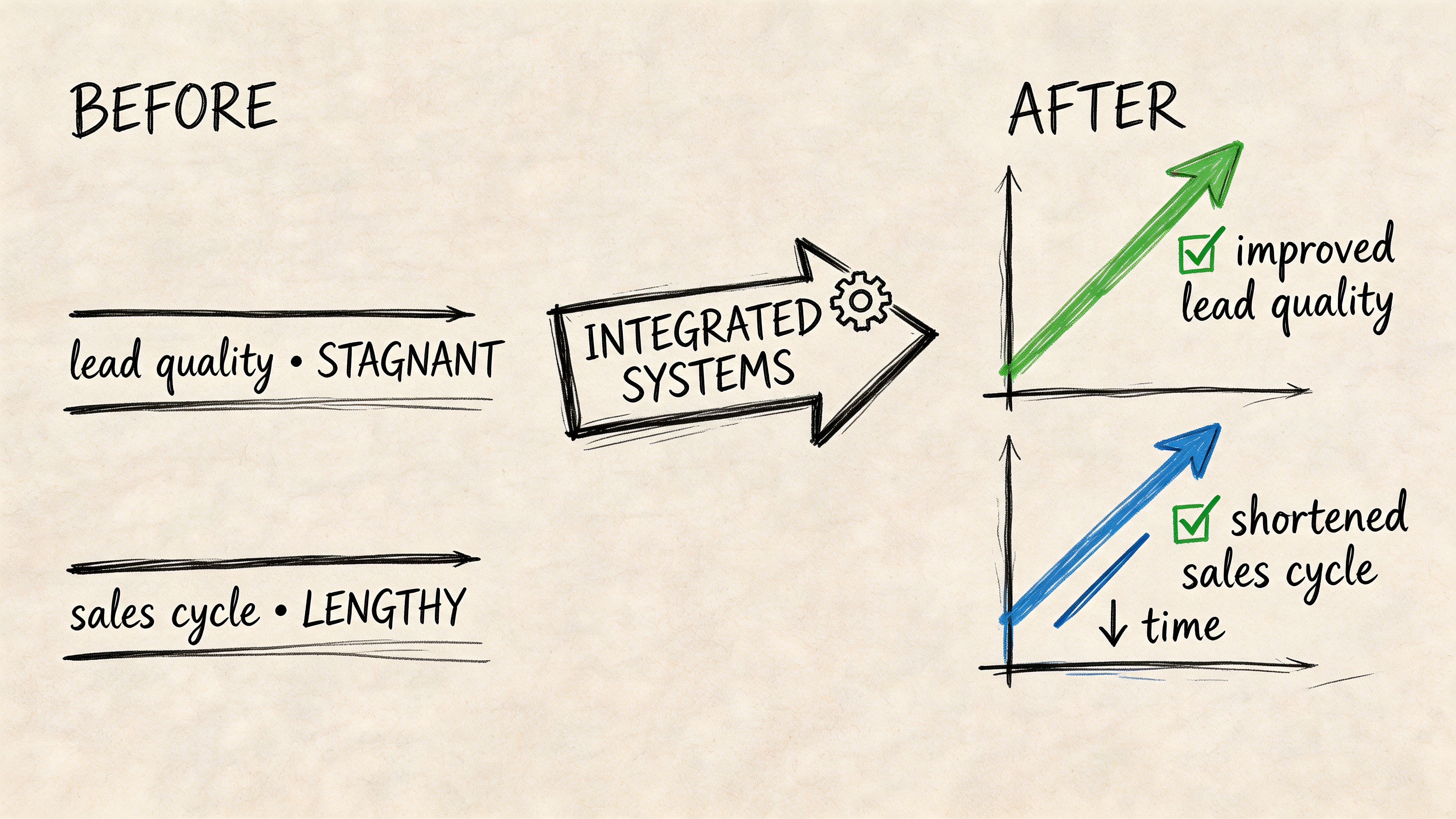
A hand-drawn comparison showing how integrated systems improve lead quality and shorten sales cycles in business.

Better lead quality

A lead record becomes more useful when sales can see behavior, not just identity. If a rep knows a contact viewed the pricing page, clicked a product email, and returned after a webinar, the first conversation changes. It becomes specific.

That also improves qualification. Marketing can score based on real behavior, and sales can validate whether those signals correlate with real opportunities.

Track it with:

  • MQL to SQL conversion rate

  • Lead to opportunity rate

  • Acceptance rate of marketing-qualified leads

  • Duplicate rate and sync error logs

Shorter sales cycles

Integrated context reduces discovery friction. Reps don’t have to start from scratch when the CRM already contains campaign history and engagement signals. Marketing also stops pushing irrelevant content after the buyer advances.

That shortens the path from first touch to meaningful sales conversation. It also reduces the awkwardness buyers feel when they repeat themselves across teams.

Sales cycles get shorter when reps enter the conversation with context, not when they simply send more follow-ups.

Better personalization and revenue visibility

Personalization depends on timing and data, not just copy quality. According to Act-On’s guidance on CRM marketing automation integration, 87% of customers expect personalized interactions, and using CRM data such as deal stage or company size to trigger marketing actions is associated with 15-25% revenue growth in major markets.

That’s the practical benefit of integration. A renewal reminder can trigger from subscription timing. A post-purchase onboarding sequence can start when lead status changes to customer. A late-stage opportunity can receive proof-point content relevant to its segment instead of a general newsletter.

The operational outcome is better attribution too. Marketing can see what happened after handoff, and sales can see which programs influenced pipeline before the opportunity existed.

A deeper look at how teams structure those systems is worth watching:

The KPI set that matters

Don’t try to measure everything at once. Start with a compact scorecard that spans both teams.

KPI

What it tells you

MQL to SQL conversion rate

Whether qualification and handoff logic are working

Lead to opportunity rate

Whether the combined data model is improving lead quality

Average sales cycle length

Whether shared context is reducing friction

Marketing-sourced revenue

Whether campaigns are influencing closed business

Time to first sales follow-up

Whether routing and assignment are working

Data sync error rate

Whether the integration is technically stable

Unsubscribe and suppression accuracy

Whether customer communications stay compliant and relevant

If your team needs a baseline for process design, these CRM best practices for growing teams are useful because they force ownership around fields, lifecycle stages, and reporting discipline before automation scales.

Implementation Checklist and Common Pitfalls to Avoid

Most failed integrations don’t fail because the connector stopped working. They fail because nobody defined the business rules first.

The number one failure point is lost context between siloed systems, and that problem can be mitigated by integration that boosts sales productivity by 14.5% and reduces marketing overhead by 12.2%. But poor syncs can also cause up to a 30% lead drop-off, according to Introhive’s analysis of CRM and marketing automation data challenges.

That’s why implementation has to start with operating decisions, not just software setup.

A practical rollout checklist

  1. Define the business goal first
    Pick a narrow outcome. Better lead handoff. Cleaner attribution. Faster sales response. If the goal is “integrate everything,” the project will drift.

  2. Audit the current data before connecting anything
    Look for duplicate contacts, conflicting lifecycle labels, free-text fields, inactive owners, and outdated segments. Automation amplifies the condition of your data. It doesn’t fix it.

  3. Choose the system of record field by field
    Don’t settle for “the CRM is the source of truth” as a slogan. Decide who owns account names, who owns lifecycle status, who owns unsubscribe status, and what happens when values conflict.

  4. Map the lifecycle stages in plain English
    MQL, SQL, opportunity, customer, recycled lead. Every label needs an entry condition and an exit condition. If marketing and sales define these differently, the sync will keep passing bad assumptions between systems.

  5. Write the sync logic before you build it
    Use a simple document. List the field, direction, trigger, overwrite rule, fallback behavior, and owner. That document becomes the operating manual when something breaks.

  6. Test with realistic scenarios
    Don’t just test whether a lead record appears. Test reassignment, unsubscribe handling, duplicate prevention, lifecycle changes, and opportunity creation after engagement.

  7. Train the team on the workflow, not just the buttons
    Reps need to know what the engagement fields mean. Marketers need to know when sales updates will suppress or trigger campaigns. Admins need to know where to check logs when records fail.

Mistakes that keep showing up

Some failures are so common that they’re predictable.

  • Dirty data at launch: Teams rush to connect systems without cleaning old records. The result is duplicate contacts, bad scoring, and bad segmentation.

  • No governance plan: People create new properties and tags ad hoc. Six months later, the business has three versions of the same field.

  • Undefined lead stages: Marketing says “qualified” based on activity. Sales says “qualified” after a call. Reports become unreliable because the same word means different things.

  • Too much automation too early: Teams build a web of workflows before they prove the base sync is stable.

  • Batch thinking in a real-time use case: If your business depends on fast follow-up, delayed syncing can kill context before the rep gets involved.

The integration should remove manual handoffs. If it creates new manual checks, the architecture is wrong.

What works better for SMBs

SMBs usually do better with a phased rollout than a full rebuild. Start with one core path: lead capture, scoring, routing, and sales handoff. Then expand into attribution, customer marketing, and deeper workflow automation.

A simple operating cadence also helps:

  • Weekly: Review sync failures, duplicate creation, and lifecycle mismatches.

  • Monthly: Audit field usage, inactive automations, and reporting accuracy.

  • Quarterly: Revisit scoring logic, stage definitions, and ownership rules.

The key trade-off is control versus complexity. Deep customization can be useful, but every extra field and workflow becomes something your team has to maintain. SMBs should bias toward fewer fields, clearer stages, and tighter logic.

The Future Is Unified: Solving Integration with Stamina

The usual SMB buying path is expensive in effort even when the software prices look manageable. You choose a CRM. Then a marketing automation tool. Then an outbound platform. Then some connector or middleware to keep the records aligned. After that, someone on the team becomes the unofficial integration manager.

That model creates fragility. Every handoff between tools is another place where context can break.

Emerging trends show GenAI is consolidating the tech stack, moving beyond simple lead scoring to automate entire workflows. According to WebEngage’s analysis of CRM and marketing automation integration, an AI-driven unified platform like Stamina addresses the silo problem by using a single data source to power everything from AI-generated email sequences to sales pipeline management.
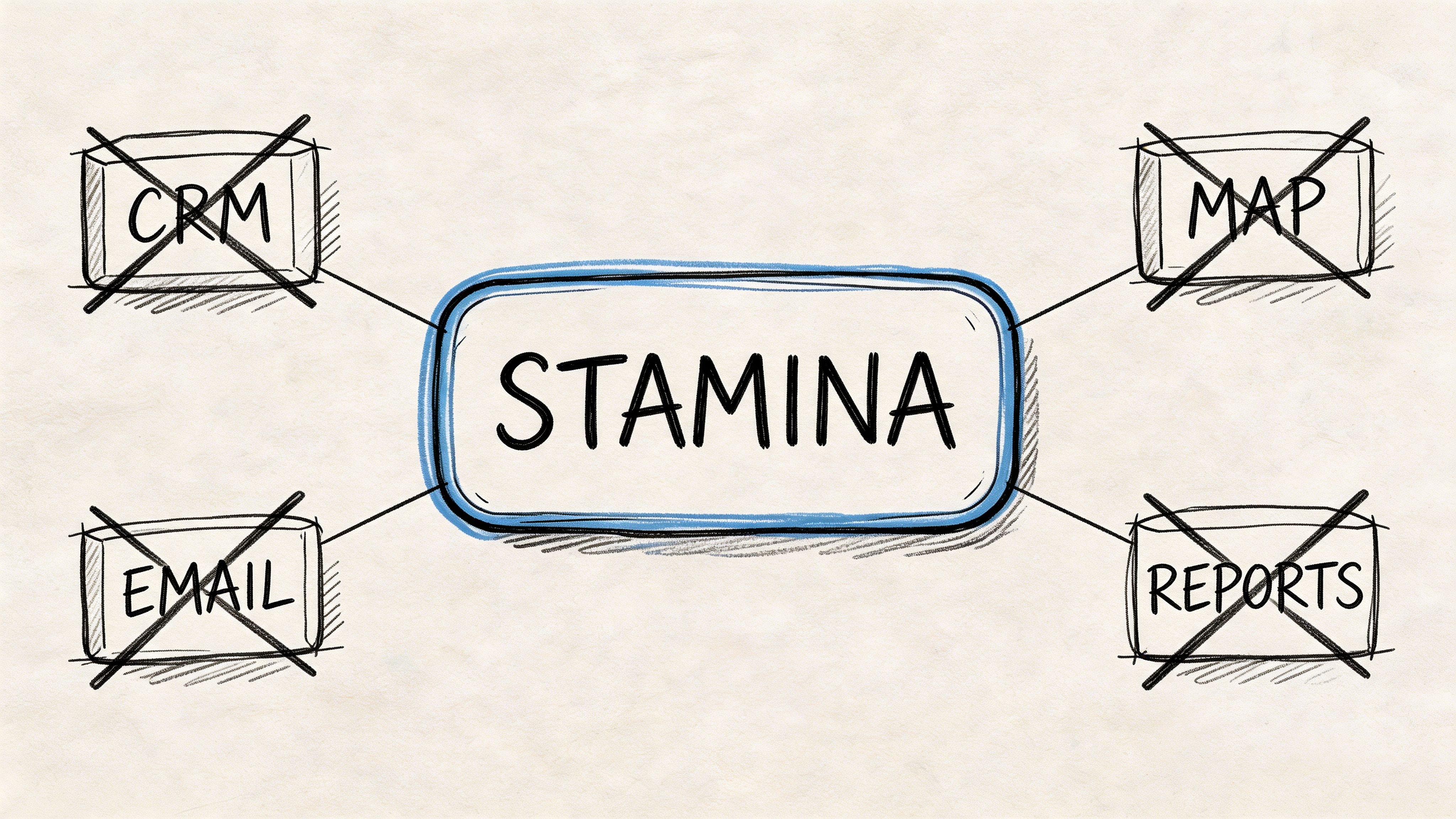
A conceptual diagram showing the word STAMINA in the center connected to four crossed-out business task boxes.

Why the unified model changes the problem

In a unified platform, integration stops being a separate project. The CRM, marketing workflows, outbound activity, and customer history share the same data foundation. That removes a lot of the field ownership and sync conflict that SMBs struggle to maintain across multiple tools.

This matters most in day-to-day execution:

  • Marketing doesn’t have to wait for exports to build segments from current pipeline context.

  • Sales doesn’t have to leave the relationship record to understand campaign behavior.

  • Workflow logic can trigger across functions without passing data through third-party connectors.

  • Reporting reflects one operating dataset instead of stitched-together snapshots.

That doesn’t eliminate implementation discipline. You still need lifecycle definitions, clean data, and ownership rules. But the technical failure surface gets smaller.

What this means for AI workflows

GenAI is useful when it operates on current context. If the AI only sees partial records, it produces partial output. If the data is unified, AI can act on account details, engagement history, pipeline stage, and recent activity together.

That’s the practical shift. Instead of AI writing generic emails from isolated lead lists, it can support workflows that depend on shared customer state. In a unified environment, AI-generated sequences, follow-up timing, handoff actions, and sales task creation can all reference the same underlying record.

For SMBs, that’s not just a convenience. It reduces the hidden cost of managing point tools that were never designed to work as one system.

A fragmented stack asks your team to maintain the integration forever. A unified stack reduces how much integration work exists in the first place.

Trade-offs SMB owners should weigh honestly

A unified platform isn’t automatically right for every business. If a company already has a mature enterprise stack, dedicated admins, and highly customized departmental tools, replacing that architecture may not make sense quickly.

But many SMBs aren’t in that position. They’re running lean teams, trying to grow pipeline, and spending too much time reconciling systems. For them, the trade-off often looks different:

Option

Main advantage

Main drawback

Separate CRM, MAP, and outbound tools

Flexibility in vendor choice

Ongoing sync complexity and fragmented context

Connector-based stack

Can preserve existing tools

Adds maintenance burden and another point of failure

Unified revenue platform

Shared data model and simpler operations

Requires commitment to one operating system

That’s why the strategic question isn’t just “Which tool has more features?” It’s “Which model gives my team fewer places to lose context?”

For growing SMBs, the answer is often the model that starts with one customer record and builds sales, marketing, and workflow automation on top of it.

If your team is tired of patching together CRM, marketing, and outbound tools, take a look at Stamina. It combines CRM, marketing automation, sales engagement, workflows, and AI SDR capabilities in one platform, which can reduce the integration burden that slows SMB teams down.

Your team probably already feels the problem.

Marketing runs campaigns, captures form fills, sends nurture emails, and watches engagement. Sales opens the CRM and sees a name, a company, and maybe a note that says “ebook download.” Nobody can tell which emails the lead clicked, what page they spent time on, or whether they went cold because the messaging missed the mark or because the handoff happened too late.

The reverse problem is just as common. Sales learns that a prospect cares about pricing, implementation speed, or a specific use case. That information never gets back into marketing. So marketing keeps sending generic content, sales keeps improvising follow-up, and the customer gets a fragmented experience that feels like dealing with two separate companies.

That’s why marketing automation and crm integration matters. This isn’t a nice-to-have for larger teams. It’s the operating model that lets a growing SMB treat customer data as one shared asset instead of a set of disconnected exports, workarounds, and Slack messages.

The High Cost of Disconnected Customer Data

Disconnected systems create a false narrative inside the business. Marketing thinks it’s generating demand. Sales thinks lead quality is weak. Customer success later discovers the buyer had strong intent signals early on, but nobody had the full picture when it mattered.

The issue usually isn’t effort. It’s architecture.

When your marketing automation platform and CRM don’t talk properly, people start compensating manually. Reps copy notes from one system to another. Marketers build segments from stale lists. Pipeline reviews become debates about whose numbers are right rather than conversations about what to fix.

What this looks like in practice

A common SMB setup looks efficient on paper. One tool sends emails, another stores contacts, a third handles forms, and maybe a fourth manages outbound. Each tool does its own job. The trouble starts at the handoffs.

A lead downloads a guide, visits the pricing page, and replies to an email. Marketing sees engagement. Sales sees a record with limited context. If the rep reaches out without that history, the conversation starts cold even when the buyer is already warm.

Practical rule: If sales has to ask questions your systems already answered, your stack is wasting demand.

The cost shows up in missed follow-up, duplicate records, weak attribution, and slow decisions. It also affects retention. Teams can’t personalize well when customer history is fragmented.

The market has already moved in the other direction. The global CRM market is projected to surpass $112 billion by 2025, and businesses achieve an average ROI of $8.71 for every $1 invested, driven by the need to unify data and enhance customer retention by up to 27%, according to Teamgate’s 2025 CRM trends analysis.

Why SMBs feel this faster

Larger companies can sometimes absorb inefficiency with headcount. SMBs usually can’t. One sales manager may also be the CRM admin. One marketer may run demand gen, lifecycle, and reporting. When systems are disconnected, the burden lands on a small team that already has too much to do.

That’s why unified operations matter early. SMBs don’t need more point tools. They need fewer data breaks, clearer ownership, and one reliable customer record. That’s the operational logic behind an all-in-one business platform approach.

Understanding the Core Concepts of Integration

Most confusion starts with the tools themselves. People buy a CRM and assume it can handle full lifecycle marketing. Or they buy a marketing automation platform and expect it to function like a sales system. Those assumptions create messy implementations.

At a basic level, the two systems serve different roles.

The MAP and the CRM do different jobs

A marketing automation platform is the loudspeaker and listening layer. It sends campaigns, tracks engagement, triggers workflows, and reacts to behavior. It’s good at one-to-many communication and behavior-based automation.

A CRM is the central relationship record. It stores account, contact, pipeline, and ownership data. It gives sales and service teams a structured place to manage conversations, opportunities, and next steps.

Neither system is enough on its own if you want clean handoffs and a usable customer timeline.

A hand-drawn diagram illustrating the bidirectional integration between CRM systems and mapping software data.

Integration is the operating layer

The integration is what turns those two tools into one coordinated system. Think of it as the central nervous system. It carries signals in both directions so both sides react to the same reality.

Without that layer, marketing acts on partial engagement data and sales acts on partial relationship data. With it, a rep can see campaign history, lead score, content consumed, and recent form activity inside the CRM. Marketing can see lifecycle changes, ownership updates, and revenue outcomes without waiting for a spreadsheet.

That’s also why data quality can’t be treated as cleanup work after launch. Before you automate anything serious, it helps to improve CRM data quality with analytics QA so field values, event tracking, and contact updates stay trustworthy across the stack.

What a proper integration actually enables

A real integration does more than move contact records around. It creates shared triggers and shared context across the customer lifecycle.

For example:

  • Behavior informs sales: Email clicks, form submissions, and content consumption flow into the CRM so reps know what to reference.

  • Pipeline informs marketing: Deal stage, close status, and customer status flow back to marketing so the right nurture or expansion workflows fire.

  • Ownership stays current: If a rep changes or an account gets reassigned, automated communications don’t continue from the wrong context.

  • Lifecycle logic stays consistent: Marketing and sales act on the same definition of lead status instead of maintaining separate realities.

If you’ve ever built a drip campaign that adapts to buyer behavior, you’ve already seen the dependency. The workflow only works when the underlying CRM and marketing data are aligned.

The integration isn’t just a connector. It’s the control layer that decides which team sees what, when they see it, and what happens next.

Architecting a Unified Customer View

The success or failure of most SMB projects hinges not on tool selection, but on the data model.

A unified customer view doesn’t happen because two vendors say they integrate. It happens because you decide what data moves, in which direction, under what rules, and which system owns each field.

A diagram comparing unidirectional and bidirectional data flow between CRM and MAP systems with a unified customer view.

Unidirectional versus bidirectional sync

A unidirectional sync pushes data one way. This is common in early-stage setups. Marketing may send lead activity into the CRM, but sales updates never flow back.

That can work for a simple handoff model. It breaks down once both teams need shared lifecycle data. Marketing keeps nurturing leads that already entered an opportunity stage. Sales misses context from fresh engagement because updates are delayed or incomplete.

A bidirectional sync creates a feedback loop. Behavioral data reaches sales, and sales outcomes reach marketing. According to ClientFactory’s guide to CRM and marketing automation integration, bidirectional data synchronization is the key to integration, triggering automated sales actions and boosting conversions by 20-30%. That same guidance stresses two essential requirements: precise field mapping and a clearly defined system of record, typically CRM for firmographic data and marketing automation for behavioral data.

The system of record question

Teams often get sloppy. They let both tools edit the same fields without rules. That’s how duplicates, conflicting lifecycle stages, and broken reports show up.

Use a simple ownership model:

  • CRM owns stable business data. Accounts, contacts, opportunities, ownership, close dates.

  • Marketing automation owns behavioral data. Email engagement, campaign participation, content interactions, scoring inputs.

  • Shared fields need rules. Lifecycle stage, phone number, and certain status fields may need updates in both directions, but only if the logic is explicit.

If two systems can overwrite the same field and nobody can explain the precedence rule, the field isn’t governed.

Example data field mapping between Marketing Automation and CRM

Data Field

System of Record (Master)

Syncs from MA to CRM

Syncs from CRM to MA

Email address

CRM

Yes, for new lead creation and updates when allowed

Yes

First and last name

CRM

Yes

Yes

Company name / Account name

CRM

Yes, mapped carefully to standard naming

Yes

Phone number

CRM

Yes, only if formatting rules are defined

Yes

Lead source

CRM

Yes, when captured on forms or campaigns

Yes

Campaign history

Marketing automation

Yes

No

Email opens and clicks

Marketing automation

Yes

No

Content consumption

Marketing automation

Yes

No

Lead score

Marketing automation

Yes

No

MQL status

Shared with rules

Yes

Yes

Contact owner

CRM

No

Yes

Deal stage

CRM

No

Yes

Close date

CRM

No

Yes

Revenue value

CRM

No

Yes

Unsubscribe status

Shared with strict compliance rules

Yes

Yes

Customer status

CRM

No

Yes

This table isn’t universal, but it’s a strong starting point for SMBs.

The details that trip teams up

Most sync failures happen in boring places. Field names don’t match. Date formats differ. “Company Name” in one system maps loosely to “Account Name” in another. One tool allows free-text values while the other expects standardized dropdown options.

That’s why integration work is part technical and part operational. The connector only does what the rules tell it to do.

For teams that also run voice workflows or service queues, this same architecture matters across adjacent systems. A practical example is this look at a powerful contact center partnership showing how CRM-linked operations depend on shared data definitions rather than isolated tools.

A useful test is simple. Build one workflow that crosses functions, then see whether it behaves correctly. If a lead reaches a threshold, becomes an MQL, gets assigned to sales, enters a deal stage, and then exits nurture automatically, your architecture is probably sound. If someone has to intervene manually, the logic still needs work. That’s why teams should create a workflow that spans marketing and sales actions before declaring the integration complete.

The Business Benefits and How to Measure Them

Most integration conversations stay too abstract. “Alignment” sounds good, but SMB owners need to know what changes operationally and how to tell whether it’s working.

The value shows up in four places: lead quality, sales speed, attribution, and customer experience.

A hand-drawn comparison showing how integrated systems improve lead quality and shorten sales cycles in business.

Better lead quality

A lead record becomes more useful when sales can see behavior, not just identity. If a rep knows a contact viewed the pricing page, clicked a product email, and returned after a webinar, the first conversation changes. It becomes specific.

That also improves qualification. Marketing can score based on real behavior, and sales can validate whether those signals correlate with real opportunities.

Track it with:

  • MQL to SQL conversion rate

  • Lead to opportunity rate

  • Acceptance rate of marketing-qualified leads

  • Duplicate rate and sync error logs

Shorter sales cycles

Integrated context reduces discovery friction. Reps don’t have to start from scratch when the CRM already contains campaign history and engagement signals. Marketing also stops pushing irrelevant content after the buyer advances.

That shortens the path from first touch to meaningful sales conversation. It also reduces the awkwardness buyers feel when they repeat themselves across teams.

Sales cycles get shorter when reps enter the conversation with context, not when they simply send more follow-ups.

Better personalization and revenue visibility

Personalization depends on timing and data, not just copy quality. According to Act-On’s guidance on CRM marketing automation integration, 87% of customers expect personalized interactions, and using CRM data such as deal stage or company size to trigger marketing actions is associated with 15-25% revenue growth in major markets.

That’s the practical benefit of integration. A renewal reminder can trigger from subscription timing. A post-purchase onboarding sequence can start when lead status changes to customer. A late-stage opportunity can receive proof-point content relevant to its segment instead of a general newsletter.

The operational outcome is better attribution too. Marketing can see what happened after handoff, and sales can see which programs influenced pipeline before the opportunity existed.

A deeper look at how teams structure those systems is worth watching:

The KPI set that matters

Don’t try to measure everything at once. Start with a compact scorecard that spans both teams.

KPI

What it tells you

MQL to SQL conversion rate

Whether qualification and handoff logic are working

Lead to opportunity rate

Whether the combined data model is improving lead quality

Average sales cycle length

Whether shared context is reducing friction

Marketing-sourced revenue

Whether campaigns are influencing closed business

Time to first sales follow-up

Whether routing and assignment are working

Data sync error rate

Whether the integration is technically stable

Unsubscribe and suppression accuracy

Whether customer communications stay compliant and relevant

If your team needs a baseline for process design, these CRM best practices for growing teams are useful because they force ownership around fields, lifecycle stages, and reporting discipline before automation scales.

Implementation Checklist and Common Pitfalls to Avoid

Most failed integrations don’t fail because the connector stopped working. They fail because nobody defined the business rules first.

The number one failure point is lost context between siloed systems, and that problem can be mitigated by integration that boosts sales productivity by 14.5% and reduces marketing overhead by 12.2%. But poor syncs can also cause up to a 30% lead drop-off, according to Introhive’s analysis of CRM and marketing automation data challenges.

That’s why implementation has to start with operating decisions, not just software setup.

A practical rollout checklist

  1. Define the business goal first
    Pick a narrow outcome. Better lead handoff. Cleaner attribution. Faster sales response. If the goal is “integrate everything,” the project will drift.

  2. Audit the current data before connecting anything
    Look for duplicate contacts, conflicting lifecycle labels, free-text fields, inactive owners, and outdated segments. Automation amplifies the condition of your data. It doesn’t fix it.

  3. Choose the system of record field by field
    Don’t settle for “the CRM is the source of truth” as a slogan. Decide who owns account names, who owns lifecycle status, who owns unsubscribe status, and what happens when values conflict.

  4. Map the lifecycle stages in plain English
    MQL, SQL, opportunity, customer, recycled lead. Every label needs an entry condition and an exit condition. If marketing and sales define these differently, the sync will keep passing bad assumptions between systems.

  5. Write the sync logic before you build it
    Use a simple document. List the field, direction, trigger, overwrite rule, fallback behavior, and owner. That document becomes the operating manual when something breaks.

  6. Test with realistic scenarios
    Don’t just test whether a lead record appears. Test reassignment, unsubscribe handling, duplicate prevention, lifecycle changes, and opportunity creation after engagement.

  7. Train the team on the workflow, not just the buttons
    Reps need to know what the engagement fields mean. Marketers need to know when sales updates will suppress or trigger campaigns. Admins need to know where to check logs when records fail.

Mistakes that keep showing up

Some failures are so common that they’re predictable.

  • Dirty data at launch: Teams rush to connect systems without cleaning old records. The result is duplicate contacts, bad scoring, and bad segmentation.

  • No governance plan: People create new properties and tags ad hoc. Six months later, the business has three versions of the same field.

  • Undefined lead stages: Marketing says “qualified” based on activity. Sales says “qualified” after a call. Reports become unreliable because the same word means different things.

  • Too much automation too early: Teams build a web of workflows before they prove the base sync is stable.

  • Batch thinking in a real-time use case: If your business depends on fast follow-up, delayed syncing can kill context before the rep gets involved.

The integration should remove manual handoffs. If it creates new manual checks, the architecture is wrong.

What works better for SMBs

SMBs usually do better with a phased rollout than a full rebuild. Start with one core path: lead capture, scoring, routing, and sales handoff. Then expand into attribution, customer marketing, and deeper workflow automation.

A simple operating cadence also helps:

  • Weekly: Review sync failures, duplicate creation, and lifecycle mismatches.

  • Monthly: Audit field usage, inactive automations, and reporting accuracy.

  • Quarterly: Revisit scoring logic, stage definitions, and ownership rules.

The key trade-off is control versus complexity. Deep customization can be useful, but every extra field and workflow becomes something your team has to maintain. SMBs should bias toward fewer fields, clearer stages, and tighter logic.

The Future Is Unified: Solving Integration with Stamina

The usual SMB buying path is expensive in effort even when the software prices look manageable. You choose a CRM. Then a marketing automation tool. Then an outbound platform. Then some connector or middleware to keep the records aligned. After that, someone on the team becomes the unofficial integration manager.

That model creates fragility. Every handoff between tools is another place where context can break.

Emerging trends show GenAI is consolidating the tech stack, moving beyond simple lead scoring to automate entire workflows. According to WebEngage’s analysis of CRM and marketing automation integration, an AI-driven unified platform like Stamina addresses the silo problem by using a single data source to power everything from AI-generated email sequences to sales pipeline management.

A conceptual diagram showing the word STAMINA in the center connected to four crossed-out business task boxes.

Why the unified model changes the problem

In a unified platform, integration stops being a separate project. The CRM, marketing workflows, outbound activity, and customer history share the same data foundation. That removes a lot of the field ownership and sync conflict that SMBs struggle to maintain across multiple tools.

This matters most in day-to-day execution:

  • Marketing doesn’t have to wait for exports to build segments from current pipeline context.

  • Sales doesn’t have to leave the relationship record to understand campaign behavior.

  • Workflow logic can trigger across functions without passing data through third-party connectors.

  • Reporting reflects one operating dataset instead of stitched-together snapshots.

That doesn’t eliminate implementation discipline. You still need lifecycle definitions, clean data, and ownership rules. But the technical failure surface gets smaller.

What this means for AI workflows

GenAI is useful when it operates on current context. If the AI only sees partial records, it produces partial output. If the data is unified, AI can act on account details, engagement history, pipeline stage, and recent activity together.

That’s the practical shift. Instead of AI writing generic emails from isolated lead lists, it can support workflows that depend on shared customer state. In a unified environment, AI-generated sequences, follow-up timing, handoff actions, and sales task creation can all reference the same underlying record.

For SMBs, that’s not just a convenience. It reduces the hidden cost of managing point tools that were never designed to work as one system.

A fragmented stack asks your team to maintain the integration forever. A unified stack reduces how much integration work exists in the first place.

Trade-offs SMB owners should weigh honestly

A unified platform isn’t automatically right for every business. If a company already has a mature enterprise stack, dedicated admins, and highly customized departmental tools, replacing that architecture may not make sense quickly.

But many SMBs aren’t in that position. They’re running lean teams, trying to grow pipeline, and spending too much time reconciling systems. For them, the trade-off often looks different:

Option

Main advantage

Main drawback

Separate CRM, MAP, and outbound tools

Flexibility in vendor choice

Ongoing sync complexity and fragmented context

Connector-based stack

Can preserve existing tools

Adds maintenance burden and another point of failure

Unified revenue platform

Shared data model and simpler operations

Requires commitment to one operating system

That’s why the strategic question isn’t just “Which tool has more features?” It’s “Which model gives my team fewer places to lose context?”

For growing SMBs, the answer is often the model that starts with one customer record and builds sales, marketing, and workflow automation on top of it.

If your team is tired of patching together CRM, marketing, and outbound tools, take a look at Stamina. It combines CRM, marketing automation, sales engagement, workflows, and AI SDR capabilities in one platform, which can reduce the integration burden that slows SMB teams down.

Share this article

Share this article

Send a shareable link to your team or anyone who might find it useful.

Send a shareable link to your team or anyone who might find it useful.

Copy link

Copied

Share directly to

Table of contents

Give Your Business the Stamina it needs to Thrive