Construction CRM Software: Track Projects, Boost Sales

Discover how construction CRM software transforms project tracking & sales. Get key features, ROI insights, and an implementation checklist for 2026.

0 - Minute Read

A lot of construction firms hit the same wall at the same time. Leads live in one spreadsheet. Bid notes sit in email threads. Estimators keep scope details in folders named by job number. Then a client says yes, operations takes over, and half the context disappears.

That's usually when leadership realizes the underlying problem isn't just lead tracking. It's continuity.

A small team can survive on memory for a while. One project manager remembers the architect's preferences. One owner knows which prospect asked for alternates. One estimator recalls that the client wanted a phased schedule, not a single mobilization plan. But once the pipeline grows, that memory system breaks. The handoff from deal to project becomes risky, and rework starts before the job even settles.

That's where construction CRM software comes in. It gives your team one place to track relationships, bids, documents, follow-ups, and the details operations needs after the sale. If you need a plain-language refresher on CRM basics first, this guide to understanding customer relationship management is a useful starting point.

Introduction To Construction CRM Software

A construction manager at a growing firm often starts the day with three tabs open. One for incoming leads, one for active bids, and one for jobs that just sold. By lunch, someone asks whether a prospect ever responded to last week's estimate. Later, the field team wants to know if the signed client approved the premium finish package or the standard one. Nobody is fully sure.

That's a normal operating picture in firms still relying on inboxes, spreadsheets, and disconnected apps.

Construction CRM software is the system built to stop that confusion. It helps teams capture inquiries, track bid status, log client conversations, store critical documents, and preserve context when a signed deal turns into a live project. For construction businesses, that last part matters more than many buying guides admit.

Most firms don't lose information at first contact. They lose it between “won” and “ready to build.”

A generic CRM might tell you who the customer is and whether the estimate was accepted. A construction CRM should also help your team keep the spec notes, change discussions, schedules, and scope assumptions attached to the record people will use later.

Understanding Construction CRM Software

Construction CRM software is a customer relationship management system designed around the way construction firms sell and deliver work. It doesn't just track names, phone numbers, and deal stages. It connects preconstruction activity to what happens after the contract is signed.

Think of a generic CRM as a digital address book with a sales pipeline. That can help a contractor organize prospects. But construction work is more complicated than that. A real opportunity often includes bid deadlines, takeoff notes, specification documents, subcontractor coordination, estimate revisions, and project-specific communication that operations will need later.

A construction CRM works more like a job-site command center for commercial relationships. Sales, estimating, and operations can all look at the same record and understand what was promised, what was priced, and what still needs clarification.
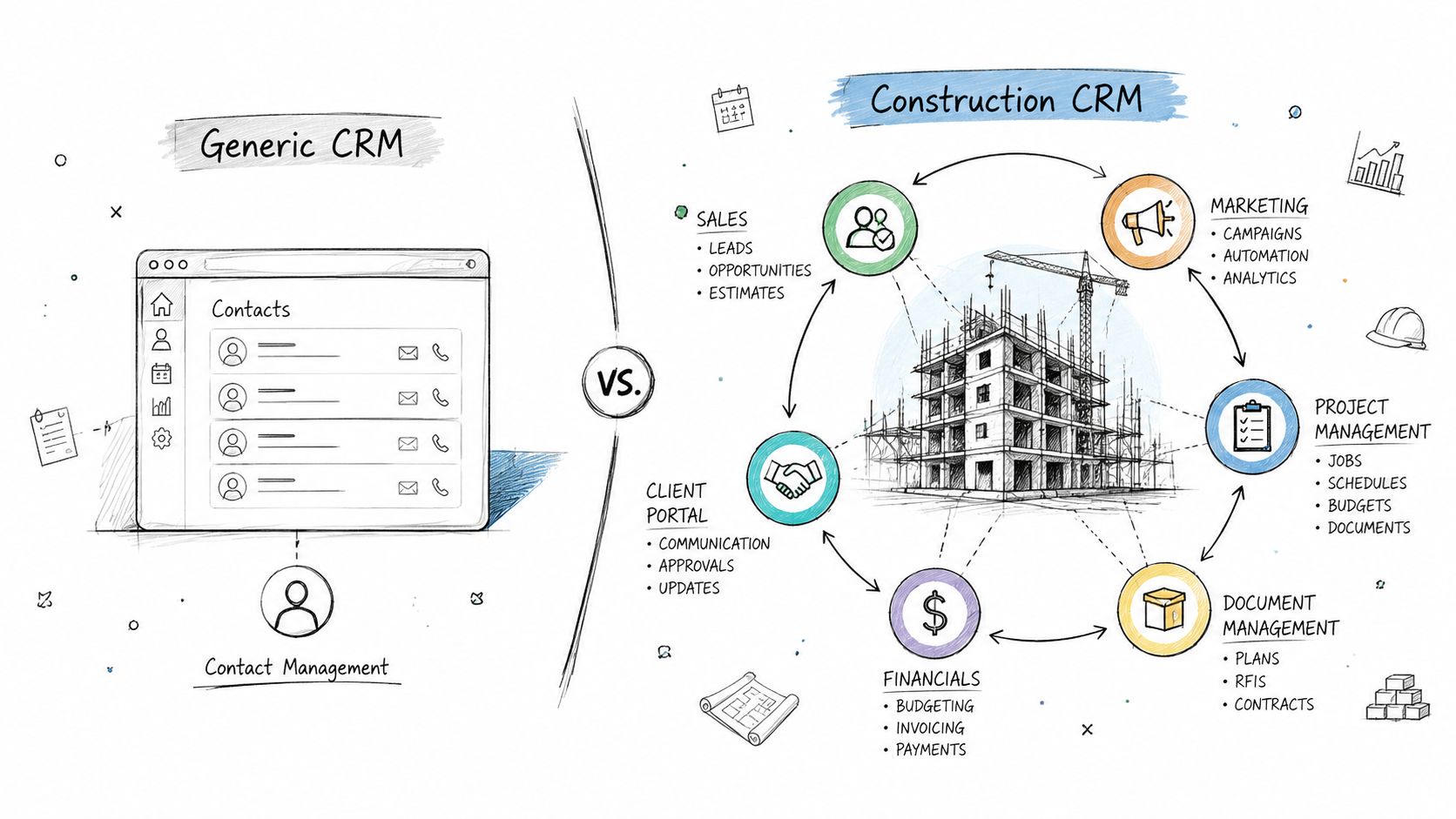
A diagram comparing a generic contact management CRM with a specialized construction CRM featuring integrated project tools.

What makes it different from a generic CRM

A general-purpose CRM usually centers on contacts, deals, and basic follow-up. Construction teams need more.

They need to connect lead management to bid management. They need to connect bid management to project records. They also need to keep documents and assumptions attached all the way through the handoff. That workflow is why many teams end up redesigning generic systems until they're hard to use.

A better way to think about it is this:

System type

Best at

Often misses

Generic CRM

Contact tracking and simple sales stages

Bid details, project context, handoff continuity

Construction CRM

Lead tracking, bids, documents, project-linked workflows

Less, if it's built around construction use cases

If you want a practical view of how those steps connect, this overview of CRM workflow design is useful.

Why more firms are adopting it

The category itself is growing quickly. The global construction CRM software market was valued at approximately USD 1.09 billion in 2024 to USD 2.47 billion in 2025 depending on the forecast, with projections reaching between USD 2.93 billion and USD 15.0 billion by 2032 to 2035, according to construction CRM market projections from Market Research Store. The same research ties that growth to AI-enabled lifecycle management and cloud deployment.

That growth makes sense. Construction firms are moving away from manual tracking because pipeline visibility, client history, and project continuity are becoming standard operating needs rather than nice-to-have features.

Essential Construction CRM Features And Workflows

The best construction CRM software doesn't win by having the most menus. It wins by making the work easier to follow from first inquiry to active job.

At minimum, the system should help your team capture the lead, qualify it, manage the bid, automate follow-up, and pass complete information into execution. If one of those steps breaks, the rest of the workflow gets shaky.
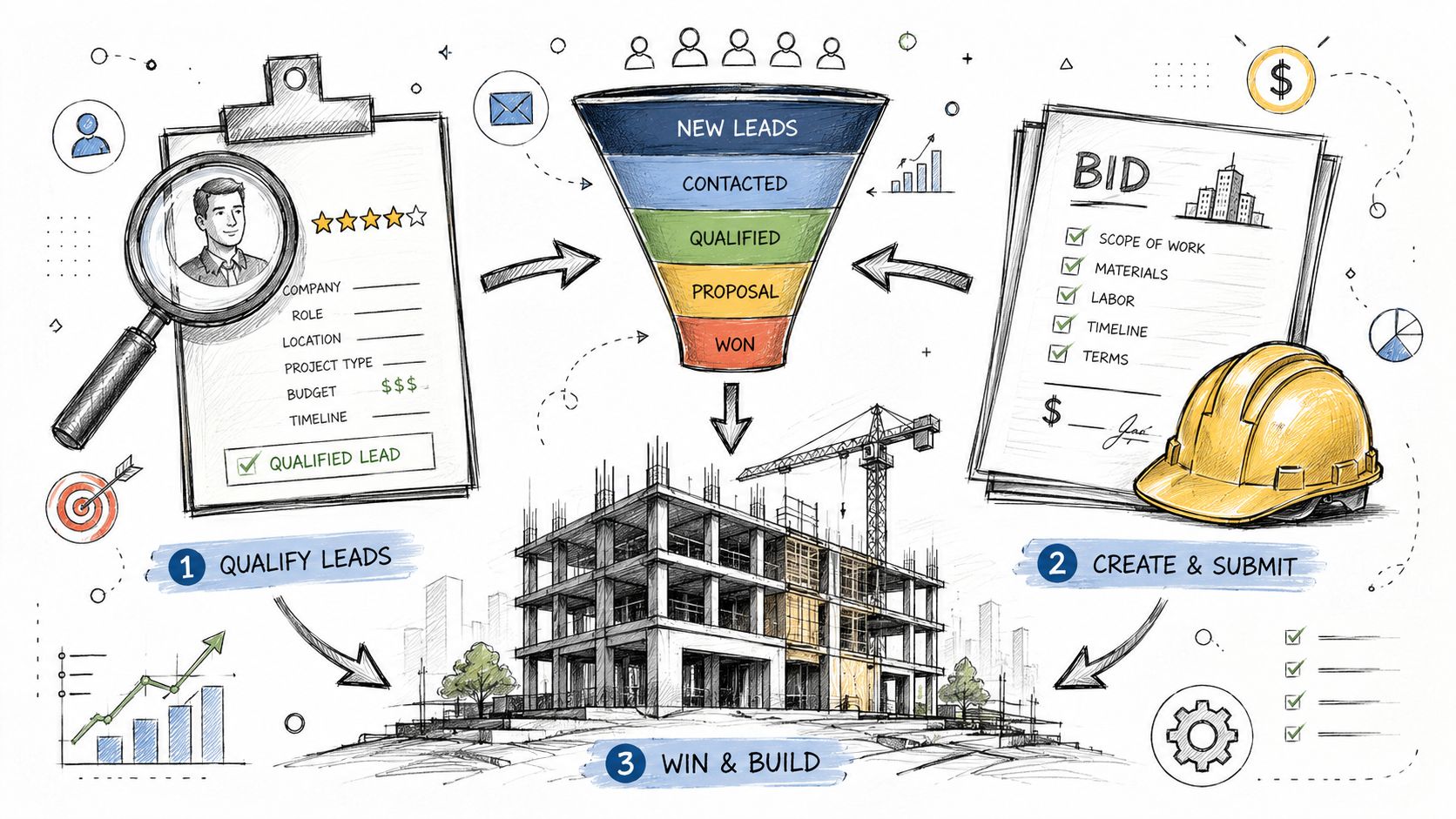
A hand-drawn illustration depicting a construction CRM software workflow from lead qualification to project building.

The core workflow every contractor should map

Here's the simple version of the workflow:

  1. Lead enters the system
    A referral, website inquiry, or outbound conversation becomes a record in the CRM.

  2. Team qualifies the opportunity
    The sales or preconstruction team logs location, project type, budget fit, timeline, and decision-makers.

  3. Bid and estimate activity gets tracked
    Documents, revisions, deadlines, and communication stay tied to the opportunity.

  4. Automated follow-up keeps the deal moving
    Reminders and sequences trigger when the prospect goes quiet or when an estimate sits unaccepted.

  5. Won deal becomes a project-ready record
    Scope details, material preferences, change history, and client expectations stay attached for operations.

That workflow sounds basic. In practice, many firms only complete steps one through four. Then they handle step five with an email, a meeting, and a hope that everyone heard the same thing.

Features that matter most in day-to-day use

Construction teams usually need a CRM with these capabilities:

  • Bid management tied to sales records
    A bid shouldn't live in a separate universe from the contact and account record. Your team needs one connected trail.

  • Pipeline stages that reflect construction reality
    “Qualified,” “estimating,” “proposal sent,” and “awarded” are more useful than generic software stages.

  • Document management with context
    Plans, scope clarifications, spec sheets, and estimate versions should stay attached to the right record.

  • Project-linked handoff fields
    The system should preserve details like finish selections, schedule assumptions, exclusions, and stakeholder preferences.

  • Workflow automation
    Time-based reminders, task creation, and message triggers keep small teams from relying on memory.

Practical rule: If your estimator has to ask sales for the same client detail twice, your CRM workflow isn't finished.

The operational payoff of automation is real. CRM adoption with automated follow-up emails and texts triggered by time-based events can reduce lead response time by 65% and increase conversion rates by 18 to 24%, according to Projul's construction CRM guide.

That matters because lead response isn't only a sales issue in construction. Fast response shapes how owners and buyers judge reliability.

Why automation should feel simple

Many SMB leaders hear “workflow automation” and think they need something technical and expensive. Usually, they need a handful of practical rules.

For example:

  • No response after inquiry
    Send a follow-up, then assign a call task.

  • Estimate sent but not accepted
    Trigger a reminder for the account owner and a check-in message to the prospect.

  • Deal marked won
    Create a handoff task list for operations, attach the key documents, and prompt a scope review.

For teams evaluating tools, workflow automation options for growing businesses can help clarify what these triggers should look like.

A short walkthrough can also make the process easier to picture:

The handoff workflow most guides skip

A lot of CRM content stops at “close won.” Construction firms can't.

A useful handoff workflow should answer questions like these before the project team takes over:

Handoff question

What the CRM should store

What did the client actually expect?

Notes on scope, timing, priorities, and special requests

Which version was approved?

Final estimate, revision history, and accepted options

What was discussed but excluded?

Scope clarifications and exclusions

Who needs updates?

Decision-makers, site contacts, billing contacts

If that information doesn't move cleanly from sales to operations, the CRM is acting like a sales tracker, not a construction system.

Construction CRM Software Benefits And ROI

Construction CRM software pays off in two places. First, it removes manual work. Second, it helps teams focus effort where they're more likely to win.

For SMB leaders, ROI usually becomes visible before they ever build a complex spreadsheet model. You see fewer missed follow-ups, less duplicate data entry, and fewer “where did that note go?” conversations. Then you start seeing stronger bid discipline and cleaner handoffs.

Productivity gains come from routine work leaving people's heads

Many firms still use smart people as process glue. One coordinator remembers to follow up after an estimate goes out. One estimator tracks open bids on a personal spreadsheet. One project manager catches missing scope notes during kickoff.

That's expensive, even when payroll doesn't make it obvious.

Digital CRM adoption in construction has surpassed 60%, and companies report 25 to 35% productivity improvements through workflow automation, according to Global Growth Insights research on construction CRM software. The same source notes Salesforce holds a 26% share of the global CRM market and a 76% adoption rate among enterprise-level construction firms.

Those numbers don't mean every small contractor needs an enterprise platform. They do show that firms are adopting CRM because workflow automation removes friction from everyday work.

Revenue impact often starts with better focus

The sales side of ROI is easy to misunderstand. A CRM doesn't magically create demand. It helps your team stop wasting attention on weak opportunities and stop neglecting stronger ones.

That's where AI-assisted features are getting more relevant. AI-powered bid matching and predictive win-probability scoring in construction CRM systems can increase contractor win rates by 22% to 31% and reduce administrative burdens by up to 40%, according to ProjectMark's construction CRM guide.

Here's why that matters in plain language:

  • Better bid selection means the team spends more time on realistic opportunities.

  • Automated compliance extraction means less time reading and re-reading complex specification packages.

  • Clear probability scoring gives leadership a stronger basis for go or no-go decisions.

A CRM creates value when it changes behavior, not when it simply stores more data.

A simple way to think about ROI

You don't need a perfect finance model to evaluate construction CRM software. Start with three questions:

  1. How much time does your team spend chasing missing information?

  2. How often do bids stall because follow-up is inconsistent?

  3. How often does the operations team re-check scope because the handoff was incomplete?

If those problems show up weekly, the software is solving more than a sales reporting issue.

A practical ROI review often looks like this:

ROI driver

Operational effect

Workflow automation

Less admin work and faster follow-up

Bid scoring

Better pursuit decisions

Document continuity

Fewer gaps during project kickoff

Unified pipeline visibility

Stronger planning across teams

If you're comparing systems, these CRM best practices for adoption and performance can help frame what to measure after rollout.

Choosing And Implementing Construction CRM Software

Buying the right platform is less about feature overload and more about fit. A good choice matches the way your team sells, estimates, and hands off work. A poor choice creates another system people avoid until reporting day.

That's why selection and implementation should be treated as one decision, not two separate projects.

What to evaluate before you shortlist vendors

Some tools look impressive in a demo because they show lots of dashboards. That isn't the same as being useful to a construction team on a busy week.

Look at the product through these lenses:

  • Workflow fit
    Can it handle lead intake, bid tracking, document storage, and handoff without awkward workarounds?

  • Ease of use
    If a project executive or estimator can't update it quickly, adoption will stall.

  • Integration support
    You'll need data to move between CRM, project management, accounting, and file storage systems.

  • Customization without chaos
    You want configurable fields and workflows, not a system that requires heavy rebuilding for every change.

  • Reporting that helps operators
    A report should answer practical questions, not just make leadership feel informed.

For firms that want a broader market view before narrowing the list, it can help to compare CRM solutions for trades and note which products are oriented toward field service versus project-based construction work.

What adoption trends tell you

The market is already shifting. Digital CRM adoption in construction has surpassed 60%, and firms report 25 to 35% productivity improvements through workflow automation, based on construction CRM adoption data from Global Growth Insights.

That doesn't mean every implementation succeeds. It means more firms have decided that manual systems can't support the level of coordination modern projects require.

A practical implementation path for SMB teams

Most small and mid-sized firms don't need a giant transformation program. They need a steady rollout with clear ownership.

Step 1 gets leadership aligned

The owner, sales lead, estimating lead, and operations lead should agree on one thing first: what problem the CRM is solving.

For some firms, it's missed follow-up. For others, it's weak visibility into active bids. For many, it's the handoff gap.

If the leadership team can't name the core problem in one sentence, the rollout will drift.

Step 2 audits the data you already have

Before migration, gather what exists now:

  • Lead lists and customer files

  • Bid logs

  • Estimate templates

  • Client communication records

  • Project kickoff notes

  • Shared folders with specs and revisions

This step usually reveals duplicate records, old contacts, and naming problems. That's useful. It's easier to clean before the new system goes live.

Step 3 defines the fields that matter

Don't just import everything because it exists.

Create the fields your team will use, such as:

CRM area

Useful field examples

Lead record

Project type, location, referral source

Bid record

Due date, revision status, assigned estimator

Handoff record

Approved scope, exclusions, client preferences

Account record

Key stakeholders, billing details, communication history

Step 4 starts with one team or one workflow

A pilot works better than a company-wide mandate. Some firms start with inbound leads. Others start with active bids. The best starting point is the workflow causing the most operational pain.

Start where dropped details cost the most money or trust.

Step 5 trains people by role

Training should look different for sales, estimating, leadership, and operations. A salesperson needs fast update habits. An estimator needs bid context. Operations needs handoff completeness.

Role-based training usually works better than one general session where everyone hears a little of everything and remembers very little.

Step 6 measures early success simply

In the first phase, watch for signs like these:

  • Fewer leads sitting without next steps

  • More complete bid records

  • Less back-and-forth at project kickoff

  • Better visibility into who owns what

Those are strong indicators that the system is becoming part of daily work instead of staying an administrative burden.

Integration And Data Migration Strategies

Once a platform is selected, the technical work begins. During this work, many firms either preserve continuity or accidentally break it.

The challenge isn't only moving records from one system to another. It's deciding which data should connect, which data should be cleaned, and how to keep project context intact during the move.
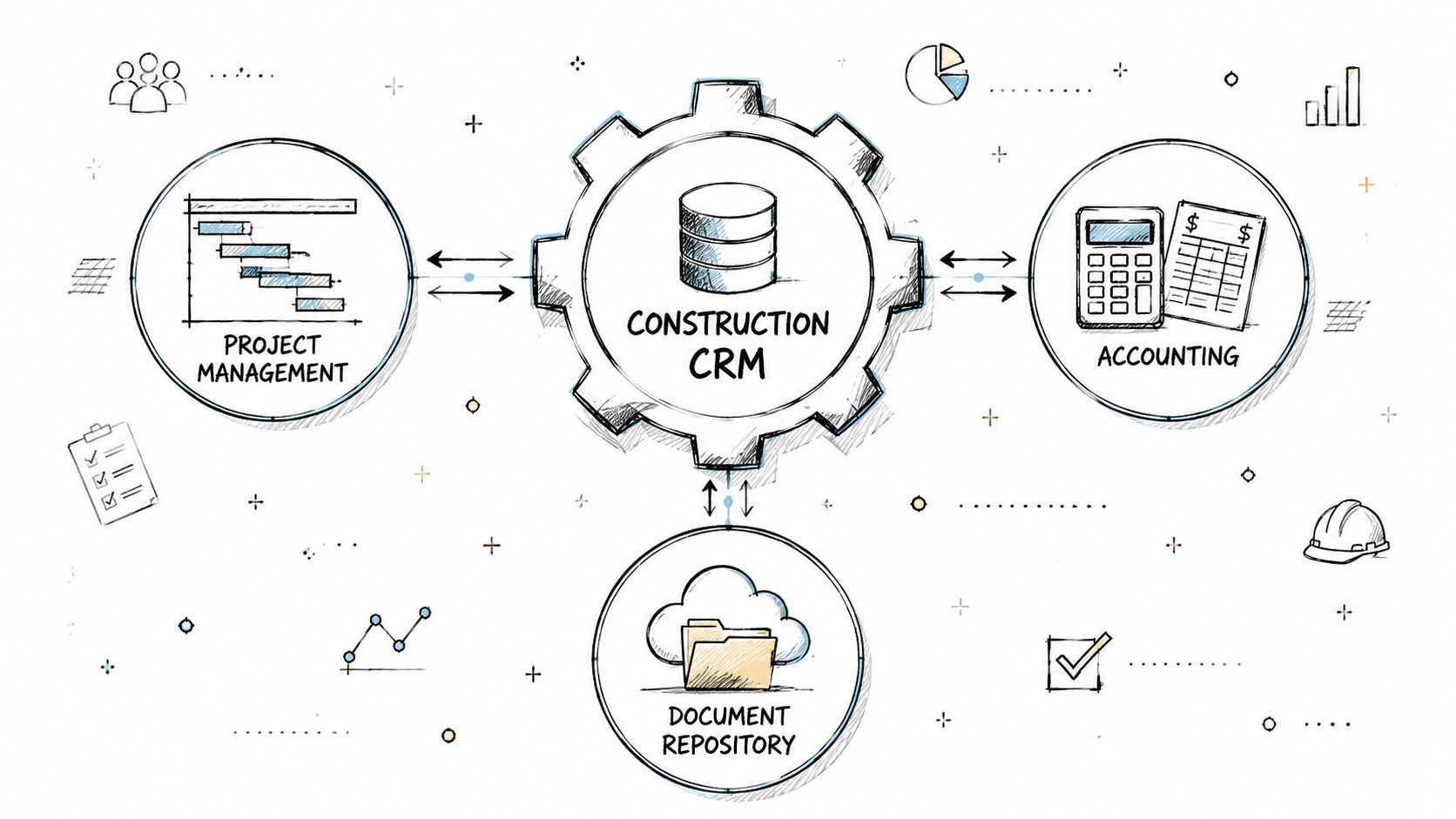
A diagram illustrating how Construction CRM software integrates with project management, accounting, and document repository systems.

What should integrate with the CRM

For most construction firms, the CRM should connect to three main system groups:

System group

Why the integration matters

Project management tools

Keeps won work moving into execution with the right context

Accounting systems

Supports clean customer records, billing contacts, and financial coordination

Document repositories

Preserves estimates, specifications, scope documents, and revisions

If those systems stay disconnected, your team ends up retyping the same information and manually checking which version is current.

How to migrate data without carrying over a mess

Migration should be deliberate. A rushed import often turns old clutter into new clutter.

A practical sequence looks like this:

  1. Export and review the legacy data
    Pull records from spreadsheets, email exports, old CRM tools, and shared folders.

  2. Map old fields to new fields
    Decide what “client,” “project,” “opportunity,” and “bid” mean in the new system.

  3. Clean duplicates and outdated entries
    Remove dead contacts, merge repeated accounts, and standardize naming.

  4. Test with a small sample first
    Move a subset of accounts and bids, then verify whether the records make sense to users.

  5. Validate document links and handoff data Make sure the files and notes people need appear where they expect them.

Protecting the deal-to-project handoff during migration

This is the part many teams underrate.

The most important information often isn't a phone number or company name. It's the detail hidden in notes, estimate versions, exclusions, and side conversations. If that context doesn't survive migration, the CRM may look complete while still failing the business.

A useful migration checklist includes questions like:

  • Did approved alternates come over with the bid record?

  • Can operations see exclusions without opening three separate files?

  • Are change discussions tied to the right opportunity or project?

  • Did stakeholder roles carry over clearly?

Migration success isn't “all rows imported.” It's “the next team can use the record without asking for a recap.”

Why phased migration usually works better

For SMB teams, phased migration often reduces disruption. Move active opportunities first. Then recent customers. Then historical records worth keeping.

That approach gives users time to test the system in real work. It also makes it easier to catch field mapping issues before they affect the full dataset.

The firms that handle migration well usually focus less on volume and more on usability. They ask a simple question: when a deal becomes a project, will the next person have what they need?

Real World Construction CRM Use Cases And Stamina Fit

The most useful way to judge construction CRM software is to look at the failure points it should prevent.

A residential remodeler, a specialty trade contractor, and a commercial builder may all use different workflows. But they often share one weak point. Sales learns what the client wants, operations gets a thinner version of that story, and the field team spends time filling in the gaps.

That gap isn't minor. Forty percent of construction projects suffer from initial scope miscommunications due to poor data transfer between sales and operations, and generic CRMs often fail to preserve specification details during handoffs, according to Pipeline CRM's analysis of CRM gaps in construction.
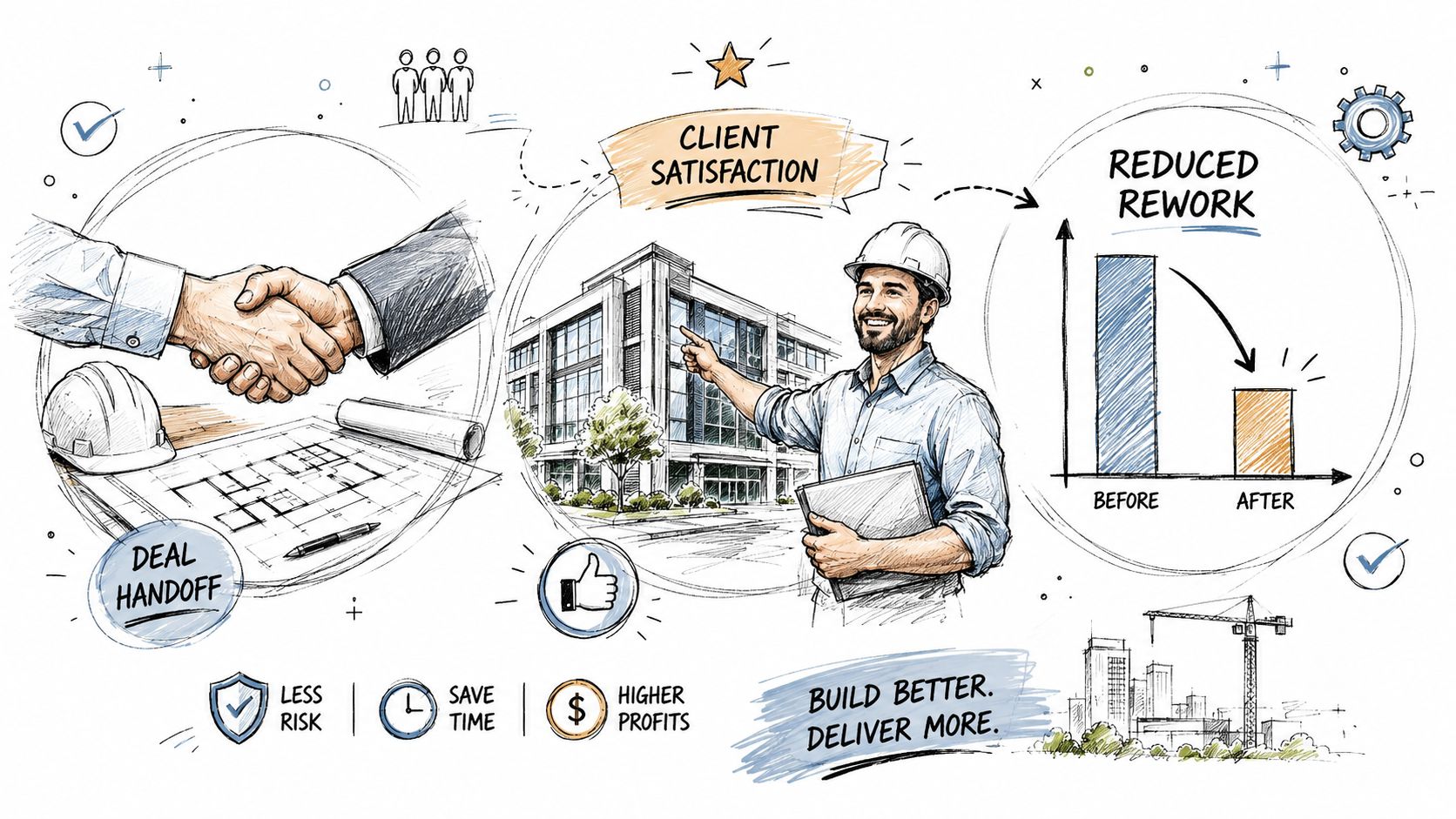
A hand-drawn illustration depicting a construction deal handoff, client satisfaction, and reduced rework for building projects.

Use case one with a growing design-build firm

A design-build firm often starts with a simple sales process. The owner takes calls, gives rough guidance, and loops in estimating when the lead looks serious. That works until the firm adds sales support and a project coordinator.

Then the problems show up:

  • The client's real priorities are trapped in email.

  • Estimate revisions aren't easy to compare.

  • The project team doesn't know which requests were priced and which were only discussed.

A construction CRM helps by centralizing those records and structuring the handoff. The operational value isn't abstract. It shows up when kickoff meetings stop turning into rediscovery sessions.

Use case two with a specialty contractor

A roofing, electrical, or concrete contractor may care less about long relationship notes and more about speed, scheduling, and estimate follow-up.

For that team, the best CRM setup often includes:

Need

CRM response

Fast estimate follow-up

Automated reminders and message triggers

Clear ownership

Assigned account and bid owners

Fewer missed details

Attached plans, notes, and approvals

Job readiness

Handoff fields visible to operations

This kind of setup is especially helpful when one person sells and another person schedules or executes.

Why a unified platform matters

Most firms don't need more tools. They need fewer disconnected ones.

A platform like Stamina fits this need when a business wants marketing, sales activity, CRM records, and automation in one place. That matters for construction-adjacent SMB teams and growth-minded contractors because fragmented systems tend to create fragmented handoffs.

The fit is strongest when teams want to:

  • keep one source of truth for pipeline and customer context

  • automate outreach and nurturing without exporting lists between platforms

  • trigger workflows across marketing, sales, and CRM actions

  • preserve details that shouldn't disappear once a deal is won

Stamina's built-in AI SDR, unified data model, and workflow automation are especially relevant for businesses trying to reduce manual follow-up and maintain context from first touch through later stages of the customer lifecycle.

The handoff gap usually isn't caused by a lack of effort. It's caused by data living in too many places.

Conclusion And Next Steps

Construction CRM software works best when you judge it by a practical standard. Can it help your team capture demand, manage bids, automate follow-up, and carry accurate project context into operations?

That last question matters most. Plenty of systems can track a deal. Fewer can protect the details that keep a project aligned after the sale.

If you're evaluating options, start with your handoff process. Review how leads become bids, how bids become jobs, and where information gets lost. Then choose a system that supports those workflows without forcing your team into awkward workarounds.

The strongest early wins usually come from cleaner follow-up, clearer ownership, and fewer kickoff surprises. Once those improve, the value of the CRM becomes obvious across sales and operations.

If you want a connected platform that combines CRM, sales engagement, marketing automation, and AI-powered outreach in one place, take a look at Stamina. It's built to give growing teams a single source of truth, automate repetitive work, and keep customer context intact as opportunities move forward.

A lot of construction firms hit the same wall at the same time. Leads live in one spreadsheet. Bid notes sit in email threads. Estimators keep scope details in folders named by job number. Then a client says yes, operations takes over, and half the context disappears.

That's usually when leadership realizes the underlying problem isn't just lead tracking. It's continuity.

A small team can survive on memory for a while. One project manager remembers the architect's preferences. One owner knows which prospect asked for alternates. One estimator recalls that the client wanted a phased schedule, not a single mobilization plan. But once the pipeline grows, that memory system breaks. The handoff from deal to project becomes risky, and rework starts before the job even settles.

That's where construction CRM software comes in. It gives your team one place to track relationships, bids, documents, follow-ups, and the details operations needs after the sale. If you need a plain-language refresher on CRM basics first, this guide to understanding customer relationship management is a useful starting point.

Introduction To Construction CRM Software

A construction manager at a growing firm often starts the day with three tabs open. One for incoming leads, one for active bids, and one for jobs that just sold. By lunch, someone asks whether a prospect ever responded to last week's estimate. Later, the field team wants to know if the signed client approved the premium finish package or the standard one. Nobody is fully sure.

That's a normal operating picture in firms still relying on inboxes, spreadsheets, and disconnected apps.

Construction CRM software is the system built to stop that confusion. It helps teams capture inquiries, track bid status, log client conversations, store critical documents, and preserve context when a signed deal turns into a live project. For construction businesses, that last part matters more than many buying guides admit.

Most firms don't lose information at first contact. They lose it between “won” and “ready to build.”

A generic CRM might tell you who the customer is and whether the estimate was accepted. A construction CRM should also help your team keep the spec notes, change discussions, schedules, and scope assumptions attached to the record people will use later.

Understanding Construction CRM Software

Construction CRM software is a customer relationship management system designed around the way construction firms sell and deliver work. It doesn't just track names, phone numbers, and deal stages. It connects preconstruction activity to what happens after the contract is signed.

Think of a generic CRM as a digital address book with a sales pipeline. That can help a contractor organize prospects. But construction work is more complicated than that. A real opportunity often includes bid deadlines, takeoff notes, specification documents, subcontractor coordination, estimate revisions, and project-specific communication that operations will need later.

A construction CRM works more like a job-site command center for commercial relationships. Sales, estimating, and operations can all look at the same record and understand what was promised, what was priced, and what still needs clarification.

A diagram comparing a generic contact management CRM with a specialized construction CRM featuring integrated project tools.

What makes it different from a generic CRM

A general-purpose CRM usually centers on contacts, deals, and basic follow-up. Construction teams need more.

They need to connect lead management to bid management. They need to connect bid management to project records. They also need to keep documents and assumptions attached all the way through the handoff. That workflow is why many teams end up redesigning generic systems until they're hard to use.

A better way to think about it is this:

System type

Best at

Often misses

Generic CRM

Contact tracking and simple sales stages

Bid details, project context, handoff continuity

Construction CRM

Lead tracking, bids, documents, project-linked workflows

Less, if it's built around construction use cases

If you want a practical view of how those steps connect, this overview of CRM workflow design is useful.

Why more firms are adopting it

The category itself is growing quickly. The global construction CRM software market was valued at approximately USD 1.09 billion in 2024 to USD 2.47 billion in 2025 depending on the forecast, with projections reaching between USD 2.93 billion and USD 15.0 billion by 2032 to 2035, according to construction CRM market projections from Market Research Store. The same research ties that growth to AI-enabled lifecycle management and cloud deployment.

That growth makes sense. Construction firms are moving away from manual tracking because pipeline visibility, client history, and project continuity are becoming standard operating needs rather than nice-to-have features.

Essential Construction CRM Features And Workflows

The best construction CRM software doesn't win by having the most menus. It wins by making the work easier to follow from first inquiry to active job.

At minimum, the system should help your team capture the lead, qualify it, manage the bid, automate follow-up, and pass complete information into execution. If one of those steps breaks, the rest of the workflow gets shaky.

A hand-drawn illustration depicting a construction CRM software workflow from lead qualification to project building.

The core workflow every contractor should map

Here's the simple version of the workflow:

  1. Lead enters the system
    A referral, website inquiry, or outbound conversation becomes a record in the CRM.

  2. Team qualifies the opportunity
    The sales or preconstruction team logs location, project type, budget fit, timeline, and decision-makers.

  3. Bid and estimate activity gets tracked
    Documents, revisions, deadlines, and communication stay tied to the opportunity.

  4. Automated follow-up keeps the deal moving
    Reminders and sequences trigger when the prospect goes quiet or when an estimate sits unaccepted.

  5. Won deal becomes a project-ready record
    Scope details, material preferences, change history, and client expectations stay attached for operations.

That workflow sounds basic. In practice, many firms only complete steps one through four. Then they handle step five with an email, a meeting, and a hope that everyone heard the same thing.

Features that matter most in day-to-day use

Construction teams usually need a CRM with these capabilities:

  • Bid management tied to sales records
    A bid shouldn't live in a separate universe from the contact and account record. Your team needs one connected trail.

  • Pipeline stages that reflect construction reality
    “Qualified,” “estimating,” “proposal sent,” and “awarded” are more useful than generic software stages.

  • Document management with context
    Plans, scope clarifications, spec sheets, and estimate versions should stay attached to the right record.

  • Project-linked handoff fields
    The system should preserve details like finish selections, schedule assumptions, exclusions, and stakeholder preferences.

  • Workflow automation
    Time-based reminders, task creation, and message triggers keep small teams from relying on memory.

Practical rule: If your estimator has to ask sales for the same client detail twice, your CRM workflow isn't finished.

The operational payoff of automation is real. CRM adoption with automated follow-up emails and texts triggered by time-based events can reduce lead response time by 65% and increase conversion rates by 18 to 24%, according to Projul's construction CRM guide.

That matters because lead response isn't only a sales issue in construction. Fast response shapes how owners and buyers judge reliability.

Why automation should feel simple

Many SMB leaders hear “workflow automation” and think they need something technical and expensive. Usually, they need a handful of practical rules.

For example:

  • No response after inquiry
    Send a follow-up, then assign a call task.

  • Estimate sent but not accepted
    Trigger a reminder for the account owner and a check-in message to the prospect.

  • Deal marked won
    Create a handoff task list for operations, attach the key documents, and prompt a scope review.

For teams evaluating tools, workflow automation options for growing businesses can help clarify what these triggers should look like.

A short walkthrough can also make the process easier to picture:

The handoff workflow most guides skip

A lot of CRM content stops at “close won.” Construction firms can't.

A useful handoff workflow should answer questions like these before the project team takes over:

Handoff question

What the CRM should store

What did the client actually expect?

Notes on scope, timing, priorities, and special requests

Which version was approved?

Final estimate, revision history, and accepted options

What was discussed but excluded?

Scope clarifications and exclusions

Who needs updates?

Decision-makers, site contacts, billing contacts

If that information doesn't move cleanly from sales to operations, the CRM is acting like a sales tracker, not a construction system.

Construction CRM Software Benefits And ROI

Construction CRM software pays off in two places. First, it removes manual work. Second, it helps teams focus effort where they're more likely to win.

For SMB leaders, ROI usually becomes visible before they ever build a complex spreadsheet model. You see fewer missed follow-ups, less duplicate data entry, and fewer “where did that note go?” conversations. Then you start seeing stronger bid discipline and cleaner handoffs.

Productivity gains come from routine work leaving people's heads

Many firms still use smart people as process glue. One coordinator remembers to follow up after an estimate goes out. One estimator tracks open bids on a personal spreadsheet. One project manager catches missing scope notes during kickoff.

That's expensive, even when payroll doesn't make it obvious.

Digital CRM adoption in construction has surpassed 60%, and companies report 25 to 35% productivity improvements through workflow automation, according to Global Growth Insights research on construction CRM software. The same source notes Salesforce holds a 26% share of the global CRM market and a 76% adoption rate among enterprise-level construction firms.

Those numbers don't mean every small contractor needs an enterprise platform. They do show that firms are adopting CRM because workflow automation removes friction from everyday work.

Revenue impact often starts with better focus

The sales side of ROI is easy to misunderstand. A CRM doesn't magically create demand. It helps your team stop wasting attention on weak opportunities and stop neglecting stronger ones.

That's where AI-assisted features are getting more relevant. AI-powered bid matching and predictive win-probability scoring in construction CRM systems can increase contractor win rates by 22% to 31% and reduce administrative burdens by up to 40%, according to ProjectMark's construction CRM guide.

Here's why that matters in plain language:

  • Better bid selection means the team spends more time on realistic opportunities.

  • Automated compliance extraction means less time reading and re-reading complex specification packages.

  • Clear probability scoring gives leadership a stronger basis for go or no-go decisions.

A CRM creates value when it changes behavior, not when it simply stores more data.

A simple way to think about ROI

You don't need a perfect finance model to evaluate construction CRM software. Start with three questions:

  1. How much time does your team spend chasing missing information?

  2. How often do bids stall because follow-up is inconsistent?

  3. How often does the operations team re-check scope because the handoff was incomplete?

If those problems show up weekly, the software is solving more than a sales reporting issue.

A practical ROI review often looks like this:

ROI driver

Operational effect

Workflow automation

Less admin work and faster follow-up

Bid scoring

Better pursuit decisions

Document continuity

Fewer gaps during project kickoff

Unified pipeline visibility

Stronger planning across teams

If you're comparing systems, these CRM best practices for adoption and performance can help frame what to measure after rollout.

Choosing And Implementing Construction CRM Software

Buying the right platform is less about feature overload and more about fit. A good choice matches the way your team sells, estimates, and hands off work. A poor choice creates another system people avoid until reporting day.

That's why selection and implementation should be treated as one decision, not two separate projects.

What to evaluate before you shortlist vendors

Some tools look impressive in a demo because they show lots of dashboards. That isn't the same as being useful to a construction team on a busy week.

Look at the product through these lenses:

  • Workflow fit
    Can it handle lead intake, bid tracking, document storage, and handoff without awkward workarounds?

  • Ease of use
    If a project executive or estimator can't update it quickly, adoption will stall.

  • Integration support
    You'll need data to move between CRM, project management, accounting, and file storage systems.

  • Customization without chaos
    You want configurable fields and workflows, not a system that requires heavy rebuilding for every change.

  • Reporting that helps operators
    A report should answer practical questions, not just make leadership feel informed.

For firms that want a broader market view before narrowing the list, it can help to compare CRM solutions for trades and note which products are oriented toward field service versus project-based construction work.

What adoption trends tell you

The market is already shifting. Digital CRM adoption in construction has surpassed 60%, and firms report 25 to 35% productivity improvements through workflow automation, based on construction CRM adoption data from Global Growth Insights.

That doesn't mean every implementation succeeds. It means more firms have decided that manual systems can't support the level of coordination modern projects require.

A practical implementation path for SMB teams

Most small and mid-sized firms don't need a giant transformation program. They need a steady rollout with clear ownership.

Step 1 gets leadership aligned

The owner, sales lead, estimating lead, and operations lead should agree on one thing first: what problem the CRM is solving.

For some firms, it's missed follow-up. For others, it's weak visibility into active bids. For many, it's the handoff gap.

If the leadership team can't name the core problem in one sentence, the rollout will drift.

Step 2 audits the data you already have

Before migration, gather what exists now:

  • Lead lists and customer files

  • Bid logs

  • Estimate templates

  • Client communication records

  • Project kickoff notes

  • Shared folders with specs and revisions

This step usually reveals duplicate records, old contacts, and naming problems. That's useful. It's easier to clean before the new system goes live.

Step 3 defines the fields that matter

Don't just import everything because it exists.

Create the fields your team will use, such as:

CRM area

Useful field examples

Lead record

Project type, location, referral source

Bid record

Due date, revision status, assigned estimator

Handoff record

Approved scope, exclusions, client preferences

Account record

Key stakeholders, billing details, communication history

Step 4 starts with one team or one workflow

A pilot works better than a company-wide mandate. Some firms start with inbound leads. Others start with active bids. The best starting point is the workflow causing the most operational pain.

Start where dropped details cost the most money or trust.

Step 5 trains people by role

Training should look different for sales, estimating, leadership, and operations. A salesperson needs fast update habits. An estimator needs bid context. Operations needs handoff completeness.

Role-based training usually works better than one general session where everyone hears a little of everything and remembers very little.

Step 6 measures early success simply

In the first phase, watch for signs like these:

  • Fewer leads sitting without next steps

  • More complete bid records

  • Less back-and-forth at project kickoff

  • Better visibility into who owns what

Those are strong indicators that the system is becoming part of daily work instead of staying an administrative burden.

Integration And Data Migration Strategies

Once a platform is selected, the technical work begins. During this work, many firms either preserve continuity or accidentally break it.

The challenge isn't only moving records from one system to another. It's deciding which data should connect, which data should be cleaned, and how to keep project context intact during the move.

A diagram illustrating how Construction CRM software integrates with project management, accounting, and document repository systems.

What should integrate with the CRM

For most construction firms, the CRM should connect to three main system groups:

System group

Why the integration matters

Project management tools

Keeps won work moving into execution with the right context

Accounting systems

Supports clean customer records, billing contacts, and financial coordination

Document repositories

Preserves estimates, specifications, scope documents, and revisions

If those systems stay disconnected, your team ends up retyping the same information and manually checking which version is current.

How to migrate data without carrying over a mess

Migration should be deliberate. A rushed import often turns old clutter into new clutter.

A practical sequence looks like this:

  1. Export and review the legacy data
    Pull records from spreadsheets, email exports, old CRM tools, and shared folders.

  2. Map old fields to new fields
    Decide what “client,” “project,” “opportunity,” and “bid” mean in the new system.

  3. Clean duplicates and outdated entries
    Remove dead contacts, merge repeated accounts, and standardize naming.

  4. Test with a small sample first
    Move a subset of accounts and bids, then verify whether the records make sense to users.

  5. Validate document links and handoff data Make sure the files and notes people need appear where they expect them.

Protecting the deal-to-project handoff during migration

This is the part many teams underrate.

The most important information often isn't a phone number or company name. It's the detail hidden in notes, estimate versions, exclusions, and side conversations. If that context doesn't survive migration, the CRM may look complete while still failing the business.

A useful migration checklist includes questions like:

  • Did approved alternates come over with the bid record?

  • Can operations see exclusions without opening three separate files?

  • Are change discussions tied to the right opportunity or project?

  • Did stakeholder roles carry over clearly?

Migration success isn't “all rows imported.” It's “the next team can use the record without asking for a recap.”

Why phased migration usually works better

For SMB teams, phased migration often reduces disruption. Move active opportunities first. Then recent customers. Then historical records worth keeping.

That approach gives users time to test the system in real work. It also makes it easier to catch field mapping issues before they affect the full dataset.

The firms that handle migration well usually focus less on volume and more on usability. They ask a simple question: when a deal becomes a project, will the next person have what they need?

Real World Construction CRM Use Cases And Stamina Fit

The most useful way to judge construction CRM software is to look at the failure points it should prevent.

A residential remodeler, a specialty trade contractor, and a commercial builder may all use different workflows. But they often share one weak point. Sales learns what the client wants, operations gets a thinner version of that story, and the field team spends time filling in the gaps.

That gap isn't minor. Forty percent of construction projects suffer from initial scope miscommunications due to poor data transfer between sales and operations, and generic CRMs often fail to preserve specification details during handoffs, according to Pipeline CRM's analysis of CRM gaps in construction.

A hand-drawn illustration depicting a construction deal handoff, client satisfaction, and reduced rework for building projects.

Use case one with a growing design-build firm

A design-build firm often starts with a simple sales process. The owner takes calls, gives rough guidance, and loops in estimating when the lead looks serious. That works until the firm adds sales support and a project coordinator.

Then the problems show up:

  • The client's real priorities are trapped in email.

  • Estimate revisions aren't easy to compare.

  • The project team doesn't know which requests were priced and which were only discussed.

A construction CRM helps by centralizing those records and structuring the handoff. The operational value isn't abstract. It shows up when kickoff meetings stop turning into rediscovery sessions.

Use case two with a specialty contractor

A roofing, electrical, or concrete contractor may care less about long relationship notes and more about speed, scheduling, and estimate follow-up.

For that team, the best CRM setup often includes:

Need

CRM response

Fast estimate follow-up

Automated reminders and message triggers

Clear ownership

Assigned account and bid owners

Fewer missed details

Attached plans, notes, and approvals

Job readiness

Handoff fields visible to operations

This kind of setup is especially helpful when one person sells and another person schedules or executes.

Why a unified platform matters

Most firms don't need more tools. They need fewer disconnected ones.

A platform like Stamina fits this need when a business wants marketing, sales activity, CRM records, and automation in one place. That matters for construction-adjacent SMB teams and growth-minded contractors because fragmented systems tend to create fragmented handoffs.

The fit is strongest when teams want to:

  • keep one source of truth for pipeline and customer context

  • automate outreach and nurturing without exporting lists between platforms

  • trigger workflows across marketing, sales, and CRM actions

  • preserve details that shouldn't disappear once a deal is won

Stamina's built-in AI SDR, unified data model, and workflow automation are especially relevant for businesses trying to reduce manual follow-up and maintain context from first touch through later stages of the customer lifecycle.

The handoff gap usually isn't caused by a lack of effort. It's caused by data living in too many places.

Conclusion And Next Steps

Construction CRM software works best when you judge it by a practical standard. Can it help your team capture demand, manage bids, automate follow-up, and carry accurate project context into operations?

That last question matters most. Plenty of systems can track a deal. Fewer can protect the details that keep a project aligned after the sale.

If you're evaluating options, start with your handoff process. Review how leads become bids, how bids become jobs, and where information gets lost. Then choose a system that supports those workflows without forcing your team into awkward workarounds.

The strongest early wins usually come from cleaner follow-up, clearer ownership, and fewer kickoff surprises. Once those improve, the value of the CRM becomes obvious across sales and operations.

If you want a connected platform that combines CRM, sales engagement, marketing automation, and AI-powered outreach in one place, take a look at Stamina. It's built to give growing teams a single source of truth, automate repetitive work, and keep customer context intact as opportunities move forward.

Share this article

Share this article

Send a shareable link to your team or anyone who might find it useful.

Send a shareable link to your team or anyone who might find it useful.

Copy link

Copied

Share directly to

Table of contents

Give Your Business the Stamina it needs to Thrive

PRODUCT

COMPANY

RESOURCES

© 2026 Stamina Software Technologies Inc. All rights reserved.

PRODUCT

COMPANY

RESOURCES

© 2026 Stamina Software Technologies Inc. All rights reserved.

PRODUCT

COMPANY

RESOURCES

© 2026 Stamina Software Technologies Inc. All rights reserved.