CRM: Understanding Customer Relationship Management for SMBs

Explore understanding customer relationship management (CRM) for SMBs. Learn key components, benefits, metrics, and how AI platforms drive growth in 2026.

0 - Minute Read

Your business probably already has a CRM problem, even if you haven't bought CRM software.

A lead fills out your form. Someone on your team replies from Gmail. A salesperson keeps notes in a spreadsheet. Support answers a question in a shared inbox. A week later, nobody remembers the full conversation, and the customer has to repeat themselves. Nothing is broken enough to trigger a crisis, but deals slow down, follow-ups slip, and the team spends too much time asking, “Who owns this account?”

That's usually where understanding customer relationship management starts for an SMB owner. Not with software demos. With operational friction.

Customer relationship management works best when you treat it as a business strategy first. The software matters, but only as the system that supports the strategy. If your process is unclear, your data is scattered, and your teams work from different assumptions, a new tool won't fix the underlying issue. It will just give the confusion a nicer interface.

What Is Customer Relationship Management Really

Customer relationship management, or CRM, is the discipline of managing every interaction your company has with prospects and customers in a consistent, organized way.

That sounds simple, but many SMBs misunderstand it. They think CRM means “a database for sales reps” or “a place to store contacts.” Those are pieces of it. They're not the whole thing.

A better definition is this: CRM is the operating system your business uses to attract, track, serve, and grow customer relationships over time. It gives your team one shared record of what happened, what matters, and what should happen next.

CRM is a strategy before it is software

If you strip away the tools, CRM still exists as a business choice. You decide whether your company will:

  • Keep one customer record: instead of separate notes in separate tools

  • Use shared process rules: instead of every rep working differently

  • Track follow-up consistently: instead of relying on memory

  • Coordinate across teams: instead of letting sales, marketing, and support operate in silos

That's why understanding customer relationship management matters more now than it did when many SMBs could get by with ad hoc processes. The category itself has become mainstream infrastructure. The CRM market was valued at USD 101.41 billion in 2024 and is projected to reach USD 262.74 billion by 2032, with an implied 12.6% CAGR, and 91% of companies with 10 or more employees use CRM software according to CRM market and adoption data from Cyntexa.

Those numbers don't just show software demand. They show a broader shift in how businesses run. CRM is no longer a niche system for larger companies. It's a standard way to organize revenue operations.

Practical rule: If customer information lives in more than one place and nobody trusts the full picture, you don't have a software problem first. You have a CRM strategy problem.

For a growing SMB, that's the actual starting point. You're not shopping for a tool. You're deciding how your company will manage relationships at scale.

The Core Components of a Modern CRM

Think of a modern CRM as your company's shared digital brain for customer relationships.

It remembers who the customer is, what they've done, what your team has said, what stage the opportunity is in, and what should happen next. Without that shared brain, each department builds its own partial memory. Sales remembers deal notes. Marketing remembers campaign clicks. Support remembers complaints. Nobody sees the whole person.
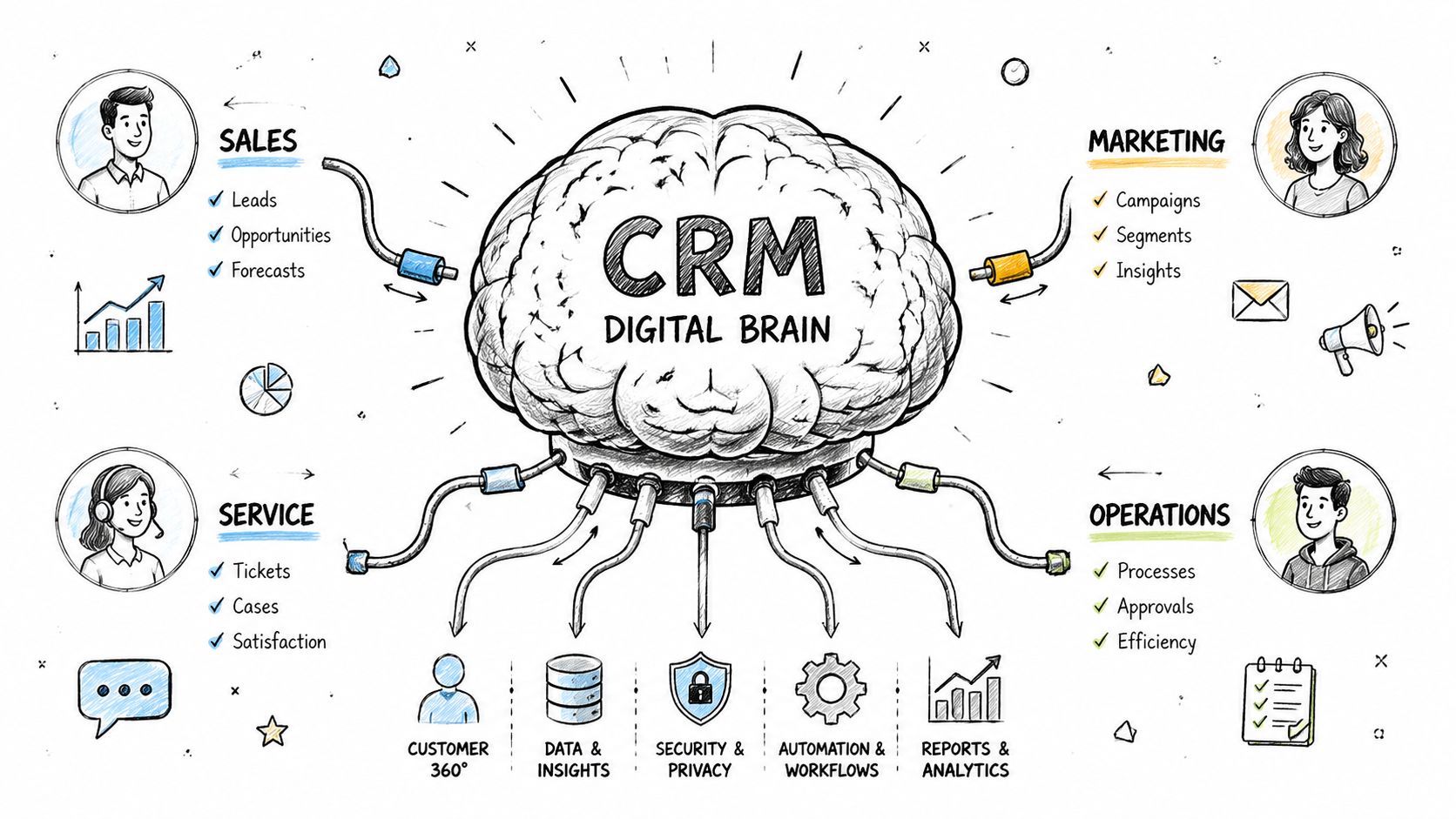
A conceptual hand-drawn illustration showing a digital brain representing CRM connected to sales, marketing, service, and operations departments.

A CRM solves that by consolidating contact data, sales history, service records, and campaign activity into a single customer view. That shared view then supports automation such as follow-ups, lead scoring, and pipeline tracking, which reduces manual handoffs and speeds up response times, as explained in DataGuard's overview of CRM centralization and automation.

Contacts are the who

Every CRM starts with records. Usually that means people and companies.

A good contact record does more than store a name, phone number, and email address. It becomes a living history of the relationship. You can see conversations, notes, purchases, open deals, support issues, and marketing engagement in one place.

That changes daily work in a practical way. If a salesperson calls a prospect, they don't need to ask basic questions the customer already answered in a form or support email. They can walk in with context.

Pipelines are the where

A pipeline shows where a relationship sits in a business process.

For sales, that might be inquiry, qualified, proposal, negotiation, and closed. For onboarding, it could be signed, kickoff scheduled, implementation in progress, training complete. For customer success, it might track renewals or expansion opportunities.

The point isn't the labels. The point is shared visibility.

CRM component

Simple question it answers

Why it matters

Contacts

Who is this?

Gives the team a shared customer record

Pipelines

Where are they in the journey?

Helps forecast work and next steps

Activities

What happened and what's next?

Prevents dropped follow-up

Activities are the what and when

Activities are the heartbeat of CRM. Calls, emails, meetings, tasks, notes, reminders, and follow-ups all live here.

Many SMB owners interpret CRM adoption as requiring staff to enter extensive administrative data. In reality, the value comes from capturing the minimum useful activity so the next person has context and the system can trigger the right action.

For teams thinking about smarter CRM process automation, automation starts to pay off. Once activities and stages are structured, you can assign follow-ups automatically, trigger reminders, and move work without constant manual checking.

The single source of truth only works if people use it

A CRM becomes useful when it stops being “the sales system” and starts becoming “the company record.”

That often requires process design, not just setup. You need agreement on what counts as a qualified lead, when a deal moves stages, and what your team must log. If those rules are unclear, the CRM fills up with inconsistent data.

One practical way to think about this is to map the workflow before configuring the tool. A simple guide to that thinking is this overview of CRM workflow design, which focuses on turning repeatable customer actions into structured processes.

A CRM record should answer three things in seconds: who this person is, where the relationship stands, and what your team should do next.

When those answers are easy to find, CRM starts working like a strategy, not a filing cabinet.

Real-World CRM Use Cases for Growth Teams

The easiest way to understand CRM is to watch what it changes in everyday work.

Features don't matter much in isolation. What matters is whether a salesperson, marketer, or support rep can make a better decision with less friction.

Sales gets context before the call

A rep opens a lead record ten minutes before a discovery call.

Without a CRM, they're digging through email threads, asking marketing for form details, and hoping someone else didn't already talk to the account. With a CRM, they can see the company, prior touchpoints, recent activity, notes from earlier conversations, and whether the lead engaged with outreach or asked support a pre-sales question.

That changes the tone of the call. The rep doesn't start with generic qualification. They start with relevance.

Instead of saying, “Tell me about your needs,” they can say, “I saw your team asked about onboarding complexity and also looked at our pricing page. Usually that means speed of implementation matters. Is that the right place to start?” The buyer feels known, and the rep moves faster.

Marketing stops guessing who is ready

A marketing manager runs campaigns across email, forms, landing pages, and nurture flows.

In a disconnected setup, campaign activity lives in one platform, lead notes live in another, and sales feedback stays in Slack. Marketing can generate leads, but it's hard to know which ones became real opportunities and which messages helped move them forward.

In a CRM-centered process, marketing can build workflows around behavior. A person who downloads a guide gets one sequence. A prospect who requests a demo gets routed differently. Someone who goes quiet can enter a re-engagement path instead of being forgotten.

That matters because marketing's job isn't just to create names in a list. It's to create buying readiness. CRM gives marketing a feedback loop from the rest of the revenue team.

The real use case isn't “email automation.” It's making sure the right person gets the right next step without a teammate having to remember it manually.

Support sees the relationship, not just the ticket

A customer writes in with a problem that sounds small on the surface.

A support agent can answer the immediate issue faster when they see the wider account history. Is this a new customer still onboarding? Is there an open renewal conversation? Has the customer had repeated friction with the same product area? Did sales promise something during the buying process that support should know about?

Without CRM context, support handles the ticket. With CRM context, support manages the relationship.

That difference matters for SMBs because one awkward service experience can ripple into churn, bad referrals, or stalled expansion.

Operations gets fewer surprises

There's another user many companies overlook. Operations.

When CRM is set up well, ops leaders can see where handoffs fail, where leads stall, which stages become bottlenecks, and where reps create inconsistent records. They don't have to manage by anecdote. They can inspect process health through real activity patterns.

Here's how those three frontline examples play out across teams:

  • Sales use case: tailor outreach based on full account history

  • Marketing use case: trigger nurture based on real behavior and sales status

  • Support use case: resolve issues with account context instead of isolated tickets

A growing business feels these gains quickly because the same customer touches multiple teams. CRM works when those teams stop acting like separate departments and start acting like one company.

Key Business Benefits for Small and Medium Businesses

SMB owners usually ask the right question: what do we get back for the time, money, and discipline CRM requires?

The answer isn't just “better organization.” The business case is stronger than that.

Businesses using CRM software see an average ROI of $8.71 for every $1 spent, a 29% increase in sales revenue, a 34% boost in sales productivity, an average sales cycle shortened by 8 to 14 days, and 27% better customer retention, according to CRM performance data summarized by CRM.org.

A hand-drawn business illustration showing ROI growth for SMBs with charts, coins, and business improvement icons.

Revenue grows because follow-up gets managed

A lot of SMB revenue leakage is boring. Leads don't get contacted fast enough. Deals sit untouched. Nobody notices when a proposal stalls.

CRM helps because it turns follow-up from a personal habit into a tracked business process. Tasks are visible. deal stages are visible. Managers can see what's moving and what's not.

That's one reason revenue tends to improve after implementation. The company gets more consistent at doing the obvious things that often get missed.

Productivity improves because work stops bouncing around

Sales productivity doesn't rise because reps suddenly work harder. It rises because reps spend less time hunting for information, updating multiple tools, or recreating context from scratch.

If you're thinking through the broader mechanics behind rep efficiency, this guide from hireSDR.io on sales productivity is useful because it connects process design, automation, and time allocation in a practical way.

A well-structured CRM also helps SMBs simplify the stack. Instead of patching together spreadsheets, inboxes, and separate trackers, teams can use a central workflow system. For business owners evaluating options, this comparison of CRM choices for small businesses is a practical starting point.

Retention improves because customers feel the continuity

Retention isn't only about product quality. It's also about whether the customer feels known.

When your team can see prior issues, purchases, preferences, and open tasks, the customer doesn't have to keep reintroducing themselves. That continuity often shapes satisfaction more than any individual feature.

Bottom line: CRM pays off when it reduces avoidable friction in the customer journey and inside your team.

For SMBs, that's why the return can be meaningful. You're not just buying organization. You're creating a system that protects revenue you already should have captured.

Essential CRM Metrics and KPIs to Track

Most SMBs make one of two mistakes with CRM metrics.

They either track almost nothing and rely on gut feel, or they track everything the dashboard offers and drown in noise. Neither approach helps. The goal is to track the few measures that answer important business questions clearly.

Modern CRM systems can support forecasting and predictive analytics, but those insights depend on data quality. Poor data hygiene weakens lead prioritization, forecasting, and retention actions, as noted in Wikipedia's overview of analytical CRM and data quality.

Start with the business question

Don't begin with a metric name. Begin with the decision you need to make.

Here are a few useful examples:

Business question

KPI to track

What it reveals

Is our pipeline healthy?

Pipeline velocity

Whether deals are moving or stalling

Are leads turning into real opportunities?

Lead conversion rate

Whether qualification and handoff are working

Can we trust our forecast?

Stage progression and close timing

Whether pipeline data reflects reality

Are customers sticking with us?

Retention trend

Whether post-sale experience is working

A small company doesn't need a huge dashboard. It needs answers to a handful of recurring management questions.

Focus on behavior-linked metrics

The strongest CRM KPIs connect to actions your team can change.

If pipeline velocity slows, you can inspect where deals sit too long. If lead conversion drops, you can look at source quality, qualification rules, or rep follow-up. If retention weakens, you can review onboarding, support patterns, or account communication.

That's why I usually tell SMB leaders to care more about operational metrics than vanity metrics. Total contact count looks impressive and rarely helps. Stage aging, follow-up completion, and conversion through key handoffs are much more useful.

Clean data beats fancy dashboards

Many owners get excited about forecasting before they've solved basic record quality.

If reps use stages inconsistently, if duplicate contacts pile up, or if closed-lost reasons never get entered, your reports will look polished but mislead you. Under these circumstances, CRM turns from a reporting issue into a management issue.

A practical standard is to review three things regularly:

  • Field consistency: Are core records completed the same way across the team?

  • Stage discipline: Are people moving deals based on real criteria?

  • Activity reliability: Does the CRM reflect what happened?

If your team doesn't trust the CRM data, they won't use the reports. If they don't use the reports, the CRM becomes an archive instead of a decision tool.

Keep the KPI set small enough to manage

For many SMBs, a strong starting set includes pipeline velocity, conversion by stage, sales cycle trend, retention trend, and task completion tied to follow-up.

That's enough to spot common problems without overwhelming the team. Once those basics are clean and trusted, you can go deeper.

Understanding customer relationship management means understanding that measurement isn't optional. CRM earns its place when it helps you diagnose problems early and act with confidence.

Your CRM Implementation Checklist and Common Pitfalls

Most CRM projects don't fail because the software was missing a feature.

They fail because the company tried to install a tool before deciding how the business should work. That's why implementation should be treated like an operating change, not a tech purchase.
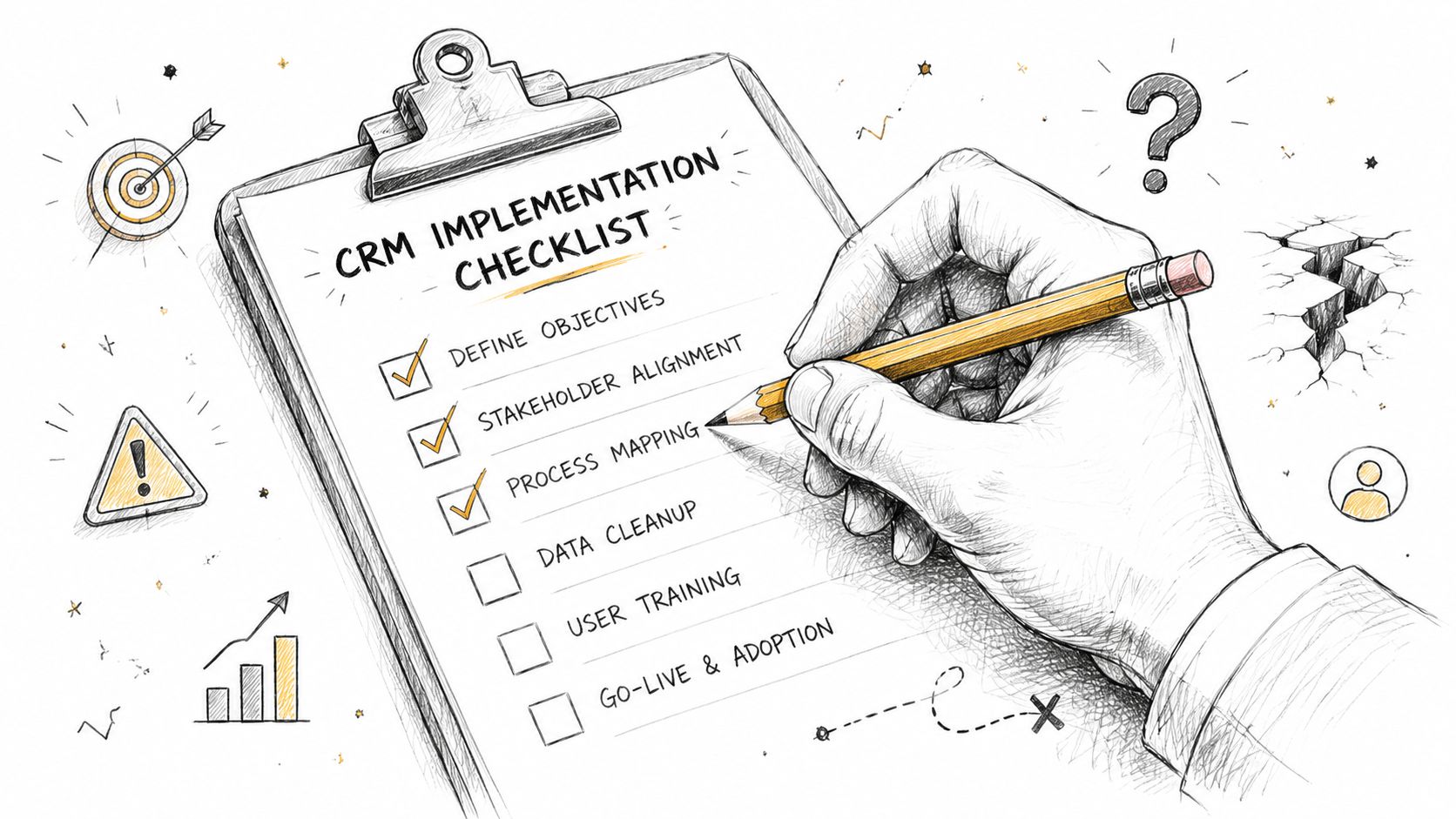
A hand using a pencil to check off items on a CRM implementation checklist on a clipboard.

The core risk is what service-quality research describes as a knowledge gap. CRM often breaks down when management's view of customer expectations doesn't match what customers value. Success depends on aligning leadership, process, and culture, not just deploying software, according to OpenStax on the knowledge gap in service quality.

A practical checklist for SMB implementation

You don't need a giant transformation program. You do need a disciplined rollout.

  1. Define the operating goal
    Decide what problem the CRM must solve first. Better lead follow-up. Cleaner pipeline visibility. Improved handoff between sales and support. Pick one primary outcome so setup decisions stay focused.

  2. Map the actual customer journey
    Write down how a lead becomes a customer in your business today. Include forms, calls, proposals, onboarding, renewals, and support touchpoints. Most CRM confusion starts when the software reflects an imaginary process instead of the actual one.

  3. Clean the data before import
    Remove duplicates. Standardize naming. Decide which fields are essential. Bad data moved into a new system is still bad data.

  4. Set minimum usage rules
    Keep them simple. For example: every active deal needs an owner, a stage, a next step, and a dated follow-up. That's manageable.

  5. Train by role, not by feature list
    Sales needs one set of habits. Marketing needs another. Managers need reporting and inspection habits. Generic training usually gets forgotten.

  6. Review adoption early
    Look at whether records are complete, whether activities are logged, and whether people are updating stages on time. Small corrections early prevent messy cleanups later.

A practical companion to this approach is this guide to CRM best practices for implementation and adoption, especially if you're formalizing process rules for the first time.

The common pitfalls are mostly human

Three problems show up again and again.

  • Leadership assumes the team will “figure it out”
    They won't. If leaders don't define process expectations, every user invents their own version.

  • The company tracks internal convenience, not customer reality
    That's the knowledge gap in action. Your stages and workflows should reflect how customers buy and get served, not just how your team prefers to report work.

  • People overload the system from day one
    Too many fields, too many stages, too many rules. Simplicity drives adoption.

Here's a short walkthrough that helps make implementation more concrete:

What to watch after launch

The first month matters more than the launch day.

Look for signs that the CRM fits real work. Are reps updating records without being chased? Can managers inspect pipeline without asking for separate spreadsheets? Can support and sales see the same account story? If not, adjust the process before blaming the platform.

CRM adoption improves when the system makes daily work easier, not when leadership gives a speech about accountability.

That's the implementation mindset SMBs need. Start with how the business should run. Then let the software support it.

The Future of CRM with AI and Unified Platforms

The old version of CRM asked people to do too much manual work.

Teams had to enter notes, copy information between tools, chase follow-ups, and build reports after the fact. The result was predictable. Data got stale, context got fragmented, and leaders lost trust in the system.

The next phase of CRM is moving in a different direction. AI and unified platforms are shifting CRM from a record-keeping tool into a more active operating layer for revenue teams.
Screenshot from https://stamina.io

AI reduces the manual burden

One of the biggest CRM frustrations has always been the gap between useful data and the effort required to maintain it.

AI can help close that gap by assisting with research, summarization, message drafting, prioritization, and workflow triggers. That doesn't remove the need for clear process or good judgment. It does reduce the clerical load that keeps teams from using CRM consistently.

If you want a broader strategic view, this perspective on how AI transforms CRM for B2B leaders is helpful because it frames AI as an operational change, not just a feature add-on.

Unified platforms solve the handoff problem

Many SMBs don't have a CRM issue in isolation. They have a fragmented stack issue.

Marketing runs in one system. Sales works in another. Customer records sit somewhere else. Every handoff creates lag, duplicate data, and missing context.

A unified platform changes that by keeping marketing, sales, and CRM activities connected in one environment. That means behavior signals, outreach, pipeline movement, and follow-up workflows can work from the same underlying record instead of syncing imperfectly across tools.

That's the logic behind customer engagement platforms more broadly, and this explanation of what a customer engagement platform is helps clarify where traditional CRM ends and more connected systems begin.

The strategic shift matters more than the feature set

This is the part many software comparisons miss.

The future of CRM isn't mainly about adding more tabs, more dashboards, or more settings. It's about reducing the gap between data, action, and customer experience. AI helps by making systems more responsive. Unified platforms help by keeping teams on the same operational record.

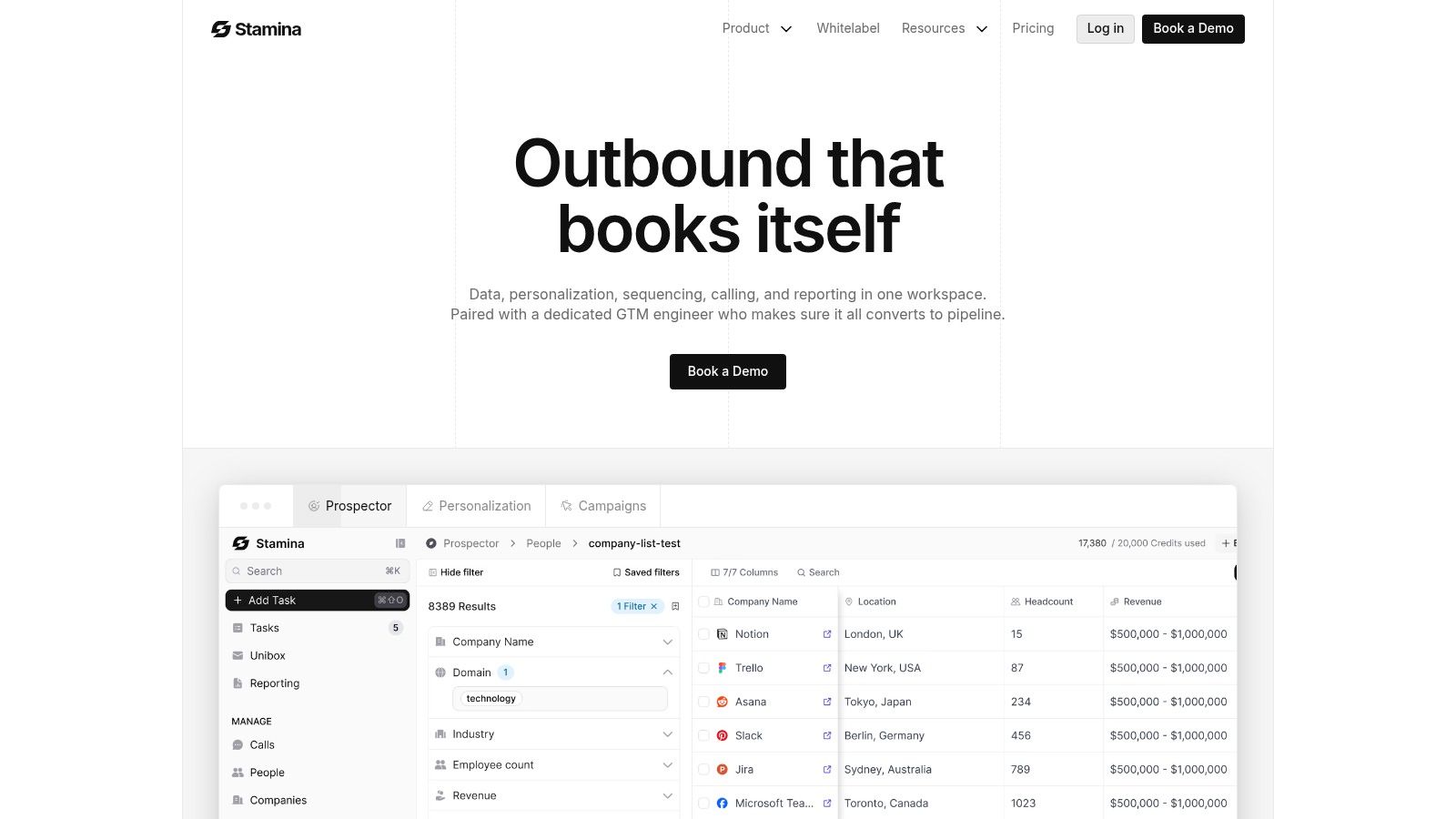
Used that way, platforms such as Stamina combine marketing, sales engagement, and CRM in a single system so growing businesses can manage pipelines, outreach, and customer data from one place instead of stitching together separate point tools.

CRM is becoming less about “logging what happened” and more about helping teams decide what to do next.

That's a useful way to close the loop on understanding customer relationship management. The strategy stays the same: know the customer, coordinate the team, and guide the next action. What changes is the quality of the system supporting that strategy.

If you're rethinking CRM as a business strategy instead of just another software purchase, Stamina is one option to explore. It combines CRM, sales engagement, marketing workflows, and AI-assisted outreach in a unified platform, which can help SMB teams reduce tool sprawl and keep customer data, activity, and follow-up in one system.

Your business probably already has a CRM problem, even if you haven't bought CRM software.

A lead fills out your form. Someone on your team replies from Gmail. A salesperson keeps notes in a spreadsheet. Support answers a question in a shared inbox. A week later, nobody remembers the full conversation, and the customer has to repeat themselves. Nothing is broken enough to trigger a crisis, but deals slow down, follow-ups slip, and the team spends too much time asking, “Who owns this account?”

That's usually where understanding customer relationship management starts for an SMB owner. Not with software demos. With operational friction.

Customer relationship management works best when you treat it as a business strategy first. The software matters, but only as the system that supports the strategy. If your process is unclear, your data is scattered, and your teams work from different assumptions, a new tool won't fix the underlying issue. It will just give the confusion a nicer interface.

What Is Customer Relationship Management Really

Customer relationship management, or CRM, is the discipline of managing every interaction your company has with prospects and customers in a consistent, organized way.

That sounds simple, but many SMBs misunderstand it. They think CRM means “a database for sales reps” or “a place to store contacts.” Those are pieces of it. They're not the whole thing.

A better definition is this: CRM is the operating system your business uses to attract, track, serve, and grow customer relationships over time. It gives your team one shared record of what happened, what matters, and what should happen next.

CRM is a strategy before it is software

If you strip away the tools, CRM still exists as a business choice. You decide whether your company will:

  • Keep one customer record: instead of separate notes in separate tools

  • Use shared process rules: instead of every rep working differently

  • Track follow-up consistently: instead of relying on memory

  • Coordinate across teams: instead of letting sales, marketing, and support operate in silos

That's why understanding customer relationship management matters more now than it did when many SMBs could get by with ad hoc processes. The category itself has become mainstream infrastructure. The CRM market was valued at USD 101.41 billion in 2024 and is projected to reach USD 262.74 billion by 2032, with an implied 12.6% CAGR, and 91% of companies with 10 or more employees use CRM software according to CRM market and adoption data from Cyntexa.

Those numbers don't just show software demand. They show a broader shift in how businesses run. CRM is no longer a niche system for larger companies. It's a standard way to organize revenue operations.

Practical rule: If customer information lives in more than one place and nobody trusts the full picture, you don't have a software problem first. You have a CRM strategy problem.

For a growing SMB, that's the actual starting point. You're not shopping for a tool. You're deciding how your company will manage relationships at scale.

The Core Components of a Modern CRM

Think of a modern CRM as your company's shared digital brain for customer relationships.

It remembers who the customer is, what they've done, what your team has said, what stage the opportunity is in, and what should happen next. Without that shared brain, each department builds its own partial memory. Sales remembers deal notes. Marketing remembers campaign clicks. Support remembers complaints. Nobody sees the whole person.

A conceptual hand-drawn illustration showing a digital brain representing CRM connected to sales, marketing, service, and operations departments.

A CRM solves that by consolidating contact data, sales history, service records, and campaign activity into a single customer view. That shared view then supports automation such as follow-ups, lead scoring, and pipeline tracking, which reduces manual handoffs and speeds up response times, as explained in DataGuard's overview of CRM centralization and automation.

Contacts are the who

Every CRM starts with records. Usually that means people and companies.

A good contact record does more than store a name, phone number, and email address. It becomes a living history of the relationship. You can see conversations, notes, purchases, open deals, support issues, and marketing engagement in one place.

That changes daily work in a practical way. If a salesperson calls a prospect, they don't need to ask basic questions the customer already answered in a form or support email. They can walk in with context.

Pipelines are the where

A pipeline shows where a relationship sits in a business process.

For sales, that might be inquiry, qualified, proposal, negotiation, and closed. For onboarding, it could be signed, kickoff scheduled, implementation in progress, training complete. For customer success, it might track renewals or expansion opportunities.

The point isn't the labels. The point is shared visibility.

CRM component

Simple question it answers

Why it matters

Contacts

Who is this?

Gives the team a shared customer record

Pipelines

Where are they in the journey?

Helps forecast work and next steps

Activities

What happened and what's next?

Prevents dropped follow-up

Activities are the what and when

Activities are the heartbeat of CRM. Calls, emails, meetings, tasks, notes, reminders, and follow-ups all live here.

Many SMB owners interpret CRM adoption as requiring staff to enter extensive administrative data. In reality, the value comes from capturing the minimum useful activity so the next person has context and the system can trigger the right action.

For teams thinking about smarter CRM process automation, automation starts to pay off. Once activities and stages are structured, you can assign follow-ups automatically, trigger reminders, and move work without constant manual checking.

The single source of truth only works if people use it

A CRM becomes useful when it stops being “the sales system” and starts becoming “the company record.”

That often requires process design, not just setup. You need agreement on what counts as a qualified lead, when a deal moves stages, and what your team must log. If those rules are unclear, the CRM fills up with inconsistent data.

One practical way to think about this is to map the workflow before configuring the tool. A simple guide to that thinking is this overview of CRM workflow design, which focuses on turning repeatable customer actions into structured processes.

A CRM record should answer three things in seconds: who this person is, where the relationship stands, and what your team should do next.

When those answers are easy to find, CRM starts working like a strategy, not a filing cabinet.

Real-World CRM Use Cases for Growth Teams

The easiest way to understand CRM is to watch what it changes in everyday work.

Features don't matter much in isolation. What matters is whether a salesperson, marketer, or support rep can make a better decision with less friction.

Sales gets context before the call

A rep opens a lead record ten minutes before a discovery call.

Without a CRM, they're digging through email threads, asking marketing for form details, and hoping someone else didn't already talk to the account. With a CRM, they can see the company, prior touchpoints, recent activity, notes from earlier conversations, and whether the lead engaged with outreach or asked support a pre-sales question.

That changes the tone of the call. The rep doesn't start with generic qualification. They start with relevance.

Instead of saying, “Tell me about your needs,” they can say, “I saw your team asked about onboarding complexity and also looked at our pricing page. Usually that means speed of implementation matters. Is that the right place to start?” The buyer feels known, and the rep moves faster.

Marketing stops guessing who is ready

A marketing manager runs campaigns across email, forms, landing pages, and nurture flows.

In a disconnected setup, campaign activity lives in one platform, lead notes live in another, and sales feedback stays in Slack. Marketing can generate leads, but it's hard to know which ones became real opportunities and which messages helped move them forward.

In a CRM-centered process, marketing can build workflows around behavior. A person who downloads a guide gets one sequence. A prospect who requests a demo gets routed differently. Someone who goes quiet can enter a re-engagement path instead of being forgotten.

That matters because marketing's job isn't just to create names in a list. It's to create buying readiness. CRM gives marketing a feedback loop from the rest of the revenue team.

The real use case isn't “email automation.” It's making sure the right person gets the right next step without a teammate having to remember it manually.

Support sees the relationship, not just the ticket

A customer writes in with a problem that sounds small on the surface.

A support agent can answer the immediate issue faster when they see the wider account history. Is this a new customer still onboarding? Is there an open renewal conversation? Has the customer had repeated friction with the same product area? Did sales promise something during the buying process that support should know about?

Without CRM context, support handles the ticket. With CRM context, support manages the relationship.

That difference matters for SMBs because one awkward service experience can ripple into churn, bad referrals, or stalled expansion.

Operations gets fewer surprises

There's another user many companies overlook. Operations.

When CRM is set up well, ops leaders can see where handoffs fail, where leads stall, which stages become bottlenecks, and where reps create inconsistent records. They don't have to manage by anecdote. They can inspect process health through real activity patterns.

Here's how those three frontline examples play out across teams:

  • Sales use case: tailor outreach based on full account history

  • Marketing use case: trigger nurture based on real behavior and sales status

  • Support use case: resolve issues with account context instead of isolated tickets

A growing business feels these gains quickly because the same customer touches multiple teams. CRM works when those teams stop acting like separate departments and start acting like one company.

Key Business Benefits for Small and Medium Businesses

SMB owners usually ask the right question: what do we get back for the time, money, and discipline CRM requires?

The answer isn't just “better organization.” The business case is stronger than that.

Businesses using CRM software see an average ROI of $8.71 for every $1 spent, a 29% increase in sales revenue, a 34% boost in sales productivity, an average sales cycle shortened by 8 to 14 days, and 27% better customer retention, according to CRM performance data summarized by CRM.org.

A hand-drawn business illustration showing ROI growth for SMBs with charts, coins, and business improvement icons.

Revenue grows because follow-up gets managed

A lot of SMB revenue leakage is boring. Leads don't get contacted fast enough. Deals sit untouched. Nobody notices when a proposal stalls.

CRM helps because it turns follow-up from a personal habit into a tracked business process. Tasks are visible. deal stages are visible. Managers can see what's moving and what's not.

That's one reason revenue tends to improve after implementation. The company gets more consistent at doing the obvious things that often get missed.

Productivity improves because work stops bouncing around

Sales productivity doesn't rise because reps suddenly work harder. It rises because reps spend less time hunting for information, updating multiple tools, or recreating context from scratch.

If you're thinking through the broader mechanics behind rep efficiency, this guide from hireSDR.io on sales productivity is useful because it connects process design, automation, and time allocation in a practical way.

A well-structured CRM also helps SMBs simplify the stack. Instead of patching together spreadsheets, inboxes, and separate trackers, teams can use a central workflow system. For business owners evaluating options, this comparison of CRM choices for small businesses is a practical starting point.

Retention improves because customers feel the continuity

Retention isn't only about product quality. It's also about whether the customer feels known.

When your team can see prior issues, purchases, preferences, and open tasks, the customer doesn't have to keep reintroducing themselves. That continuity often shapes satisfaction more than any individual feature.

Bottom line: CRM pays off when it reduces avoidable friction in the customer journey and inside your team.

For SMBs, that's why the return can be meaningful. You're not just buying organization. You're creating a system that protects revenue you already should have captured.

Essential CRM Metrics and KPIs to Track

Most SMBs make one of two mistakes with CRM metrics.

They either track almost nothing and rely on gut feel, or they track everything the dashboard offers and drown in noise. Neither approach helps. The goal is to track the few measures that answer important business questions clearly.

Modern CRM systems can support forecasting and predictive analytics, but those insights depend on data quality. Poor data hygiene weakens lead prioritization, forecasting, and retention actions, as noted in Wikipedia's overview of analytical CRM and data quality.

Start with the business question

Don't begin with a metric name. Begin with the decision you need to make.

Here are a few useful examples:

Business question

KPI to track

What it reveals

Is our pipeline healthy?

Pipeline velocity

Whether deals are moving or stalling

Are leads turning into real opportunities?

Lead conversion rate

Whether qualification and handoff are working

Can we trust our forecast?

Stage progression and close timing

Whether pipeline data reflects reality

Are customers sticking with us?

Retention trend

Whether post-sale experience is working

A small company doesn't need a huge dashboard. It needs answers to a handful of recurring management questions.

Focus on behavior-linked metrics

The strongest CRM KPIs connect to actions your team can change.

If pipeline velocity slows, you can inspect where deals sit too long. If lead conversion drops, you can look at source quality, qualification rules, or rep follow-up. If retention weakens, you can review onboarding, support patterns, or account communication.

That's why I usually tell SMB leaders to care more about operational metrics than vanity metrics. Total contact count looks impressive and rarely helps. Stage aging, follow-up completion, and conversion through key handoffs are much more useful.

Clean data beats fancy dashboards

Many owners get excited about forecasting before they've solved basic record quality.

If reps use stages inconsistently, if duplicate contacts pile up, or if closed-lost reasons never get entered, your reports will look polished but mislead you. Under these circumstances, CRM turns from a reporting issue into a management issue.

A practical standard is to review three things regularly:

  • Field consistency: Are core records completed the same way across the team?

  • Stage discipline: Are people moving deals based on real criteria?

  • Activity reliability: Does the CRM reflect what happened?

If your team doesn't trust the CRM data, they won't use the reports. If they don't use the reports, the CRM becomes an archive instead of a decision tool.

Keep the KPI set small enough to manage

For many SMBs, a strong starting set includes pipeline velocity, conversion by stage, sales cycle trend, retention trend, and task completion tied to follow-up.

That's enough to spot common problems without overwhelming the team. Once those basics are clean and trusted, you can go deeper.

Understanding customer relationship management means understanding that measurement isn't optional. CRM earns its place when it helps you diagnose problems early and act with confidence.

Your CRM Implementation Checklist and Common Pitfalls

Most CRM projects don't fail because the software was missing a feature.

They fail because the company tried to install a tool before deciding how the business should work. That's why implementation should be treated like an operating change, not a tech purchase.

A hand using a pencil to check off items on a CRM implementation checklist on a clipboard.

The core risk is what service-quality research describes as a knowledge gap. CRM often breaks down when management's view of customer expectations doesn't match what customers value. Success depends on aligning leadership, process, and culture, not just deploying software, according to OpenStax on the knowledge gap in service quality.

A practical checklist for SMB implementation

You don't need a giant transformation program. You do need a disciplined rollout.

  1. Define the operating goal
    Decide what problem the CRM must solve first. Better lead follow-up. Cleaner pipeline visibility. Improved handoff between sales and support. Pick one primary outcome so setup decisions stay focused.

  2. Map the actual customer journey
    Write down how a lead becomes a customer in your business today. Include forms, calls, proposals, onboarding, renewals, and support touchpoints. Most CRM confusion starts when the software reflects an imaginary process instead of the actual one.

  3. Clean the data before import
    Remove duplicates. Standardize naming. Decide which fields are essential. Bad data moved into a new system is still bad data.

  4. Set minimum usage rules
    Keep them simple. For example: every active deal needs an owner, a stage, a next step, and a dated follow-up. That's manageable.

  5. Train by role, not by feature list
    Sales needs one set of habits. Marketing needs another. Managers need reporting and inspection habits. Generic training usually gets forgotten.

  6. Review adoption early
    Look at whether records are complete, whether activities are logged, and whether people are updating stages on time. Small corrections early prevent messy cleanups later.

A practical companion to this approach is this guide to CRM best practices for implementation and adoption, especially if you're formalizing process rules for the first time.

The common pitfalls are mostly human

Three problems show up again and again.

  • Leadership assumes the team will “figure it out”
    They won't. If leaders don't define process expectations, every user invents their own version.

  • The company tracks internal convenience, not customer reality
    That's the knowledge gap in action. Your stages and workflows should reflect how customers buy and get served, not just how your team prefers to report work.

  • People overload the system from day one
    Too many fields, too many stages, too many rules. Simplicity drives adoption.

Here's a short walkthrough that helps make implementation more concrete:

What to watch after launch

The first month matters more than the launch day.

Look for signs that the CRM fits real work. Are reps updating records without being chased? Can managers inspect pipeline without asking for separate spreadsheets? Can support and sales see the same account story? If not, adjust the process before blaming the platform.

CRM adoption improves when the system makes daily work easier, not when leadership gives a speech about accountability.

That's the implementation mindset SMBs need. Start with how the business should run. Then let the software support it.

The Future of CRM with AI and Unified Platforms

The old version of CRM asked people to do too much manual work.

Teams had to enter notes, copy information between tools, chase follow-ups, and build reports after the fact. The result was predictable. Data got stale, context got fragmented, and leaders lost trust in the system.

The next phase of CRM is moving in a different direction. AI and unified platforms are shifting CRM from a record-keeping tool into a more active operating layer for revenue teams.

Screenshot from https://stamina.io

AI reduces the manual burden

One of the biggest CRM frustrations has always been the gap between useful data and the effort required to maintain it.

AI can help close that gap by assisting with research, summarization, message drafting, prioritization, and workflow triggers. That doesn't remove the need for clear process or good judgment. It does reduce the clerical load that keeps teams from using CRM consistently.

If you want a broader strategic view, this perspective on how AI transforms CRM for B2B leaders is helpful because it frames AI as an operational change, not just a feature add-on.

Unified platforms solve the handoff problem

Many SMBs don't have a CRM issue in isolation. They have a fragmented stack issue.

Marketing runs in one system. Sales works in another. Customer records sit somewhere else. Every handoff creates lag, duplicate data, and missing context.

A unified platform changes that by keeping marketing, sales, and CRM activities connected in one environment. That means behavior signals, outreach, pipeline movement, and follow-up workflows can work from the same underlying record instead of syncing imperfectly across tools.

That's the logic behind customer engagement platforms more broadly, and this explanation of what a customer engagement platform is helps clarify where traditional CRM ends and more connected systems begin.

The strategic shift matters more than the feature set

This is the part many software comparisons miss.

The future of CRM isn't mainly about adding more tabs, more dashboards, or more settings. It's about reducing the gap between data, action, and customer experience. AI helps by making systems more responsive. Unified platforms help by keeping teams on the same operational record.

Used that way, platforms such as Stamina combine marketing, sales engagement, and CRM in a single system so growing businesses can manage pipelines, outreach, and customer data from one place instead of stitching together separate point tools.

CRM is becoming less about “logging what happened” and more about helping teams decide what to do next.

That's a useful way to close the loop on understanding customer relationship management. The strategy stays the same: know the customer, coordinate the team, and guide the next action. What changes is the quality of the system supporting that strategy.

If you're rethinking CRM as a business strategy instead of just another software purchase, Stamina is one option to explore. It combines CRM, sales engagement, marketing workflows, and AI-assisted outreach in a unified platform, which can help SMB teams reduce tool sprawl and keep customer data, activity, and follow-up in one system.

Share this article

Share this article

Send a shareable link to your team or anyone who might find it useful.

Send a shareable link to your team or anyone who might find it useful.

Copy link

Copied

Share directly to

Table of contents

Give Your Business the Stamina it needs to Thrive

PRODUCT

COMPANY

RESOURCES

© 2026 Stamina Software Technologies Inc. All rights reserved.

PRODUCT

COMPANY

RESOURCES

© 2026 Stamina Software Technologies Inc. All rights reserved.

PRODUCT

COMPANY

RESOURCES

© 2026 Stamina Software Technologies Inc. All rights reserved.