Customer Data Integration: A Practical Guide for SMBs

Learn what customer data integration is, why it matters, and how SMBs can unify marketing, sales, and CRM data into one trusted source of truth.

0 - Minute Read

Your team probably has the same customer in five places right now. Marketing has one email, sales has a slightly different contact record, support sees a ticket history that never reaches the rep, finance has billing details, and nobody is fully sure which version is current. The result is wasted follow-up, awkward handoffs, and the kind of quiet data distrust that makes a small business act much bigger than it really is, without getting the benefit.

Customer data integration is the discipline that fixes that drift. It's not just about moving records between tools, it's about making sure the people who sell, support, and market from those records can trust them enough to act. For SMBs, that trust is the difference between a stack that helps and a stack that keeps creating cleanup work.

The Daily Reality of Scattered Customer Data

A founder gets a demo request, sales logs it in the CRM, marketing adds the lead to a nurture sequence, and support later opens a ticket for the same contact under a slightly different email. Then finance sends an invoice to a billing address that never made it into the CRM. Everyone did their part, but nobody worked from the same customer view.

That's why fragmentation feels so expensive in practice. People spend time reconciling records instead of selling, customers get duplicated outreach, and managers start asking which report to trust. A CRM helps organize relationships, but it doesn't solve the coordination problem by itself, which is why a clean CRM process matters so much in the first place, as outlined in CRM best practices.

What breaks first

The first thing to fail is usually follow-up. A rep calls a lead who already converted, or marketing sends an offer to someone who just became a customer. Then the team starts building workarounds, like manual exports or private spreadsheets, and the original source of truth gets weaker.

Practical rule: if a customer has to be corrected by hand more than once, the system is already asking your team to do data engineering work.

For SMBs, that's the cost. You're not just losing efficiency, you're training people to ignore the systems they're supposed to rely on. Once that habit takes hold, every new tool adds another version of the same customer instead of reducing confusion.

What Customer Data Integration Actually Means

Think of your stack like a library with several card catalogs. The website knows one version of the patron, the CRM knows another, the helpdesk knows a third, and billing knows when invoices go out. Customer data integration is the librarian who combines those fragments into one master card, removes duplicates, and keeps the record usable across the whole building.
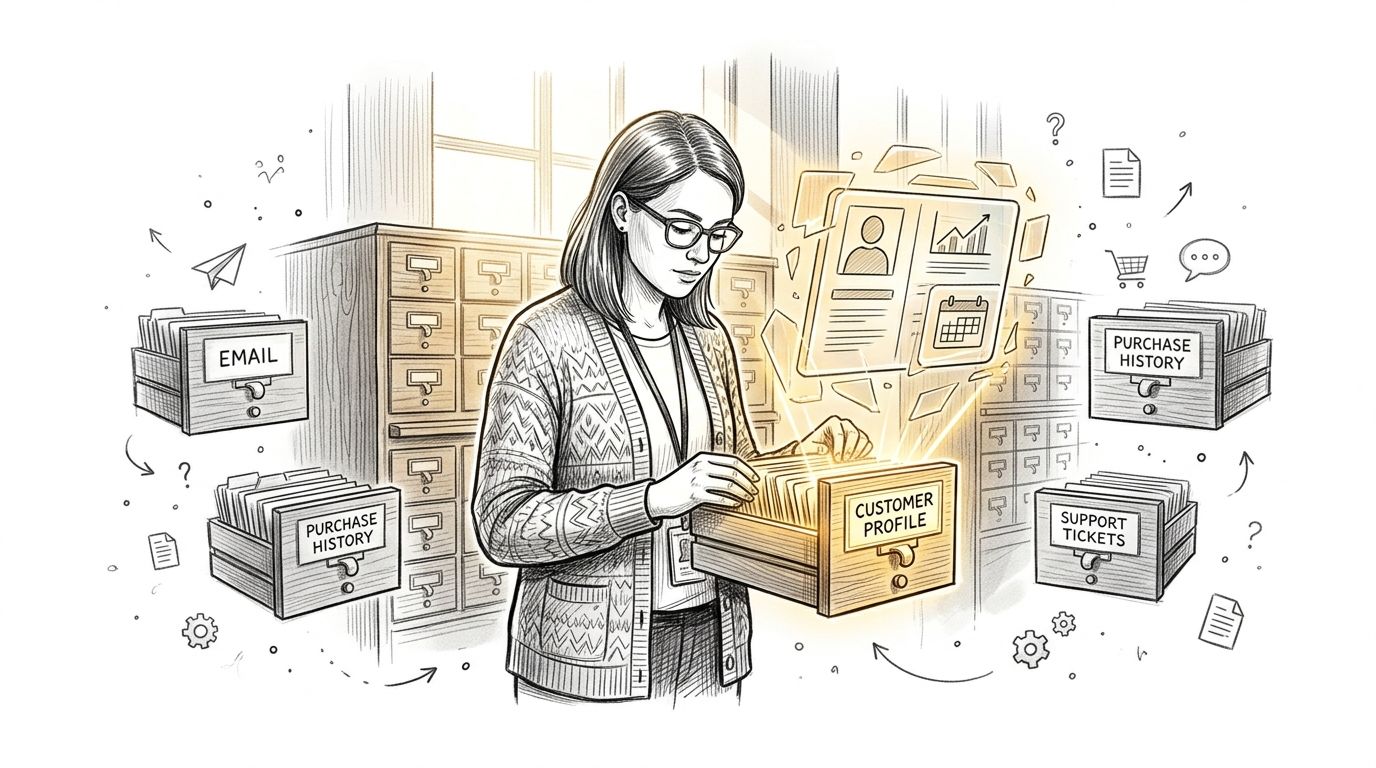
A professional analyzing customer data by integrating information from various filing cabinets into a single profile.

The four moving parts

The first part is source connectors, the pipes that pull data from systems like your CRM, billing platform, marketing tool, and support desk. Without them, every team stays isolated in its own application.

The second part is identity resolution, which is the hard bit. Records are matched using multiple keys such as email, account ID, and phone, with confidence scores and explicit tie-breaking rules for exceptions before merge, because matching is a scoring problem, not a simple deduplication task, as described in this explanation of identity resolution and customer data integration.

The third part is the golden record, the version of the customer profile that becomes the most reliable reference point. It doesn't mean every field is perfect, it means the system has rules for deciding which field wins when sources disagree.

The fourth part is activation, which is where the merged data gets used. Clean data can be exposed through APIs, curated datasets, dashboards, or marketing segments so sales and marketing can act on it without rebuilding the record themselves.

A useful test is simple, if a rep can open a profile and immediately know what happened last, the integration is doing real work.

Why Customer Data Integration Is Now a Growth Lever

The market has moved because the business problem has moved. One 2025 estimate valued the Customer Data Integration market at $14.8 billion, with projections to reach $36.2 billion by 2034 at a 12.4% CAGR (source). That growth reflects the shift from fragmented records to a unified 360-degree view that supports personalization, analytics, and compliance.

For SMBs, the important takeaway isn't the market size, it's the operating reality behind it. Every channel is now a data channel, every campaign depends on freshness, and every rep needs to know whether the record in front of them is current enough to act on. If you're connecting sales, finance, and CRM workflows, a resource like streamlining operations with integrated software shows how much overhead disappears when systems stop disagreeing.

The timing pressure is real

The broader data-integration market is projected to grow from $15.18 billion in 2026 to $30.27 billion by 2030 at a 12.1% CAGR, and streaming analytics is forecast to rise from $23.4 billion to $128.4 billion at 28.3% CAGR (source). That combination says something simple, businesses want customer data to stay current, not just arrive eventually.

Metric

Value

Customer Data Integration market, 2025

$14.8 billion

Customer Data Integration market, 2034 projection

$36.2 billion

CAGR

12.4%

A lot of SMBs start by asking whether integration is worth the effort. The better question is whether you can keep scaling with disconnected customer records. If your team is also evaluating a broader stack, what a customer engagement platform does helps frame how integration connects to outreach rather than sitting in a back-office silo.

Four Common Approaches to Customer Data Integration

There isn't one right architecture for every SMB. The right choice depends on how many tools you've already bought, how often customer data changes, and how much of the upkeep your team can realistically own. If you need a broader look at audience and website logic before choosing, build a website that connects is a useful companion lens.
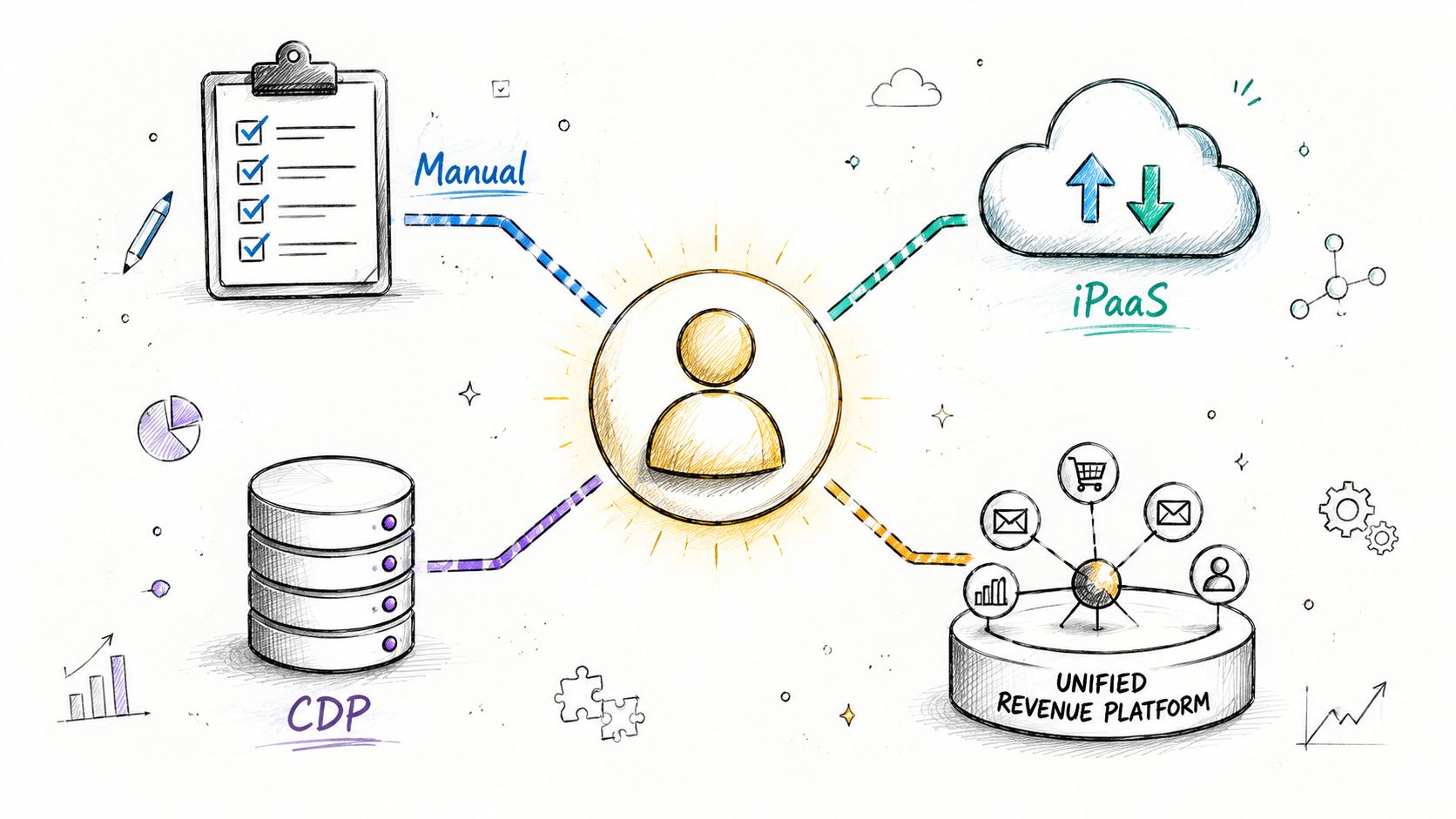
A diagram illustrating the integration of various business data sources into a central customer profile.

Comparing the main paths

Approach

Setup Cost

Maintenance

Real-Time

Best Fit

Point integrations

Low at first, then grows with manual work

High

Limited

Very small teams with a few tools

iPaaS or ETL tools

Moderate

Moderate to high

Sometimes

Teams with technical support and many systems

Standalone CDP

Higher

Moderate

Strong for marketing use cases

Marketing-led organizations that need profiling and segmentation

Unified revenue platform

Moderate to higher, but less stack sprawl

Lower after setup

Strong across teams

SMBs that want marketing, sales, and CRM in one place

Point integrations are the easiest to start and the easiest to outgrow. They're fine when you only need a few one-way syncs, but every new tool adds more breakpoints and more maintenance.

iPaaS and ETL tools give you more control. They're better when you have a technical operator who can manage mappings, sync logic, and exceptions, but they still leave you stitching together ownership across teams.

A standalone CDP is strongest when the business problem is mostly customer profile unification and activation. The trade-off is that it often sits alongside, rather than replaces, the rest of the stack.

A unified revenue platform reduces the number of places where customer data can drift. For SMBs, that matters because the hidden cost isn't the integration itself, it's the ongoing coordination between tools, users, and rules.

A Step-by-Step Implementation Path for SMBs

Start small and keep the work visible. A six-step rollout is usually enough for a lean team, and it works better when every step ends with a concrete artifact someone can review, question, and approve. Effective CDI treats data quality as continuous and automated, with measurable standards for completeness, accuracy, consistency, and timeliness enforced through validation, cleansing, normalization, and anomaly detection as data flows in (source).
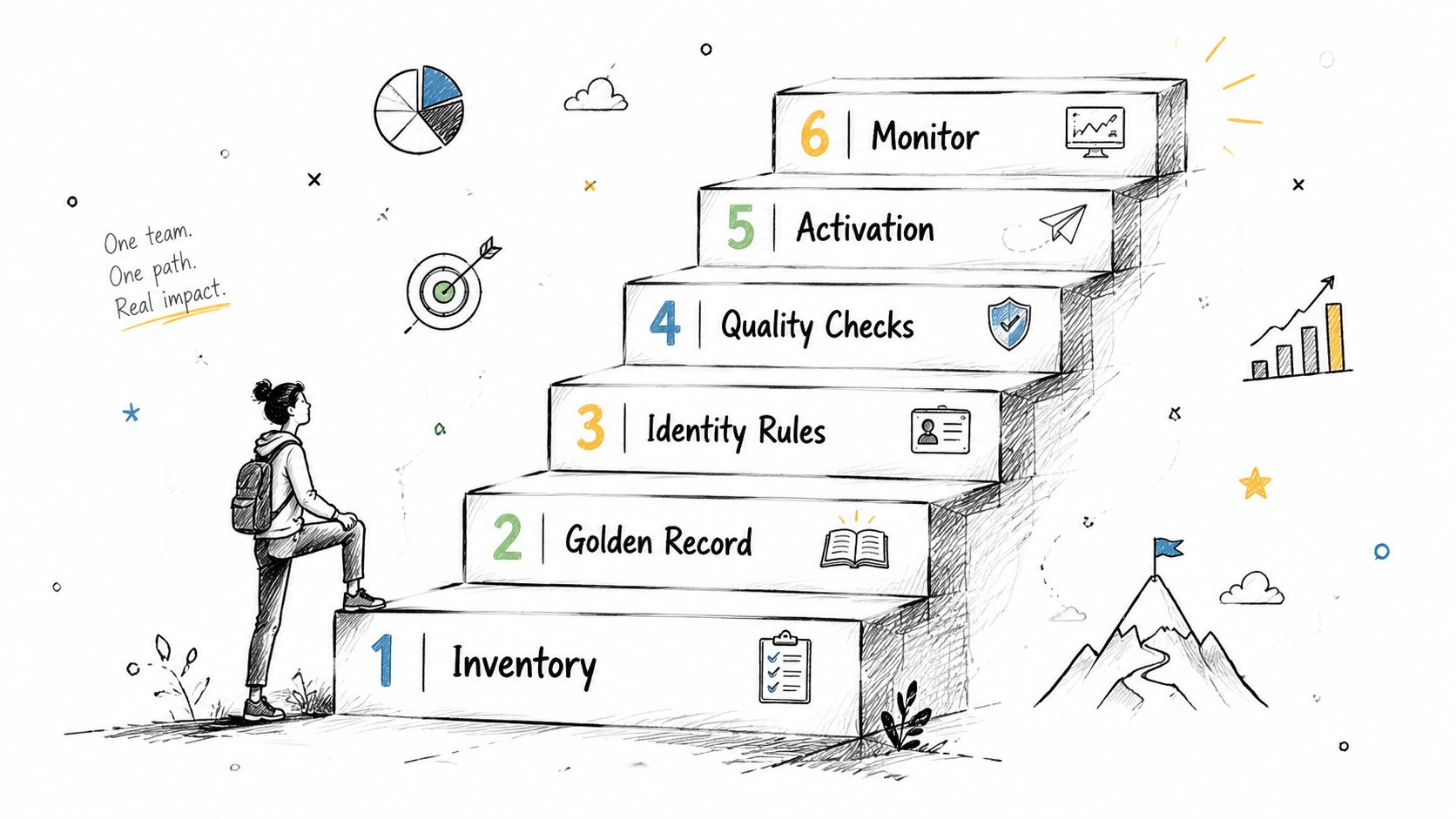
A sketched illustration of a person stepping up a staircase, representing a six-step customer data integration process.
  1. Inventory every source. List the systems that create or modify customer data, then note what each system owns. Your deliverable is a source map, not a project plan.

  2. Define the golden record. Pick the fields that must be trusted first, like name, email, lifecycle stage, account owner, and billing status. Your deliverable is a field-ownership sheet.

  3. Set identity rules. Decide how matches are scored, which identifiers matter most, and what happens when two records conflict. Your deliverable is a merge policy your team can read.

  4. Automate quality checks. Use validation and anomaly detection so bad data is caught as it enters the stack, not after a campaign fails. Your deliverable is a short list of rules for completeness, consistency, and freshness.

  5. Choose one activation surface. Send the unified record to one place first, such as sales routing, a dashboard, or a nurture flow. Your deliverable is a single live use case, not a full rollout.

  6. Review what changes weekly. Check where records break, where fields go stale, and where users still export data by hand. Your deliverable is a simple exception log.

The question of sync speed matters too. Use real-time only where freshness changes the outcome, and lean on batch or micro-batch when immediacy doesn't affect the decision. That's the kind of judgment call SMBs need, not over-engineered plumbing.

If you need a practical way to connect marketing triggers to the CRM after the source map is clean, the logic in marketing automation and CRM integration is a useful reference point.

Governance and Trust After the Merge

A merged record doesn't automatically mean a trusted record. That's the part most guides skip, even though it's where SMB teams feel the pain every day. Recent practitioner guidance says most mainstream CDI content stops at ETL, identity resolution, and golden records, but rarely answers who owns conflicting fields, how precedence is enforced, or how to prove lineage and freshness, which makes trust the core operational issue, not setup (source).

Who owns the disagreement

If sales changes a lifecycle stage and marketing later overwrites it, someone needs to decide which system wins. That decision should be explicit, not implied by whichever tool syncs last. Source inventories, field-level ownership, and data contracts keep that from becoming tribal knowledge.

A lightweight governance model gives small teams clarity without creating bureaucracy. It also makes audits easier, because you can point to the rule instead of reconstructing it from Slack threads and spreadsheet history.

Practical rule: if no one can explain why a field changed, that field is not governed, it's just moving around.

What trust looks like in practice

Trust also depends on proof. Teams need lineage so they can see where a value came from, freshness so they know how current it is, and SLA monitoring so they can tell when a source stops behaving.

That's why “more unified” doesn't always mean “more usable.” As integration expands, hidden conflicts and stale fields grow unless governance is built into the workflow, not added later as cleanup. SMBs that treat this as product work, not IT housekeeping, usually get more adoption because the merged record feels safe enough to use.

Privacy-Safe Real-Time Activation and the Unified Platform Option

Integration is now judged by how quickly data can be activated without violating privacy constraints or creating stale outreach, especially for outbound and nurturing workflows (source). That changes the design brief. Consent enforcement, role-based access, retention rules, and change data capture stop being nice extras and become part of the activation path.

Why a unified platform lowers the overhead

The hardest SMB problem is rarely “can we connect the tools?” It's “can we keep the tools aligned after the first sync?” A unified revenue platform reduces the number of seams where data can drift because marketing, sales, and CRM all sit inside one operating layer. If you're comparing that model to a broader stack, Stamina's all-in-one business platform is a relevant example of how teams can collapse the integration burden.

That matters for outbound, because your sales rep needs to know whether a prospect visited the site, engaged with a message, or already hit a suppression rule. It matters for nurture, because a stale profile can trigger the wrong sequence and create avoidable compliance risk.

One practical platform example

Stamina is one option in this category. It unifies marketing, sales, and CRM for SMBs, and it includes tools for AI-assisted outbound, sales engagement based on visitor and social signals, and automated nurture flows. The value here is not magic, it's fewer places for customer data to fragment while teams try to move fast.

If your business is still early, the simplest path is often the best one. A single source of truth that already supports activation is easier to govern than a stack that needs constant reconciliation across separate products.

Measuring Success and Avoiding the Common Pitfalls

The best CDI programs show up in daily work, not in slide decks. The most useful KPIs are record completeness, freshness, activation latency, pipeline attribution accuracy, and team adoption. If those improve, the system is doing something real.

The most common mistakes are predictable. Teams over-invest in real-time when batch would work, skip governance, treat identity as a one-time dedupe, let shadow tools rebuild the silos, and measure success by tools connected instead of decisions enabled.

A good next step this week is simple, pick one customer field that causes the most confusion and write down who owns it, where it comes from, and how often it should be checked.

That one exercise usually exposes the actual bottleneck faster than another software demo.

If you want a simpler operating model for customer data integration, Stamina brings marketing, sales, and CRM into one system so your team spends less time reconciling records and more time using them. Visit Stamina to see how a unified revenue platform can reduce integration overhead and help your SMB act on customer data with more confidence.

Your team probably has the same customer in five places right now. Marketing has one email, sales has a slightly different contact record, support sees a ticket history that never reaches the rep, finance has billing details, and nobody is fully sure which version is current. The result is wasted follow-up, awkward handoffs, and the kind of quiet data distrust that makes a small business act much bigger than it really is, without getting the benefit.

Customer data integration is the discipline that fixes that drift. It's not just about moving records between tools, it's about making sure the people who sell, support, and market from those records can trust them enough to act. For SMBs, that trust is the difference between a stack that helps and a stack that keeps creating cleanup work.

The Daily Reality of Scattered Customer Data

A founder gets a demo request, sales logs it in the CRM, marketing adds the lead to a nurture sequence, and support later opens a ticket for the same contact under a slightly different email. Then finance sends an invoice to a billing address that never made it into the CRM. Everyone did their part, but nobody worked from the same customer view.

That's why fragmentation feels so expensive in practice. People spend time reconciling records instead of selling, customers get duplicated outreach, and managers start asking which report to trust. A CRM helps organize relationships, but it doesn't solve the coordination problem by itself, which is why a clean CRM process matters so much in the first place, as outlined in CRM best practices.

What breaks first

The first thing to fail is usually follow-up. A rep calls a lead who already converted, or marketing sends an offer to someone who just became a customer. Then the team starts building workarounds, like manual exports or private spreadsheets, and the original source of truth gets weaker.

Practical rule: if a customer has to be corrected by hand more than once, the system is already asking your team to do data engineering work.

For SMBs, that's the cost. You're not just losing efficiency, you're training people to ignore the systems they're supposed to rely on. Once that habit takes hold, every new tool adds another version of the same customer instead of reducing confusion.

What Customer Data Integration Actually Means

Think of your stack like a library with several card catalogs. The website knows one version of the patron, the CRM knows another, the helpdesk knows a third, and billing knows when invoices go out. Customer data integration is the librarian who combines those fragments into one master card, removes duplicates, and keeps the record usable across the whole building.

A professional analyzing customer data by integrating information from various filing cabinets into a single profile.

The four moving parts

The first part is source connectors, the pipes that pull data from systems like your CRM, billing platform, marketing tool, and support desk. Without them, every team stays isolated in its own application.

The second part is identity resolution, which is the hard bit. Records are matched using multiple keys such as email, account ID, and phone, with confidence scores and explicit tie-breaking rules for exceptions before merge, because matching is a scoring problem, not a simple deduplication task, as described in this explanation of identity resolution and customer data integration.

The third part is the golden record, the version of the customer profile that becomes the most reliable reference point. It doesn't mean every field is perfect, it means the system has rules for deciding which field wins when sources disagree.

The fourth part is activation, which is where the merged data gets used. Clean data can be exposed through APIs, curated datasets, dashboards, or marketing segments so sales and marketing can act on it without rebuilding the record themselves.

A useful test is simple, if a rep can open a profile and immediately know what happened last, the integration is doing real work.

Why Customer Data Integration Is Now a Growth Lever

The market has moved because the business problem has moved. One 2025 estimate valued the Customer Data Integration market at $14.8 billion, with projections to reach $36.2 billion by 2034 at a 12.4% CAGR (source). That growth reflects the shift from fragmented records to a unified 360-degree view that supports personalization, analytics, and compliance.

For SMBs, the important takeaway isn't the market size, it's the operating reality behind it. Every channel is now a data channel, every campaign depends on freshness, and every rep needs to know whether the record in front of them is current enough to act on. If you're connecting sales, finance, and CRM workflows, a resource like streamlining operations with integrated software shows how much overhead disappears when systems stop disagreeing.

The timing pressure is real

The broader data-integration market is projected to grow from $15.18 billion in 2026 to $30.27 billion by 2030 at a 12.1% CAGR, and streaming analytics is forecast to rise from $23.4 billion to $128.4 billion at 28.3% CAGR (source). That combination says something simple, businesses want customer data to stay current, not just arrive eventually.

Metric

Value

Customer Data Integration market, 2025

$14.8 billion

Customer Data Integration market, 2034 projection

$36.2 billion

CAGR

12.4%

A lot of SMBs start by asking whether integration is worth the effort. The better question is whether you can keep scaling with disconnected customer records. If your team is also evaluating a broader stack, what a customer engagement platform does helps frame how integration connects to outreach rather than sitting in a back-office silo.

Four Common Approaches to Customer Data Integration

There isn't one right architecture for every SMB. The right choice depends on how many tools you've already bought, how often customer data changes, and how much of the upkeep your team can realistically own. If you need a broader look at audience and website logic before choosing, build a website that connects is a useful companion lens.

A diagram illustrating the integration of various business data sources into a central customer profile.

Comparing the main paths

Approach

Setup Cost

Maintenance

Real-Time

Best Fit

Point integrations

Low at first, then grows with manual work

High

Limited

Very small teams with a few tools

iPaaS or ETL tools

Moderate

Moderate to high

Sometimes

Teams with technical support and many systems

Standalone CDP

Higher

Moderate

Strong for marketing use cases

Marketing-led organizations that need profiling and segmentation

Unified revenue platform

Moderate to higher, but less stack sprawl

Lower after setup

Strong across teams

SMBs that want marketing, sales, and CRM in one place

Point integrations are the easiest to start and the easiest to outgrow. They're fine when you only need a few one-way syncs, but every new tool adds more breakpoints and more maintenance.

iPaaS and ETL tools give you more control. They're better when you have a technical operator who can manage mappings, sync logic, and exceptions, but they still leave you stitching together ownership across teams.

A standalone CDP is strongest when the business problem is mostly customer profile unification and activation. The trade-off is that it often sits alongside, rather than replaces, the rest of the stack.

A unified revenue platform reduces the number of places where customer data can drift. For SMBs, that matters because the hidden cost isn't the integration itself, it's the ongoing coordination between tools, users, and rules.

A Step-by-Step Implementation Path for SMBs

Start small and keep the work visible. A six-step rollout is usually enough for a lean team, and it works better when every step ends with a concrete artifact someone can review, question, and approve. Effective CDI treats data quality as continuous and automated, with measurable standards for completeness, accuracy, consistency, and timeliness enforced through validation, cleansing, normalization, and anomaly detection as data flows in (source).

A sketched illustration of a person stepping up a staircase, representing a six-step customer data integration process.
  1. Inventory every source. List the systems that create or modify customer data, then note what each system owns. Your deliverable is a source map, not a project plan.

  2. Define the golden record. Pick the fields that must be trusted first, like name, email, lifecycle stage, account owner, and billing status. Your deliverable is a field-ownership sheet.

  3. Set identity rules. Decide how matches are scored, which identifiers matter most, and what happens when two records conflict. Your deliverable is a merge policy your team can read.

  4. Automate quality checks. Use validation and anomaly detection so bad data is caught as it enters the stack, not after a campaign fails. Your deliverable is a short list of rules for completeness, consistency, and freshness.

  5. Choose one activation surface. Send the unified record to one place first, such as sales routing, a dashboard, or a nurture flow. Your deliverable is a single live use case, not a full rollout.

  6. Review what changes weekly. Check where records break, where fields go stale, and where users still export data by hand. Your deliverable is a simple exception log.

The question of sync speed matters too. Use real-time only where freshness changes the outcome, and lean on batch or micro-batch when immediacy doesn't affect the decision. That's the kind of judgment call SMBs need, not over-engineered plumbing.

If you need a practical way to connect marketing triggers to the CRM after the source map is clean, the logic in marketing automation and CRM integration is a useful reference point.

Governance and Trust After the Merge

A merged record doesn't automatically mean a trusted record. That's the part most guides skip, even though it's where SMB teams feel the pain every day. Recent practitioner guidance says most mainstream CDI content stops at ETL, identity resolution, and golden records, but rarely answers who owns conflicting fields, how precedence is enforced, or how to prove lineage and freshness, which makes trust the core operational issue, not setup (source).

Who owns the disagreement

If sales changes a lifecycle stage and marketing later overwrites it, someone needs to decide which system wins. That decision should be explicit, not implied by whichever tool syncs last. Source inventories, field-level ownership, and data contracts keep that from becoming tribal knowledge.

A lightweight governance model gives small teams clarity without creating bureaucracy. It also makes audits easier, because you can point to the rule instead of reconstructing it from Slack threads and spreadsheet history.

Practical rule: if no one can explain why a field changed, that field is not governed, it's just moving around.

What trust looks like in practice

Trust also depends on proof. Teams need lineage so they can see where a value came from, freshness so they know how current it is, and SLA monitoring so they can tell when a source stops behaving.

That's why “more unified” doesn't always mean “more usable.” As integration expands, hidden conflicts and stale fields grow unless governance is built into the workflow, not added later as cleanup. SMBs that treat this as product work, not IT housekeeping, usually get more adoption because the merged record feels safe enough to use.

Privacy-Safe Real-Time Activation and the Unified Platform Option

Integration is now judged by how quickly data can be activated without violating privacy constraints or creating stale outreach, especially for outbound and nurturing workflows (source). That changes the design brief. Consent enforcement, role-based access, retention rules, and change data capture stop being nice extras and become part of the activation path.

Why a unified platform lowers the overhead

The hardest SMB problem is rarely “can we connect the tools?” It's “can we keep the tools aligned after the first sync?” A unified revenue platform reduces the number of seams where data can drift because marketing, sales, and CRM all sit inside one operating layer. If you're comparing that model to a broader stack, Stamina's all-in-one business platform is a relevant example of how teams can collapse the integration burden.

That matters for outbound, because your sales rep needs to know whether a prospect visited the site, engaged with a message, or already hit a suppression rule. It matters for nurture, because a stale profile can trigger the wrong sequence and create avoidable compliance risk.

One practical platform example

Stamina is one option in this category. It unifies marketing, sales, and CRM for SMBs, and it includes tools for AI-assisted outbound, sales engagement based on visitor and social signals, and automated nurture flows. The value here is not magic, it's fewer places for customer data to fragment while teams try to move fast.

If your business is still early, the simplest path is often the best one. A single source of truth that already supports activation is easier to govern than a stack that needs constant reconciliation across separate products.

Measuring Success and Avoiding the Common Pitfalls

The best CDI programs show up in daily work, not in slide decks. The most useful KPIs are record completeness, freshness, activation latency, pipeline attribution accuracy, and team adoption. If those improve, the system is doing something real.

The most common mistakes are predictable. Teams over-invest in real-time when batch would work, skip governance, treat identity as a one-time dedupe, let shadow tools rebuild the silos, and measure success by tools connected instead of decisions enabled.

A good next step this week is simple, pick one customer field that causes the most confusion and write down who owns it, where it comes from, and how often it should be checked.

That one exercise usually exposes the actual bottleneck faster than another software demo.

If you want a simpler operating model for customer data integration, Stamina brings marketing, sales, and CRM into one system so your team spends less time reconciling records and more time using them. Visit Stamina to see how a unified revenue platform can reduce integration overhead and help your SMB act on customer data with more confidence.

Share this article

Share this article

Send a shareable link to your team or anyone who might find it useful.

Send a shareable link to your team or anyone who might find it useful.

Copy link

Copied

Share directly to

Table of contents

Give Your Business the Stamina it needs to Thrive

PRODUCT

COMPANY

RESOURCES

© 2026 Stamina Software Technologies Inc. All rights reserved.

PRODUCT

COMPANY

RESOURCES

© 2026 Stamina Software Technologies Inc. All rights reserved.

PRODUCT

COMPANY

RESOURCES

© 2026 Stamina Software Technologies Inc. All rights reserved.